
Some links in this article are affiliate links. If you purchase through them, we may earn a small commission at no extra cost to you. This does not influence our recommendations.
Lower back pain is the most common workplace complaint worldwide. Hours of sitting in poorly designed chairs compresses spinal discs, strains the lumbar muscles, and creates a cycle of discomfort that follows you home long after the workday ends.
An ergonomic chair does not just make sitting more comfortable — it changes how your body is supported throughout the day. The right chair maintains your spine’s natural curves, distributes weight properly, and allows enough adjustability for your body to stay in a healthy position for hours at a time.
Back pain from prolonged sitting is one of the most common complaints among remote workers, connecting ergonomics directly to broader workplace health and lifestyle technology choices.
This guide covers the features that actually matter for back pain relief, what the research says about sitting posture, and what to prioritize when choosing an ergonomic chair.
Quick Navigation
- Why Your Chair Matters More Than You Think
- The Features That Actually Matter
- Top Chair Picks
- Comparison Table
- Setup Guide
- FAQ
Why Your Chair Matters More Than You Think

The average desk worker sits for 6-8 hours daily. During prolonged sitting, several biomechanical problems compound over time. The lumbar curve naturally flattens, placing disproportionate pressure on the L4-L5 and L5-S1 discs. Hip flexors tighten. The posterior chain weakens. Thoracic spine mobility decreases.
A 2001 study published in the journal Spine found that sitting increases intradiscal pressure significantly more than standing — meaning the discs in your lower back bear more load sitting than they do when you walk. An ergonomic chair’s job is to minimize this pressure by supporting the spine’s natural S-curve and distributing load across more of the body.
The result of good ergonomic support is not just less pain during sitting — it is reduced cumulative damage to spinal structures over months and years of desk work.
A healthy home office environment extends beyond the chair — desk height, monitor positioning, and lighting all contribute to reducing physical strain through the workday.
The Features That Actually Matter
Lumbar Support — The Most Important Feature
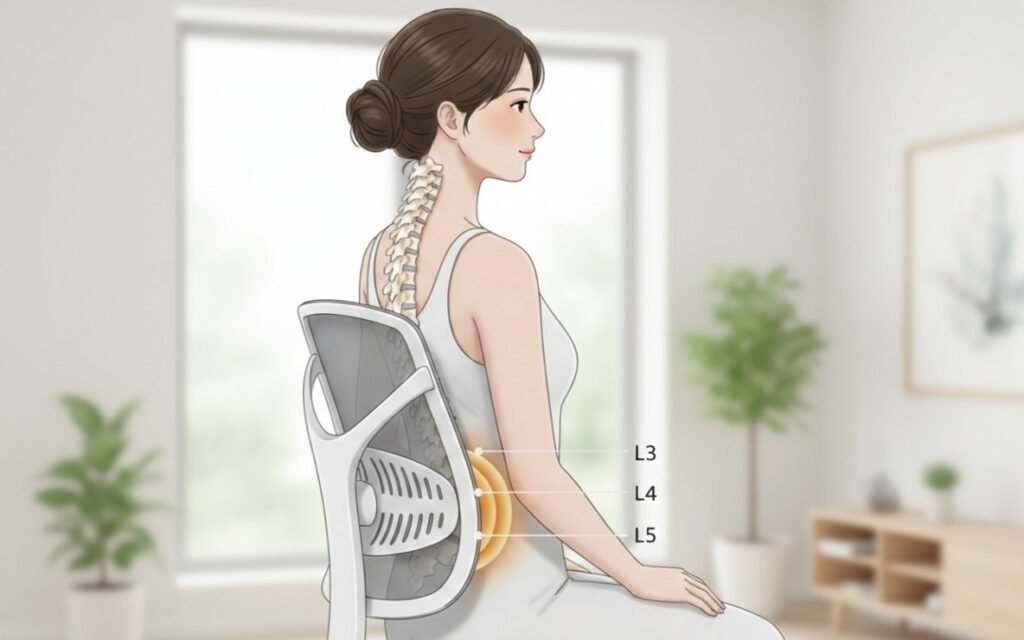
Lumbar support is the single most critical feature for back pain relief. The lumbar spine has a natural inward curve (lordosis). When you sit without support, this curve flattens or reverses, placing direct compressive load on the posterior elements of the lumbar discs.
What to look for: Adjustable lumbar support that moves both up and down and in and out (depth adjustment). The support should sit at the small of your back — typically around the L3-L5 region — maintaining rather than forcing the natural curve. Rigid lumbar support that does not adjust is often worse than no lumbar support at all, since it pushes the wrong area for many body types. The NHS recommends maintaining the spine’s natural curve as the foundation of back pain prevention during prolonged sitting.
Dynamic lumbar support that moves with your body as you shift position is the gold standard. Chairs with passive lumbar support that only works in one fixed position often fail within an hour of seated work.
Ergonomic chair investment pairs well with health monitoring technology that tracks posture, movement, and activity levels to reinforce healthy sitting habits throughout the day.
Seat Depth and Height Adjustment
Seat depth is widely underappreciated. The seat pan should allow 2-4 fingers of clearance between the front edge of the seat and the back of your knees. Too deep, and you lean forward to reach the desk, losing lumbar contact. Too shallow, and your thighs are insufficiently supported, transferring more weight to your lower back.
Seat height adjustment should position your feet flat on the floor with knees at approximately 90 degrees. If your chair cannot reach the right height, a footrest is a practical addition. Dangling feet or elevated knees both create downstream postural problems.
Seat tilt — the ability to angle the seat pan slightly forward or backward — is a useful additional adjustment. A slight forward tilt opens the hip angle, which reduces lumbar compression for many users.
Backrest Height and Recline
The backrest should support the full length of your spine from lumbar to upper thoracic, not just the lower back. Shorter backrests leave the upper back unsupported, causing users to slump forward with their shoulders.
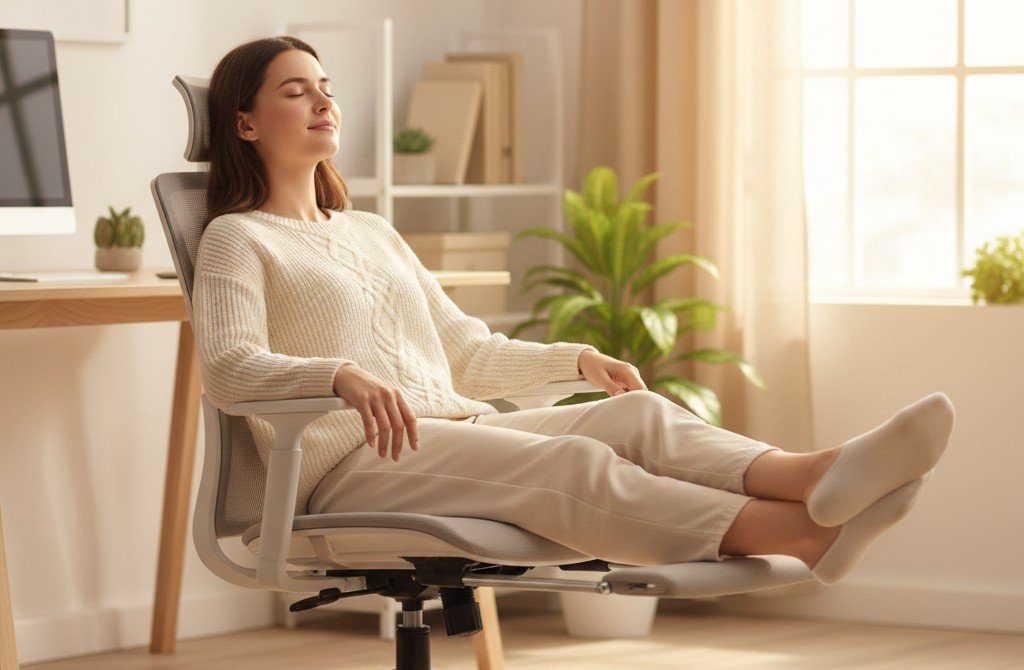
Recline mechanism matters significantly. Research consistently shows that a slightly reclined position — around 100-110 degrees from seated — reduces intradiscal pressure more than an upright 90-degree posture. Mayo Clinic’s office ergonomics guidelines also support a slightly reclined seated position to reduce spinal load throughout the workday. A good ergonomic chair allows the backrest to recline with tension control, meaning you can adjust how much resistance the recline provides.
Recline lock at multiple positions lets you rest in a slightly reclined position without having to actively hold yourself there — reducing sustained muscle tension in the back extensors.
Armrest Adjustability
Poor armrests cause more problems than no armrests at all. Fixed-height armrests at the wrong height force shoulder elevation, which creates trapezius tension and cervical spine strain that eventually contributes to upper back and neck pain.
What to look for: Height-adjustable armrests are the minimum standard. Width adjustment (moving armrests in toward the body) and pivot adjustment (rotating the armrest surface) allow the arms to rest comfortably in a more natural position, reducing shoulder load.
4D armrests — adjustable in height, width, depth (forward/back), and pivot — are found on higher-end chairs and make a meaningful difference for users who type extensively or use a mouse for long periods.
Seat Material and Breathability
Hours of sitting in non-breathable material creates heat buildup and pressure points that contribute to fatigue and discomfort. Mesh seats allow air circulation and conform slightly to body shape, reducing pressure points.
Foam seats with quality high-density foam distribute weight well initially but compress over time — typically within 2-3 years of regular use — reducing effectiveness. Memory foam seats retain heat and can cause users to sink into an unsupported position.
Mesh seats maintain consistent support regardless of temperature, do not compress with age, and distribute weight evenly. The quality of mesh varies significantly — cheap mesh has minimal tension and provides little support, while quality mesh has calibrated tension that provides active resistance.
Headrest
A headrest is beneficial for users who recline during breaks or meetings, but should not be a substitute for proper cervical posture during active work. For desk workers, a headrest should be adjustable in height and angle — a fixed headrest often pushes the head forward into a flexed position, which worsens cervical strain.
Users with neck pain or those who work in calls and meetings where they naturally lean back benefit most from a well-positioned headrest.
Build Quality and Seat Pan Structure
The structural integrity of the seat pan directly affects long-term lumbar support. Chairs with flexible seat pans that deform under weight lose their postural benefits quickly. A firm, stable seat pan maintains proper weight distribution and lumbar support geometry over years of use.
Weight capacity ratings are a useful proxy for structural quality. Chairs rated for higher weight limits typically use more robust materials and construction throughout, regardless of user weight.
Top Ergonomic Chairs for Back Pain
TRALT Mesh Office Chair — Best Overall Mesh Chair
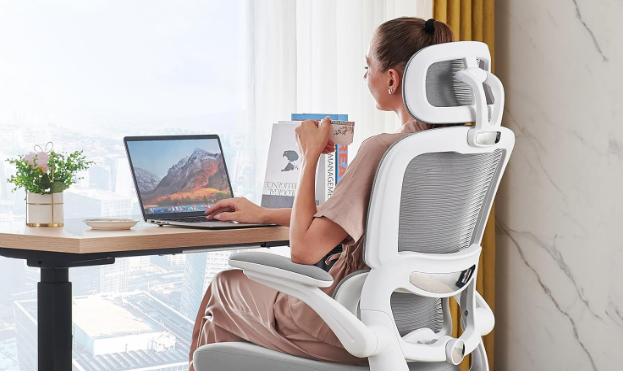
Best for: Home and office users wanting a breathable high-back mesh chair with solid build quality at accessible cost
The TRALT delivers where many budget mesh chairs fall short — a genuine high-back design that supports the full spine from lumbar to upper thoracic, a 330 lb weight capacity that signals structural confidence, and smooth-rolling wheels suited to both hard floors and carpet. The all-white design stands apart from the typical black office chair and suits modern home office and professional environments equally well.
Exact Amazon Title: TRALT Office Chair Ergonomic Desk Chair, 330 LBS Home Mesh Office Desk Chairs with Wheels, Comfortable Gaming Chair, High Back Office Chair for Long Hours (White)
Key Features:
- High-back full mesh construction for all-day breathability
- 330 lb weight capacity — robust frame confidence
- Smooth-rolling casters for hard floors and carpet
- Lumbar support contoured into mesh back
- Seat height adjustment
- Armrests included
- Suitable for both gaming and desk work
Why the Mesh Back Matters: Full mesh construction means no trapped heat during long sessions — a real advantage over chairs with foam or padded backs. Heat buildup in the seat and back is one of the most underappreciated causes of afternoon fatigue and restlessness. The TRALT’s mesh stays at ambient temperature regardless of how long you sit, which means you stay focused rather than shifting around trying to cool down.
Why the 330 lb Capacity Matters for Everyone: Weight capacity is not just about the user’s weight — it is a signal about the engineering standard of the entire chair. Chairs rated for higher loads use thicker frame tubing, stronger caster mountings, more durable gas lift cylinders, and denser materials throughout. Even a 150 lb user benefits from a 330 lb rated chair because everything flexes less, squeaks less, and lasts significantly longer under daily use.
Real-World Strengths: High-back design keeps upper thoracic spine supported, reducing the forward slump that creates mid-back tension over long work sessions. Clean white aesthetic works well in both bright home offices and professional environments. The full mesh back does not compress or degrade the way foam inserts do — the support you have on day one is the same support you have two years later.
Honest Limitations: Lumbar support is contoured into the mesh back rather than being independently adjustable — it cannot be moved up, down, or forward separately. Users whose natural lumbar position does not align with the built-in contour may find the support insufficient. Armrests are standard fixed-height rather than multi-directional — adequate for most users but not configurable for specific arm positioning needs.
Who Should Buy: Home office users wanting breathable mesh, those who run warm and find padded chairs uncomfortable by afternoon, users wanting a clean white aesthetic, anyone upgrading from a standard non-mesh desk chair.
Who Should Skip: Users who need precise independent lumbar depth adjustment. Those requiring 4D adjustable armrests for extensive typing or mousing.
Check current price on Amazon →
Mimoglad High-Back Ergonomic Chair — Best for Versatility
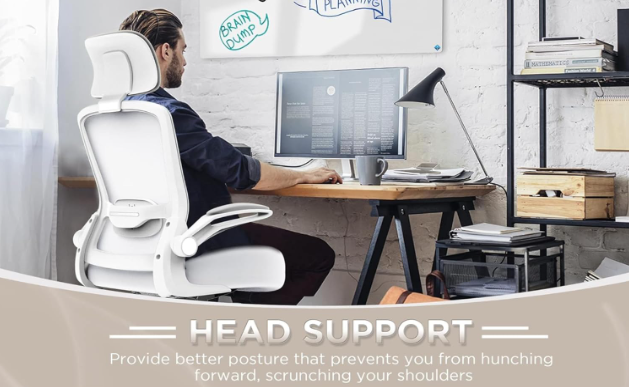
Best for: Users wanting flip-up armrests, adjustable lumbar and headrest, and a 5-year warranty at a mid-range investment
The Mimoglad stands out for its flip-up armrest design — a genuinely practical feature that allows the chair to tuck fully under a desk, work for guitar players or musicians who need full arm clearance, and adapt to tasks where armrests would otherwise be in the way. Combined with adjustable lumbar support and an independently adjustable headrest, it covers the key ergonomic bases at a competitive price point with strong warranty backing.
Exact Amazon Title: Mimoglad Office Chair, High Back Ergonomic Desk Chair with Adjustable Lumbar Support and Headrest, Swivel Task Chair with flip-up Armrests for Guitar Players, Musicians
Key Features:
- Flip-up armrests — fold completely out of the way
- Adjustable lumbar support (height and depth)
- Independently adjustable headrest
- High-back design for full spine coverage
- Swivel base
- 5-year warranty
- Suitable for desk work, music, and creative tasks
Why Flip-Up Armrests Are More Useful Than They Sound: Most people who have never used flip-up armrests underestimate how often they actually want armrests removed. Guitar players and musicians obviously benefit — but so do artists working with tablets, people who do yoga or stretches at their desk, users whose desk is too narrow for standard armrest clearance, and anyone who wants to push the chair under the desk when not in use without armrests catching on the edge. It is a feature that sounds niche until you have it, at which point it becomes something you do not want to give up.
Why the Adjustable Lumbar Matters More Than Contoured Support: Unlike the TRALT’s built-in contour, the Mimoglad’s lumbar support moves. You can raise or lower it to meet your specific spine height, and adjust its forward depth to match your natural curvature. This is meaningful for users on either end of height ranges — a 5’4″ user and a 6’2″ user need their lumbar support in completely different positions, and a fixed contour cannot serve both. Adjustable lumbar support that you set for your body is more effective for pain relief than an average-position contour.
5-Year Warranty — What It Signals: Most chairs in this category carry one-year warranties. A 5-year warranty at this price means the manufacturer expects their chair to function correctly for at least five years of regular use — and is willing to stand behind that expectation financially. For a daily-use item like an office chair, warranty confidence is a legitimate quality signal.
Honest Limitations: Flip-up armrests fold up or down but do not offer the width, depth, or pivot adjustability of 4D armrests — for users who need fine positional control for mousing or typing, standard flip-up armrests have one axis of adjustment (up/down when in use). Lumbar adjustment is height and depth rather than full multi-axis control. Seat material is fabric/mesh blend rather than full mesh.
Who Should Buy: Musicians, guitar players, artists, users with narrow desks, anyone who values armrest flexibility, users wanting adjustable lumbar and headrest, anyone prioritizing warranty confidence.
Who Should Skip: Users needing maximum armrest positional precision. Those wanting a full-mesh seat for maximum breathability.
Check current price on Amazon →
Reclining Mesh Office Chair with Footrest — Best for Long Hours and Recovery
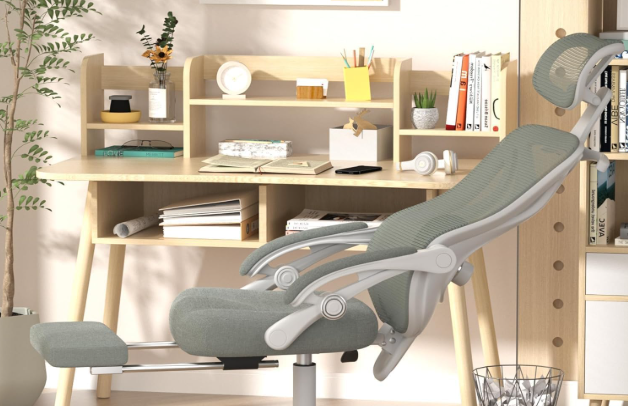
Best for: Users who work long hours, need genuine positional variety throughout the day, or are recovering from a back injury
This chair addresses one of the most underserved needs in the ergonomic category — true recline capability with footrest support for users who spend extended hours seated and need genuine positional flexibility throughout the day. The 90-160 degree recline range covers everything from active upright work to a near-horizontal rest position. SGS certification provides independent third-party verification of the 350 lb weight capacity claim — not a self-reported figure.
Exact Amazon Title: Ergonomic Office Chair with Footrest – Adjustable Lumbar Support & Headrest, 90-160° Reclining Mesh Back Computer Chair – Home Office/Gaming, 350lbs
Key Features:
- 90-160 degree reclining backrest — widest range in this category
- Retractable footrest for elevated leg support during recline
- Adjustable lumbar support
- Adjustable headrest
- Full mesh back for breathability in all positions
- 350 lb weight capacity — SGS certified
- Suitable for home office and gaming setups
The Science Behind Footrest + Recline: When you recline and simultaneously elevate your legs, two things happen to your lower back simultaneously. First, the reclined backrest reduces the compressive load on your lumbar discs by shifting your body weight backward — research cited by Mayo Clinic’s ergonomics team confirms that 100-110 degrees of recline reduces intradiscal pressure compared to upright sitting. Second, elevating the legs reduces the pull of the hip flexors on the lumbar spine, further reducing strain on the L4-L5 and L5-S1 segments. Together, this combination gives people with lower back pain a way to decompress their spine during the workday without having to leave their workspace.
Who Needs This vs. Who Just Wants It: This chair is purpose-built for two groups of people. The first is remote workers who sit for six, eight, or ten hours daily and genuinely need mid-session positional relief rather than just a different angle. The second is anyone managing an active back condition — a flare-up, a recovery from injury, or a disc issue where lying semi-flat periodically throughout the day is part of how they manage pain. For everyone else — users who take regular standing breaks, have short work sessions, or work in shared office spaces — a standard ergonomic chair is probably sufficient.
SGS Certification Explained: SGS is one of the world’s oldest and most recognized independent testing and certification organizations. When a chair claims “SGS certified 350 lbs,” it means an external laboratory physically tested the chair’s load capacity and verified the claim — it is not the manufacturer’s own figure. This matters for anyone concerned about frame integrity, gas lift durability, or caster strength.
Honest Limitations: Reclined with footrest extended, this chair has a significantly larger footprint than in its upright position — it needs clear floor space behind and to the sides. The chair is heavier and bulkier than designs optimized purely for compact upright desk work. Best suited to a dedicated home office with adequate space rather than a shared or tight environment.
Who Should Buy: Remote workers on long hours, users recovering from back injury or managing chronic disc issues, anyone who takes reclined rest breaks during the workday, heavy users who value SGS-certified capacity ratings.
Who Should Skip: Small office or tight desk spaces. Users who primarily work upright and rarely recline. Those sharing an office where a larger chair footprint creates problems.
Check current price on Amazon →
Feature Comparison
| TRALT Mesh | Mimoglad High-Back | Reclining + Footrest | |
|---|---|---|---|
| Lumbar Support | Contoured mesh | Adjustable ✅ | Adjustable ✅ |
| Headrest | ❌ | Adjustable ✅ | Adjustable ✅ |
| Armrests | Standard | Flip-up ✅ | Standard |
| Recline | Standard | Standard | 90-160° ✅ |
| Footrest | ❌ | ❌ | Included ✅ |
| Seat Material | Full mesh ✅ | Fabric/mesh | Full mesh ✅ |
| Weight Capacity | 330 lbs | Standard | 350 lbs (SGS) ✅ |
| Warranty | Standard | 5 years ✅ | Standard |
| Best For | Breathability | Versatility | Long hours |
Setting Up Your Ergonomic Chair Correctly
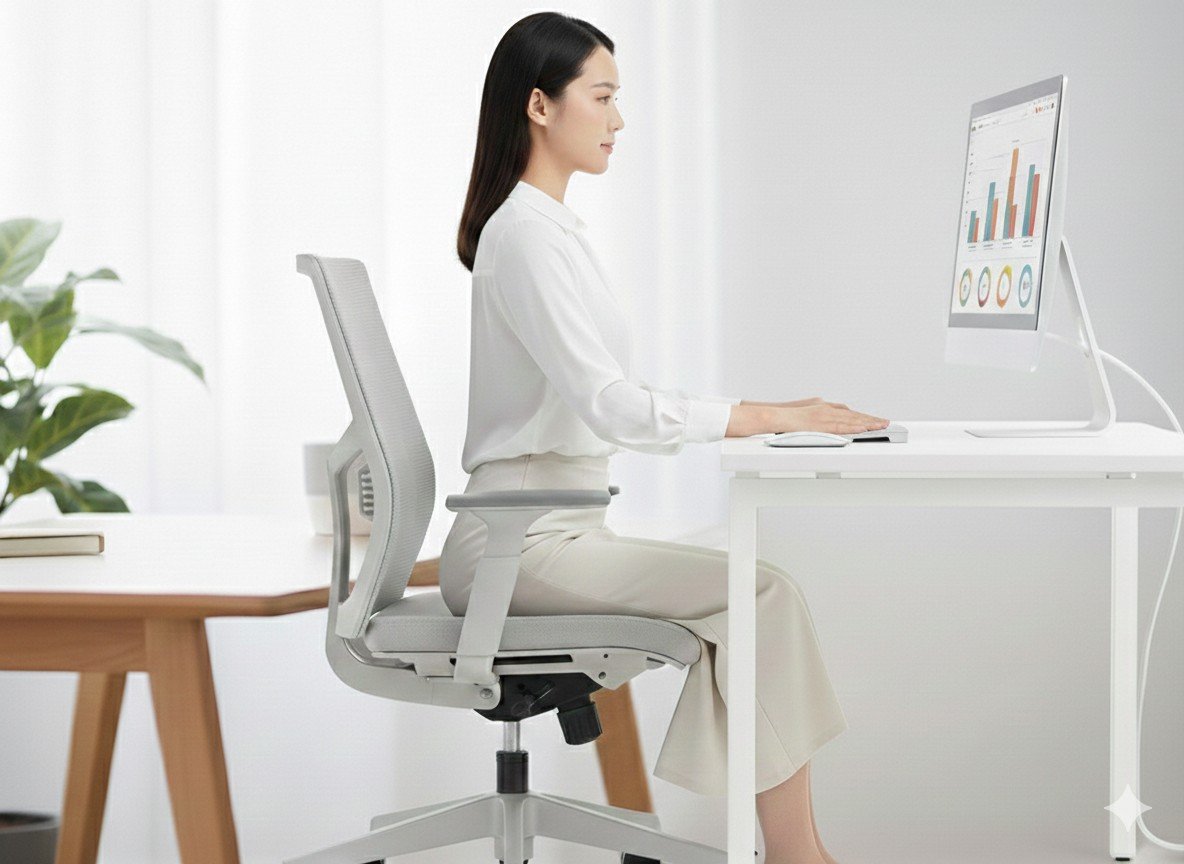
Owning an ergonomic chair and setting it up correctly are two different things. Research consistently shows that most ergonomic chair benefits are lost when the chair is improperly adjusted — users often sit in ergonomic chairs for years in a configuration that negates the design’s intent.
Step 1 — Set seat height first. Sit with feet flat on the floor. Knees should be at approximately 90 degrees. Thighs parallel to the floor or slightly angled downward. This is the foundation everything else is built on — all other adjustments are meaningless if seat height is wrong.
Step 2 — Adjust seat depth. Slide the seat pan until you have 2-4 finger widths of clearance between the front edge and the back of your knees. If your chair has seat depth adjustment, use it — do not assume the default position is correct for your leg length. Too deep forces you forward and out of lumbar contact.
Step 3 — Set lumbar support. Position the lumbar support at the small of your back — where the spine curves inward naturally, typically around waist height. Adjust depth until you feel gentle but consistent support without having to lean into it. If your chair has height-adjustable lumbar, position it so it contacts the natural curve of your lower back, not your mid-back.
Step 4 — Adjust armrests. Raise or lower until your shoulders are relaxed and elbows are at approximately 90-100 degrees with wrists neutral. Move armrests inward if available until your arms rest naturally without shoulder elevation or inward rotation. If armrests are forcing your shoulders up, lower them or remove them temporarily.
Step 5 — Set recline tension. Adjust recline tension so the chair resists your body weight enough to keep you upright during active work but allows easy recline during breaks. Aim to use the recline — most back pain sufferers benefit from brief reclined breaks every 45-60 minutes rather than sustained upright sitting.
Step 6 — Check monitor height. Your ergonomic chair investment is significantly reduced if your monitor forces you to look down or up consistently. Eye line should hit the top third of the monitor screen. Chronic downward neck flexion is one of the most common causes of upper back and secondary lower back tension — it changes how your entire spine loads when seated.
A complete home office setup — ergonomic chair, proper desk height, quality monitor positioning, and smart peripherals — is among the highest-return investments covered in our home and smart living guides.
Frequently Asked Questions
How long does it take to feel the benefit of an ergonomic chair? Most users report reduced acute discomfort within 1-2 weeks of correct setup. Longer-term benefits — reduced chronic tension, fewer flare-ups — typically build over 4-8 weeks. Some initial adjustment discomfort is normal; your body is adapting to different support patterns after years of sitting in chairs that allowed postural compensation.
Is an expensive ergonomic chair worth the investment? For users sitting 6+ hours daily with existing back pain, research and consistent user experience both support the investment. Chairs with genuine adjustable lumbar, full mesh construction, and higher weight capacities hold their ergonomic effectiveness significantly longer than basic alternatives. Amortized over years of daily use, the cost per day is low compared to the productivity and comfort benefit — and significantly less expensive than the physiotherapy that inadequate seating often necessitates.
Can an ergonomic chair fix back pain by itself? No. No chair eliminates back pain caused by other factors — muscle weakness, disc issues, movement deficits, or poor monitor and desk setup. An ergonomic chair reduces the postural load during sitting. For meaningful improvement, combine a good chair with regular movement breaks every 45-60 minutes, basic core and hip flexor exercises, and correct workstation setup overall. The chair is a necessary component of a solution, not the complete solution.
What is the best sitting posture? Research has moved away from prescribing a single “correct” posture. Current evidence supports varied posture — alternating between upright, slightly reclined, and forward-leaning positions throughout the day. A good ergonomic chair supports this variation rather than locking you into one position. The movement between postures matters as much as any individual position.
Should I use a lumbar pillow instead of buying a new chair? A quality lumbar pillow is a legitimate short-term or travel solution and can meaningfully improve an inadequate chair. However, lumbar pillows provide fixed support that does not adjust as you move throughout the day, which limits their benefit compared to integrated adjustable lumbar systems. If your chair otherwise fits your body well, a lumbar pillow is worth trying before replacing the chair entirely. If the chair’s seat depth, height, or armrests are also wrong, a pillow alone will not resolve the broader fit problem.
How do I know if my back pain is from my chair or something else? A useful test: if your pain noticeably improves on days when you do not sit at a desk — weekends, travel days, or holidays — your chair and seating setup are likely significant contributors. If pain persists regardless of how much or how little you sit, the cause is more likely muscular, disc-related, or structural, and a healthcare professional should be your first step rather than a new chair.
Key Takeaways
Back pain from sitting is a mechanical problem that requires a mechanical solution — the right chair, set up correctly, for your specific body. No single feature matters in isolation; lumbar support, seat depth, armrests, and recline work together to create proper seated posture throughout the day.
The TRALT Mesh Chair delivers all-day breathability with a high-back full mesh design and 330 lb structural confidence — the strongest choice for users who run warm, want zero heat buildup, or prefer a clean white aesthetic. The Mimoglad High-Back stands out for its flip-up armrests, adjustable lumbar, adjustable headrest, and 5-year warranty — the most versatile option for varied desk tasks and the most warranty-backed choice at this investment level. The Reclining Chair with Footrest serves users spending the longest hours seated, combining 90-160 degree recline with footrest leg elevation and SGS-certified 350 lb capacity for genuine mid-session spinal decompression.
The best ergonomic chair is the one correctly adjusted for your body — configuration matters as much as quality.
This article contains affiliate links. Purchases made through links may earn a commission at no additional cost to you. All assessments reflect verified product specifications. We do not personally test products.