
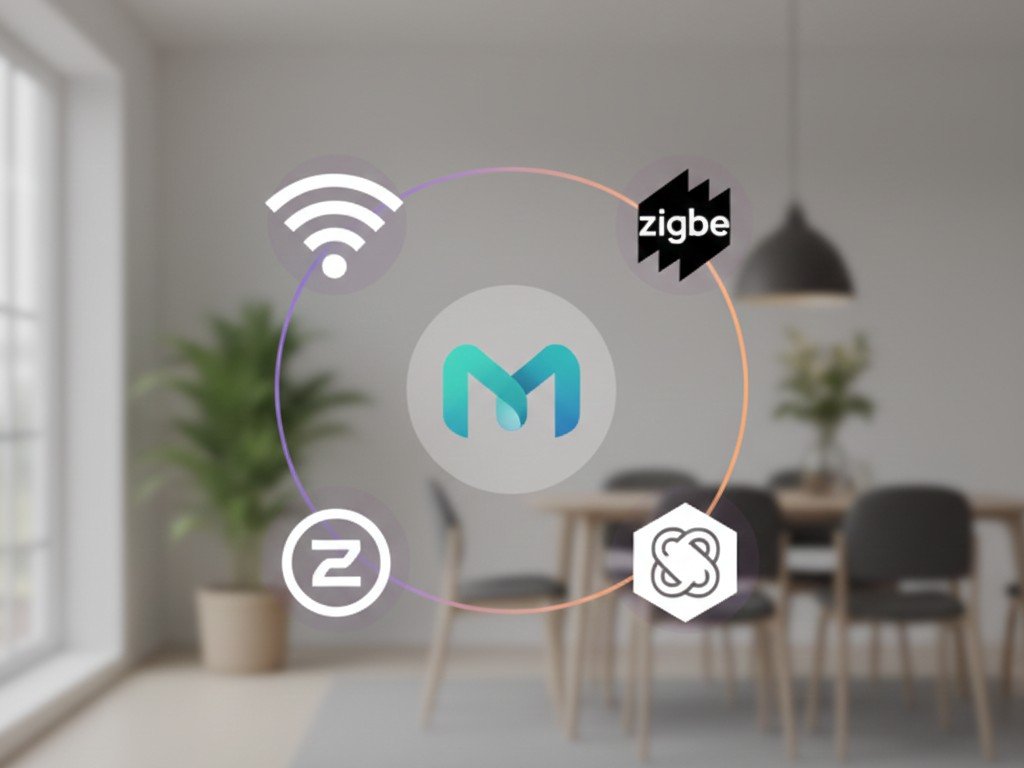
Understanding smart home protocols is the single most important decision you make before buying your first device — yet most buyers skip this entirely and end up with incompatible products that can’t talk to each other.
This guide breaks down exactly how Zigbee, Z-Wave, Thread, Matter, and WiFi actually work, which devices use which protocols, and how to avoid the most expensive mistake in smart home building: buying devices that won’t work together.
Quick Navigation
- What Are Smart Home Protocols
- WiFi: The Default Choice
- Zigbee: The Mesh Network Standard
- Z-Wave: The Competing Mesh Protocol
- Thread: The Modern Low-Power Standard
- Matter: The Universal Compatibility Layer
- Bluetooth: Limited Range, Specific Uses
- Which Protocol Should You Choose
- Protocol Comparison Table
- Common Mistakes to Avoid
- FAQ
What Are Smart Home Protocols
A smart home protocol is the wireless communication language that devices use to talk to each other and to your control hub. When a smart bulb receives a command from your phone, that command travels through a specific protocol — WiFi, Zigbee, Z-Wave, Thread, Bluetooth, or Matter.
Why this matters: Devices using different protocols cannot communicate directly with each other. A Zigbee light switch cannot control a Z-Wave light bulb. A WiFi thermostat cannot trigger a Bluetooth door lock. Understanding protocols before buying prevents compatibility disasters.
The protocol determines three critical characteristics:
Range: How far the signal reaches from the hub or router.
Power consumption: How long battery-powered devices last between charges.
Network structure: Whether devices talk directly to a hub, create a mesh network, or operate independently.
Every smart home decision — which ecosystem to choose, which devices work together, whether you need a separate hub — flows from understanding these protocols.
WiFi: The Default Choice (And Its Limitations)
WiFi is what most people assume all smart home devices use. It is familiar, already installed in every home, and requires no additional hub hardware. WiFi smart devices connect directly to your home router just like your laptop or phone.
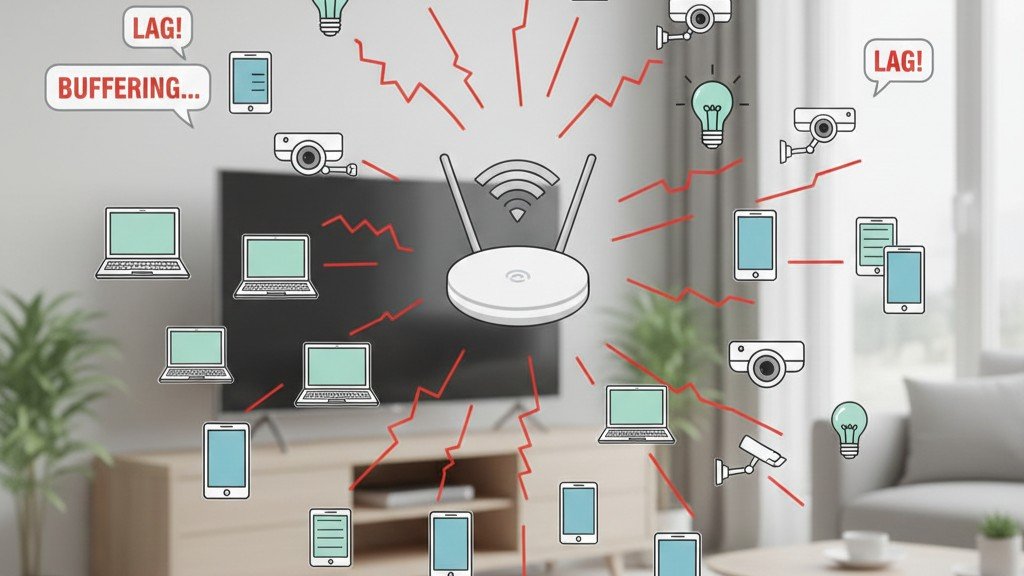
How WiFi Works for Smart Home
WiFi operates on 2.4 GHz and 5 GHz frequency bands. Smart home devices almost exclusively use 2.4 GHz because it penetrates walls better and reaches farther than 5 GHz — though at slower speeds.
When you add a WiFi smart bulb to your network, it occupies one connection slot on your router. Most consumer routers handle 20-50 simultaneous WiFi connections before performance degrades. For small smart homes with 5-15 devices, this is fine. For larger installations with 30+ devices, WiFi congestion becomes a real problem.
WiFi Advantages
No hub required: Devices connect directly to your existing router. One less box to buy, one less thing to set up.
High bandwidth: WiFi handles video streaming and large data transfers that low-power protocols cannot. This is why security cameras and video doorbells almost always use WiFi.
Universal compatibility: Every smartphone, tablet, and computer already speaks WiFi. Control is immediate without additional hardware.
Long range: 2.4 GHz WiFi typically reaches 100-150 feet indoors, covering most homes from a central router.
WiFi Disadvantages
Power consumption: WiFi radios draw significant power. Battery-powered WiFi devices drain quickly — often requiring recharging every few weeks rather than months or years. This is why WiFi smart locks are rare compared to Zigbee or Z-Wave locks.
Network congestion: Each device consumes one connection slot. In homes with multiple family members (each with phone, laptop, tablet) plus streaming devices, adding 20-30 smart home devices can overwhelm consumer routers.
Security concerns: WiFi devices live on the same network as your computers and phones. A compromised smart bulb could theoretically access other devices on your network. Quality devices implement proper security, but the risk exists.
Router dependency: If your router reboots, every WiFi smart device disconnects and must reconnect. Mesh protocols like Zigbee and Z-Wave continue functioning between devices even when the hub is offline.
Best WiFi Smart Home Devices
WiFi works best for devices that need high bandwidth, run on constant power, or are placed far from a hub:
- Security cameras and video doorbells (need video bandwidth)
- Smart displays and voice assistants (always plugged in)
- Smart thermostats (usually wired, need reliable connectivity)
- Smart plugs and outlets (always powered, simple setup)
For homes just getting started with smart home devices, WiFi products offer the easiest entry point — no hub purchase required, familiar setup process, immediate compatibility with voice assistants.
Zigbee: The Mesh Network Standard
Zigbee is a low-power wireless protocol designed specifically for smart home devices. It creates a mesh network where each powered device acts as a signal repeater, extending range throughout your home.
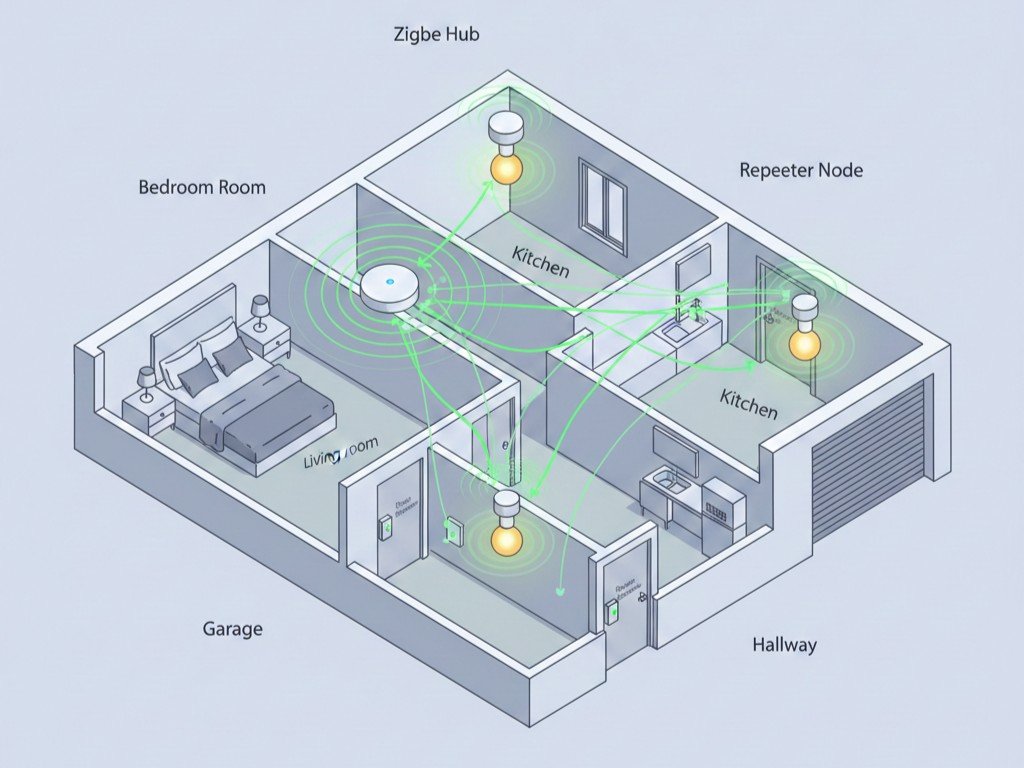
How Zigbee Works
Zigbee operates on the 2.4 GHz frequency band — the same as WiFi — but uses a different communication method that prevents interference. Devices form a mesh network where every powered Zigbee device (plugged into an outlet) can relay signals from battery-powered devices to the hub.
Example: A Zigbee smart bulb in your living room receives a command from the hub in your bedroom. It executes the command and also repeats that signal to the Zigbee door sensor in your garage. This creates a self-healing network — if one device fails, signals automatically route through alternative paths.
The Zigbee protocol supports up to 65,000 devices on a single network theoretically, though practical limits sit around 100-200 devices depending on the hub’s processing power.
Zigbee Advantages
Low power consumption: Battery-powered Zigbee devices last months or years on a single battery. Door sensors, motion detectors, and window sensors routinely run 1-2 years on coin cell batteries.
Mesh network self-healing: If one device fails or loses power, the network automatically reroutes through other devices. The more powered devices you add, the stronger your network becomes.
No router congestion: Zigbee devices do not connect to your WiFi router. A home with 50 Zigbee devices uses zero WiFi bandwidth.
Fast response: Zigbee commands execute in milliseconds. Pressing a Zigbee light switch feels instant compared to WiFi devices that sometimes lag by a second or more.
Device variety: Zigbee has the largest selection of third-party device manufacturers. Hundreds of brands make Zigbee-compatible products across every category.
Zigbee Disadvantages
Requires a hub: You must buy a Zigbee hub or a smart speaker with Zigbee built-in (like Amazon Echo 4th generation or newer). This adds upfront cost and one more device to manage.
Hub dependency: If your Zigbee hub fails, the entire network stops responding to commands (though existing automations between devices can continue locally).
Range limitations: Individual Zigbee devices only transmit 30-50 feet. You need multiple powered devices to create a mesh that covers a large home.
Setup complexity: Pairing Zigbee devices requires understanding hubs and channels. It is more technical than plugging in a WiFi device.
Best Zigbee Smart Home Devices
Zigbee excels for battery-powered sensors and devices that need fast, reliable response:
- Door and window sensors (long battery life critical)
- Motion sensors (need instant response)
- Smart bulbs (create mesh network, fast response)
- Smart locks (battery-powered, secure, responsive)
- Temperature and humidity sensors (low power, continuous monitoring)
Most smart locks with keypad backup use Zigbee or Z-Wave specifically because battery life on WiFi locks is impractical for daily use.
Z-Wave: The Competing Mesh Protocol
Z-Wave is Zigbee’s primary competitor — a proprietary mesh networking protocol owned by Silicon Labs. It works similarly to Zigbee but operates on a different frequency and follows stricter certification standards.
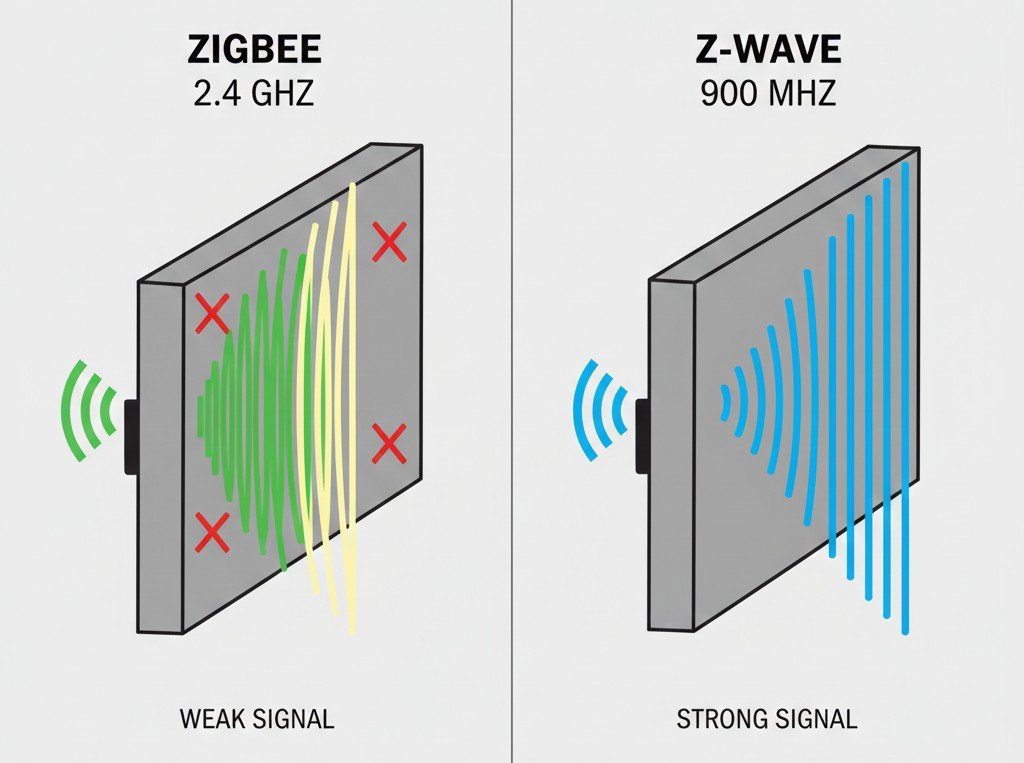
How Z-Wave Works
Z-Wave operates on sub-1 GHz frequencies (908.42 MHz in the US, different frequencies in other regions). This lower frequency penetrates walls and floors better than 2.4 GHz, giving Z-Wave devices slightly better range than Zigbee in challenging environments.
Like Zigbee, Z-Wave creates a mesh network where every powered device repeats signals. Z-Wave networks support up to 232 devices — fewer than Zigbee theoretically, but still far beyond what most homes need.
Key difference from Zigbee: Z-Wave certification is mandatory and enforced. Every Z-Wave device must pass Silicon Labs certification testing before being sold. This creates better inter-device compatibility but also limits manufacturer flexibility and raises device costs slightly.
Z-Wave Advantages
Better range: Sub-1 GHz frequency typically reaches 100-150 feet per hop — roughly double Zigbee’s range. Fewer devices needed to cover large homes.
Less interference: 900 MHz band has no competition from WiFi, Bluetooth, or microwave ovens. Z-Wave signals are more reliable in homes with heavy 2.4 GHz congestion.
Mandatory certification: Every Z-Wave device is certified to work with every Z-Wave hub. You will not encounter compatibility surprises.
Simpler network: Fewer devices needed to cover the same space due to longer range per device.
Z-Wave Disadvantages
Requires a hub: Like Zigbee, Z-Wave needs a dedicated hub. Z-Wave hubs are less common in mainstream smart speakers compared to Zigbee.
Higher device cost: Mandatory certification and licensing fees make Z-Wave devices typically 10-20% more expensive than equivalent Zigbee devices.
Smaller device selection: Fewer manufacturers make Z-Wave products compared to Zigbee. The ecosystem is high-quality but narrower.
Regional frequency differences: A Z-Wave device bought in the US will not work in Europe due to different frequencies. International moves require replacing devices.
Best Z-Wave Smart Home Devices
Z-Wave is particularly strong in categories where reliability and range matter most:
- Smart locks (security-critical, reliable)
- Light switches and dimmers (in-wall installation, strong mesh)
- Garage door controllers (far from hub, need range)
- Outdoor sensors (long range, weather-resistant)
For homes building more advanced automation or requiring devices in basements, garages, or outbuildings, Z-Wave’s superior range often justifies the slightly higher cost.
Thread: The Modern Low-Power Standard
Thread is a newer low-power mesh networking protocol designed by a consortium including Google, Apple, Amazon, and Samsung. It is built specifically to support Matter (explained next) and represents the industry’s bet on future smart home connectivity.
How Thread Works
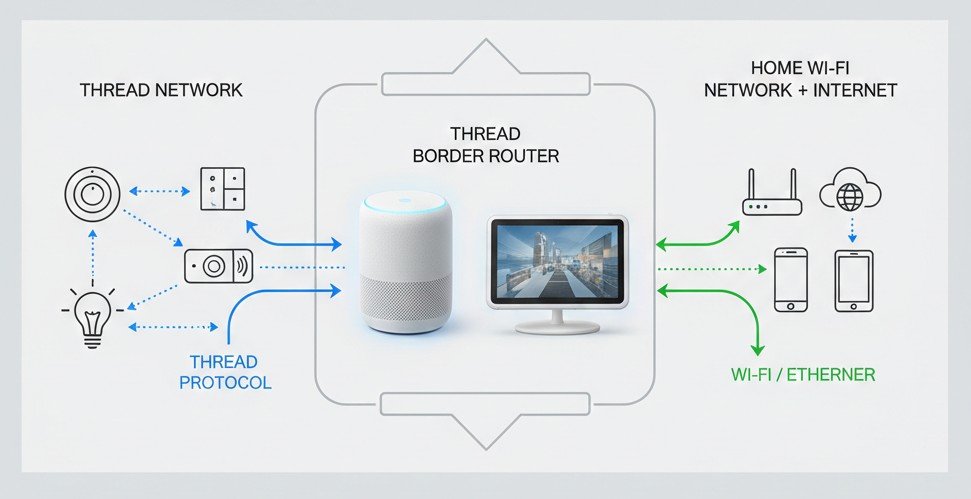
Thread operates on 2.4 GHz like Zigbee but uses IPv6 networking — the same addressing system as the modern internet. This allows Thread devices to have unique IP addresses and communicate more like traditional networked devices while maintaining Zigbee-level power efficiency.
Thread Border Router: Thread devices need a Thread Border Router to connect to your home network and the internet. Many recent smart home hubs include Thread Border Routers:
- HomePod mini (Apple)
- Apple TV 4K (2021 or newer)
- Google Nest Hub (2nd generation)
- Google Nest WiFi Pro
- Amazon Echo 4th generation (some models)
Like Zigbee and Z-Wave, Thread creates a mesh where each powered device repeats signals. The IPv6 architecture makes Thread networks more scalable and easier to integrate with standard home networking.
Thread Advantages
Future-proof: Major tech companies are building Thread into new products. It is the foundation for Matter and likely the long-term standard.
Low power consumption: Comparable to Zigbee — battery devices last months or years.
Mesh networking: Self-healing, range-extending mesh like Zigbee and Z-Wave.
Native IP addressing: Every device has an IP address, making network management and diagnostics simpler.
Matter ready: Thread is designed as the underlying protocol for Matter devices.
Thread Disadvantages
Requires Border Router: You need a compatible Border Router device. Older smart home hubs do not support Thread.
Limited device selection currently: Thread is newer than Zigbee and Z-Wave. Device selection is growing but still smaller.
Ecosystem still maturing: Thread’s advantages become clear in large networks. For small setups with 5-10 devices, benefits over Zigbee are minimal.
Best Thread Smart Home Devices
Thread excels in the same categories as Zigbee — battery-powered sensors and devices needing fast response:
- Door and window sensors (low power, reliable)
- Smart bulbs (fast response, mesh building)
- Motion sensors (instant detection)
- Smart thermostats (always powered, IPv6 benefits)
As Matter adoption grows, Thread will increasingly be the underlying protocol for new smart home products, particularly from Apple, Google, and Amazon ecosystems.
Matter: The Universal Compatibility Layer
Matter is not a wireless protocol like WiFi, Zigbee, or Thread. It is an application layer standard that sits on top of existing protocols — primarily WiFi and Thread — to ensure devices work across all major smart home platforms.
How Matter Works
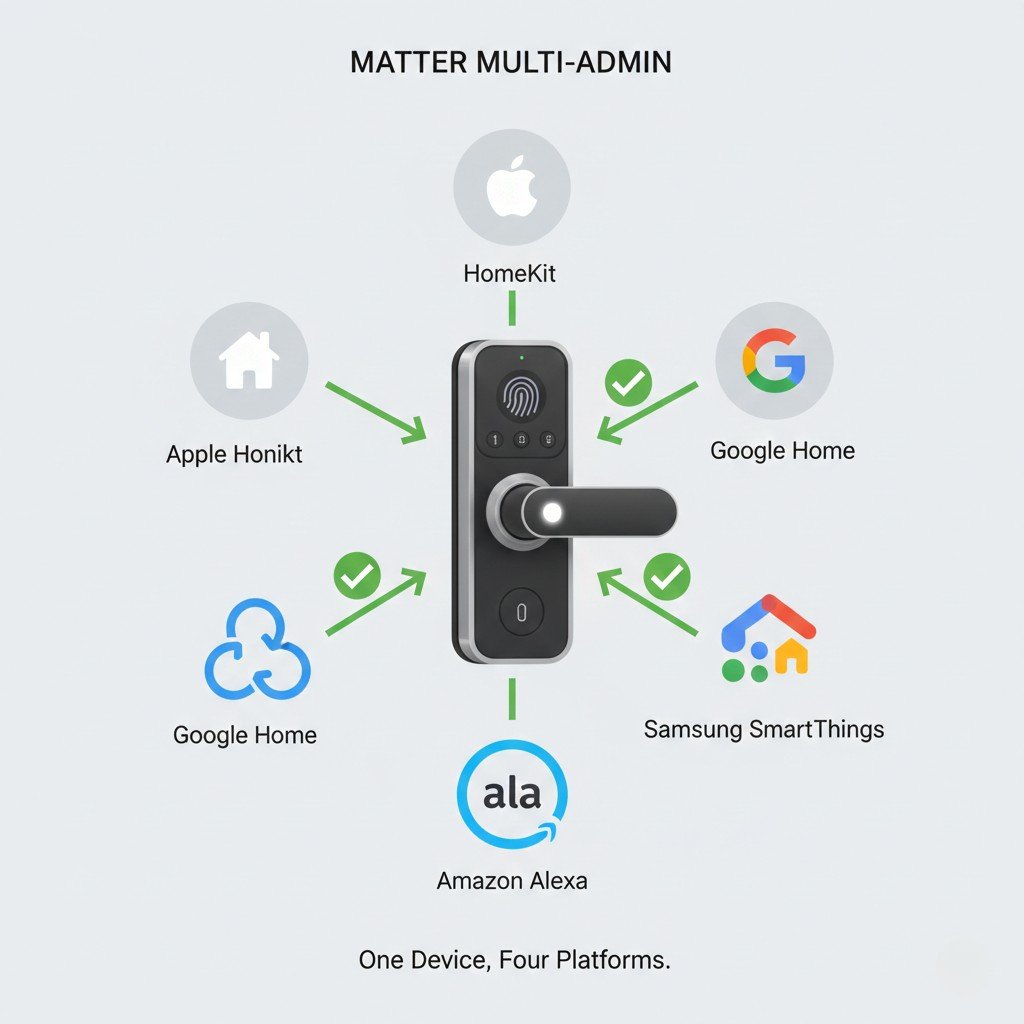
Think of Matter as a universal translator. A Matter-certified smart bulb can work simultaneously with Apple HomeKit, Google Home, Amazon Alexa, and Samsung SmartThings without the manufacturer building separate versions for each platform.
Under the hood: Matter devices communicate using either WiFi (for high-power devices like cameras) or Thread (for low-power devices like sensors). The Matter standard defines how devices identify themselves, what commands they accept, and how they report status — ensuring consistency across platforms.
Example: A Matter smart lock connects to your home using Thread. When you add it to Apple HomeKit, Google Home, and Amazon Alexa, all three platforms control the same lock using the same Matter commands over the same Thread connection. Before Matter, you would need to choose one platform — the lock could only work with Apple or Google or Amazon, not all three simultaneously.
According to the Connectivity Standards Alliance, Matter’s goal is to make smart home devices work together regardless of which company made them or which voice assistant you prefer. This is the industry’s answer to years of fragmentation.
Matter Advantages
Universal compatibility: One device works with Apple HomeKit, Google Home, Amazon Alexa, and Samsung SmartThings simultaneously. Buy any Matter device and use it with any platform.
Multi-admin capability: You can control the same device from multiple platforms at once. One family member uses Apple Home, another uses Google Home — both control the same devices.
Local control: Matter devices process commands locally on your home network rather than routing through manufacturer clouds. Faster response, better privacy, works during internet outages.
Simpler setup: Matter devices use a standard QR code pairing process across all platforms. No platform-specific pairing procedures.
Industry backing: Apple, Google, Amazon, Samsung, and 550+ companies are building Matter into their ecosystems. This is not a niche standard.
Matter Disadvantages
Still rolling out: Matter launched in October 2022. Device selection is growing but remains limited compared to mature protocols like Zigbee.
Requires compatible hub: Older smart home hubs cannot control Matter devices. You need recent Apple TV, HomePod, Google Nest Hub, Echo, or SmartThings hub with Matter support.
Feature limitations: Matter’s first versions support basic device types well (lights, locks, thermostats) but lack advanced features some manufacturers offer through proprietary protocols.
WiFi Matter devices burden routers: Matter over WiFi has the same router congestion issues as any WiFi device. Matter over Thread solves this but requires Thread Border Router.
Current Matter Device Categories
Fully supported:
- Smart bulbs and light switches
- Smart plugs and outlets
- Door locks
- Thermostats
- Window coverings (blinds, shades)
Coming soon (2025-2026):
- Security cameras and video doorbells
- Robot vacuums
- Appliances (washers, dryers, ovens)
- Energy management devices
For homes building a smart home from scratch, choosing Matter-certified devices ensures compatibility regardless of which ecosystem you ultimately prefer.
Bluetooth: Limited Range, Specific Uses
Bluetooth appears in some smart home devices but is rarely the primary protocol. It serves three specific niches where its characteristics work well.
How Bluetooth Works in Smart Home
Most smart home Bluetooth devices use Bluetooth Low Energy (BLE) — a power-efficient version designed for small data transfers. BLE devices can run months or years on coin cell batteries, making it suitable for sensors.
Range: Bluetooth typically reaches 30-50 feet in ideal conditions, 10-20 feet through walls. This limited range restricts Bluetooth to devices near your phone or a Bluetooth hub.
Bluetooth Advantages
Very low power: BLE sensors can run years on a single battery.
No hub required (for direct control): Some Bluetooth devices connect directly to your phone without a hub.
Simple pairing: Bluetooth pairing is familiar and straightforward.
Bluetooth Disadvantages
Very limited range: 30-50 feet maximum, often much less. Devices must be near your phone or a Bluetooth hub.
No mesh networking: Bluetooth devices cannot relay signals through each other like Zigbee/Z-Wave/Thread.
Phone dependency: Direct Bluetooth control only works when your phone is in range. For remote control or automation, you need a Bluetooth-capable hub.
Best Bluetooth Smart Home Uses
Temporary devices: Bluetooth trackers (Tile, AirTag) you carry with you.
Direct-control devices: Bluetooth locks you unlock from your pocket as you approach.
Sensors near hubs: Temperature sensors placed near a Bluetooth-capable smart speaker.
For whole-home automation, Bluetooth is too limited. It works as a supplementary protocol for specific use cases, not as the foundation of a smart home system.
Which Protocol Should You Choose
The right protocol depends on which devices you want, how many you plan to install, and which smart home ecosystem you prefer.
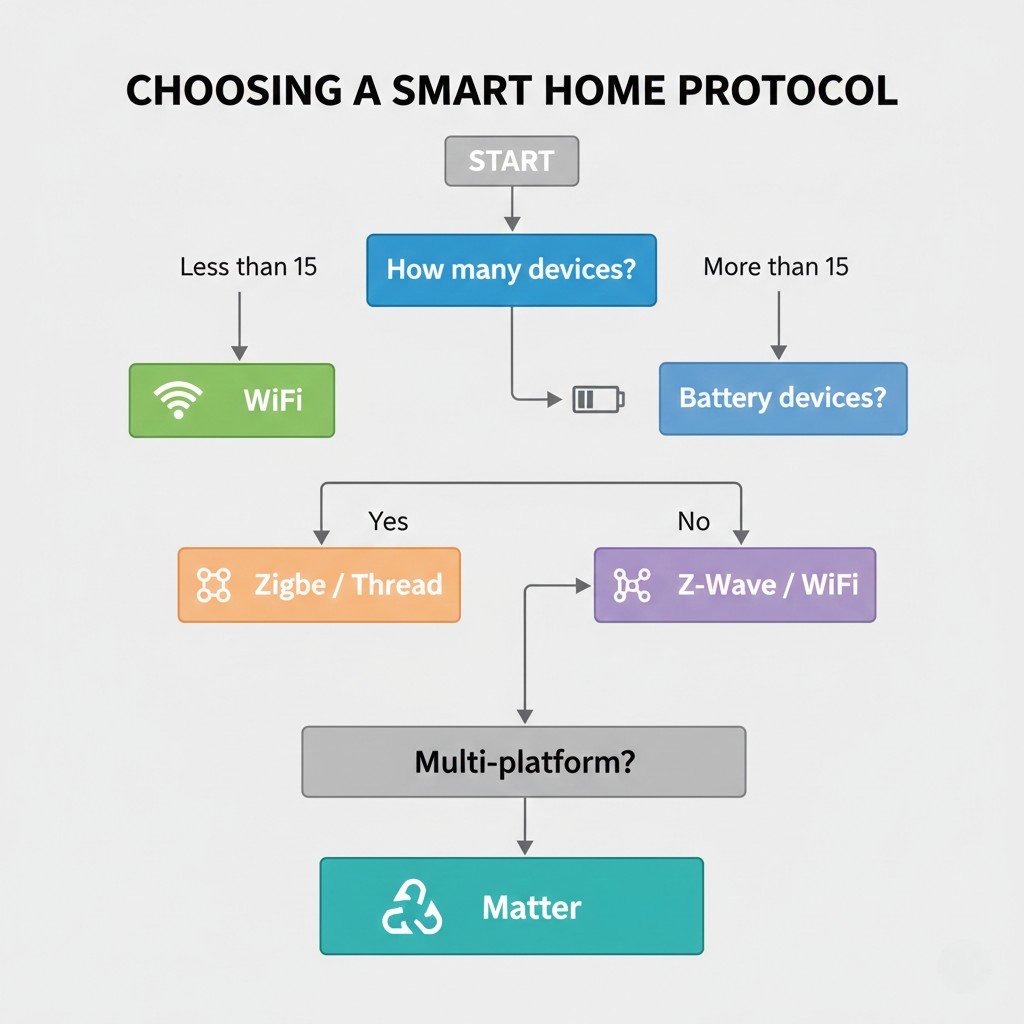
Choose WiFi If:
- You have fewer than 15 smart devices total
- Most devices are always plugged in (outlets, switches, cameras)
- You want the absolute simplest setup (no hub)
- You prioritize video devices (cameras, doorbells)
Best for: Beginners with small homes, renters who need easy installation, users focused on security cameras.
Choose Zigbee If:
- You want many battery-powered sensors (20+ devices)
- You value device variety and third-party options
- You already own or plan to buy an Echo with Zigbee hub built-in
- Cost per device matters (Zigbee devices are often cheapest)
Best for: Enthusiasts building large sensor networks, users committed to Amazon Alexa ecosystem, homes needing extensive coverage.
Choose Z-Wave If:
- You have a large home or thick walls where range matters
- Reliability is critical (security-focused installations)
- You are willing to pay slightly more for better range
- You need devices in outbuildings, basements, or detached garages
Best for: Large homes, reliability-focused users, those needing superior range and penetration.
Choose Thread/Matter If:
- You are starting fresh and want future compatibility
- You use multiple ecosystems (Apple + Google + Amazon)
- You value local control and privacy
- You are willing to accept smaller device selection currently
Best for: New smart home builders, multi-platform households, privacy-conscious users, future-proofing.
Mix Protocols Strategically
Most advanced smart homes use multiple protocols:
- WiFi for cameras, video doorbells, smart displays
- Zigbee or Z-Wave for sensors and battery devices
- Matter over Thread for new devices as ecosystem grows
The key is having hubs that support multiple protocols. Recent SmartThings hubs, Hubitat Elevation, and Home Assistant support WiFi, Zigbee, Z-Wave, Thread, and Matter simultaneously.
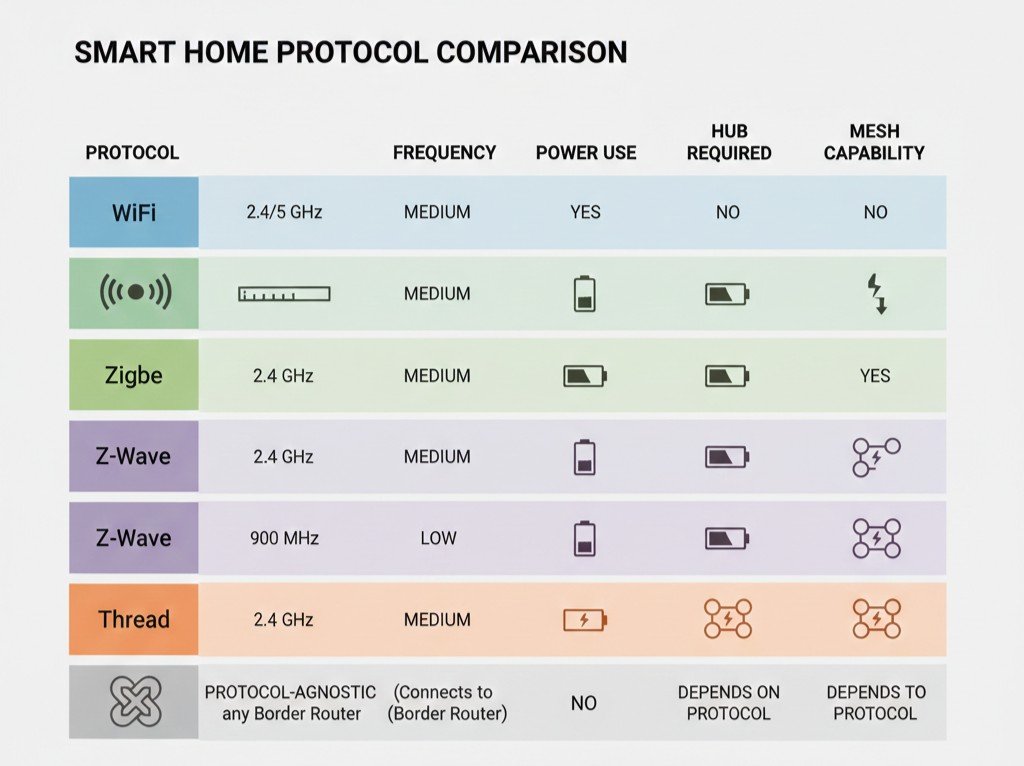
Protocol Comparison Table
| Feature | WiFi | Zigbee | Z-Wave | Thread | Matter |
|---|---|---|---|---|---|
| Frequency | 2.4/5 GHz | 2.4 GHz | ~900 MHz | 2.4 GHz | WiFi/Thread |
| Range (typical) | 100-150 ft | 30-50 ft | 100-150 ft | 30-50 ft | Varies |
| Power Use | High | Very Low | Very Low | Very Low | Varies |
| Hub Required | No | Yes | Yes | Yes (Border Router) | Yes |
| Mesh Network | No | Yes | Yes | Yes | Via Thread |
| Max Devices | 20-50 | 65,000 | 232 | 250+ | Unlimited |
| Battery Devices | Rare | Common | Common | Common | Via Thread |
| Setup Complexity | Easy | Medium | Medium | Medium | Easy |
| Device Cost | Low-Medium | Low | Medium | Medium | Medium |
| Cross-Platform | No | No | No | No | Yes |
Common Mistakes to Avoid
Mistake 1: Buying Devices Before Choosing Ecosystem
Problem: You buy a Zigbee smart bulb, then discover your Google Home cannot control Zigbee devices without an additional hub.
Solution: Choose your control platform first (Apple HomeKit, Google Home, Amazon Alexa, SmartThings), then verify which protocols it supports natively.
Mistake 2: Mixing Incompatible Devices
Problem: You have Zigbee sensors and Z-Wave switches. They cannot communicate directly, requiring complex hub automation to work together.
Solution: Stick to one low-power protocol (Zigbee or Z-Wave) for sensors and switches. Use WiFi only for high-bandwidth devices like cameras.
Mistake 3: Assuming All Hubs Support All Protocols
Problem: You buy a basic smart speaker assuming it supports Zigbee, only to discover it is WiFi-only.
Solution: Verify protocol support before buying:
- Amazon Echo (4th gen and newer): Zigbee built-in
- Google Nest Hub (2nd gen): Thread built-in
- Apple HomePod mini: Thread built-in
- Samsung SmartThings Hub: Zigbee and Z-Wave built-in
Mistake 4: Ignoring Matter for New Purchases
Problem: You invest heavily in proprietary WiFi devices, then want to switch platforms and cannot.
Solution: For new purchases, prioritize Matter-certified devices when available. They work across all platforms and future-proof your investment.
Mistake 5: Underestimating WiFi Congestion
Problem: You add 30 WiFi smart devices to your home network. Router performance degrades, devices drop offline randomly.
Solution: Keep WiFi smart devices under 20-25 on consumer routers. Use Zigbee, Z-Wave, or Thread for sensors and switches.
Frequently Asked Questions
Can Zigbee and Z-Wave devices work together?
No, not directly. Zigbee and Z-Wave use different wireless protocols and cannot communicate. However, a hub that supports both protocols (like SmartThings Hub) can create automations that bridge the two networks — for example, a Zigbee motion sensor triggering a Z-Wave light.
Will Matter replace Zigbee, Z-Wave, and WiFi?
No. Matter is an application layer that runs on top of WiFi and Thread. Matter over Thread essentially uses Thread as the wireless protocol with Matter ensuring compatibility across platforms. Zigbee and Z-Wave will continue as mature, reliable protocols, though new device development will increasingly focus on Matter over Thread.
Do I need a separate hub for each protocol?
Not necessarily. Many modern hubs support multiple protocols in one device:
- SmartThings Hub: Zigbee + Z-Wave + WiFi
- Hubitat Elevation: Zigbee + Z-Wave + WiFi
- Home Assistant: All protocols via add-ons
Buying a multi-protocol hub gives maximum flexibility.
Can I mix WiFi and Zigbee devices in one smart home?
Yes, and this is common. Use WiFi for bandwidth-heavy devices (cameras, video doorbells) and Zigbee for battery-powered sensors (door sensors, motion detectors). A hub like Echo Plus or SmartThings controls both types simultaneously.
Which protocol has the best security?
All modern protocols include encryption and security measures. Z-Wave uses AES-128 encryption mandatory for all devices. Zigbee 3.0 requires security certification. WiFi security depends on your router’s WPA2/WPA3 settings. Thread and Matter include security by design. Realistically, security comes more from device manufacturer implementation quality than protocol choice.
How do I know which protocol a device uses?
Check the product specifications on the manufacturer’s website or Amazon listing. Look for explicit mentions: “Works with Zigbee,” “Z-Wave Plus certified,” “Matter over Thread,” or “WiFi required.” If unclear, search “[product name] protocol” or check compatibility with specific hubs.
Key Takeaways
Understanding smart home protocols prevents expensive compatibility mistakes and creates a foundation for reliable automation. WiFi works well for small installations and high-bandwidth devices but creates router congestion in larger homes. Zigbee and Z-Wave excel for battery-powered sensors and switches, creating mesh networks that improve with each added device. Thread represents the modern evolution of low-power mesh, designed to support Matter’s universal compatibility promise.
Matter is the industry’s solution to years of platform fragmentation — one device working simultaneously with Apple HomeKit, Google Home, Amazon Alexa, and SmartThings without manufacturer-specific versions. As Matter device selection expands through 2025-2026, it increasingly becomes the smart default for new purchases.
Choose your control platform first — the voice assistant and app you prefer. Verify which protocols that platform supports natively. Build your smart home primarily on one low-power protocol (Zigbee, Z-Wave, or Thread) for sensors and switches, using WiFi only where high bandwidth is genuinely required. This creates a reliable, expandable system that avoids the compatibility chaos of mixing incompatible protocols randomly.
Smart home protocols are not exciting technology. They are infrastructure — invisible when working correctly, painfully obvious when wrong. Understanding them before buying your first device determines whether your smart home grows smoothly or hits compatibility walls every few purchases.
Related guides:
- Best Smart Home Devices for Beginners: Complete 2026 Starter Guide
- Smart Lock with Keypad Backup — I Got Locked Out Twice (Yale Review)
- Your Home WiFi Is Probably Fine: When Mesh Systems Are Actually Necessary
- Best Budget Smart Home Starter Kits: Build a Smart Home for Under $250
- Top Wi-Fi Security Cameras for Renters: No Drilling, Easy Setup
- Top 10 Affordable Smart Kitchen Gadgets That Actually Get Use
- 7 Smart Home Gadgets That Actually Save Electricity (With Real Numbers)
- Budget Robot Vacuum Deals 2026: Smart Cleaning on a Budget
- Robotic Window Cleaners: Do They Actually Work?
- Best Home Products for Small Apartments (Space-Saving Picks)