
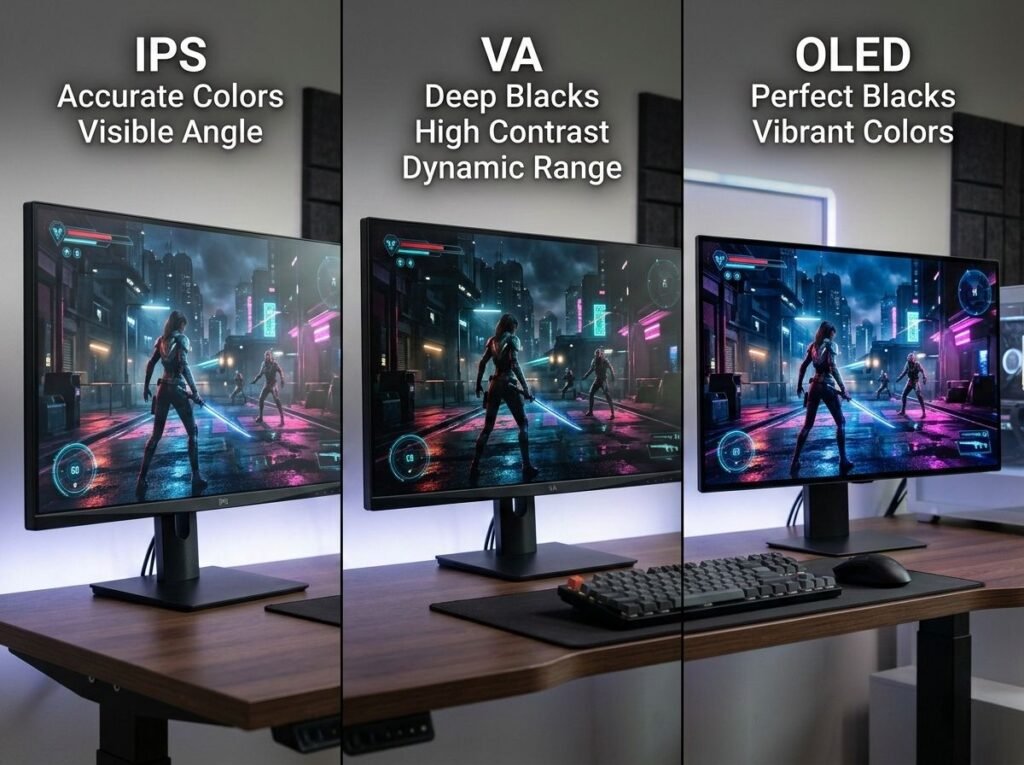
Monitor specifications list panel types — IPS, VA, OLED, TN — yet most buyers don’t understand what these technologies actually represent, how they create images differently, or why panel type determines whether a display excels at work, gaming, or media consumption.
This guide explains the engineering and physics behind each display technology, their fundamental trade-offs between color accuracy, contrast, viewing angles, and response time, and how to match panel type to your specific use case rather than chasing marketing superlatives.
Quick Navigation
- How LCD Panels Create Images
- TN Panels: Twisted Nematic
- IPS Panels: In-Plane Switching
- VA Panels: Vertical Alignment
- OLED: Organic Light-Emitting Diode
- Mini-LED and Micro-LED
- Panel Comparison by Use Case
- Response Time and Motion Clarity
- Viewing Angles Explained
- Color Accuracy vs Color Gamut
- Burn-In and Image Retention
- FAQ
How LCD Panels Create Images
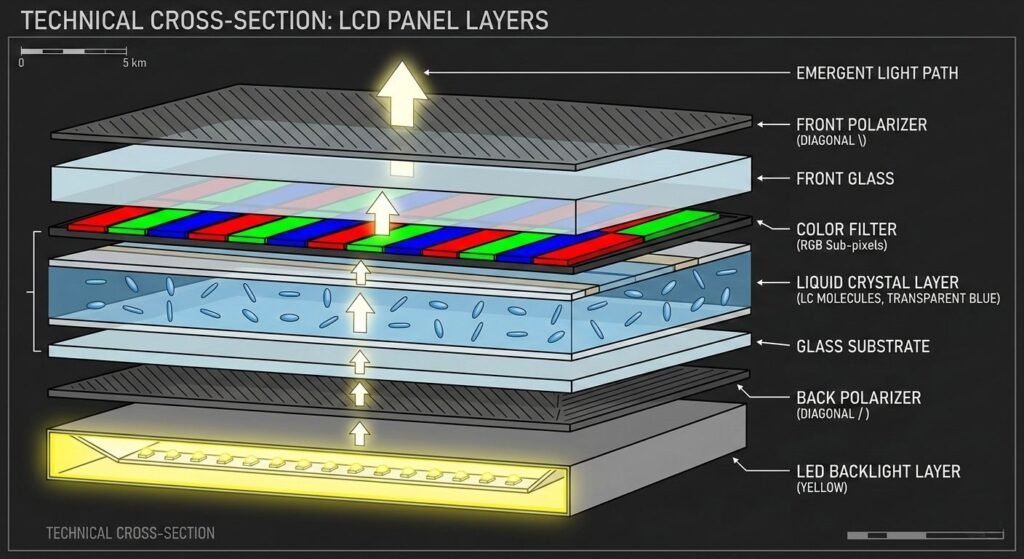
TN, IPS, and VA panels are all LCD (Liquid Crystal Display) technologies — they use liquid crystals to control light transmission from a backlight. Understanding this shared foundation explains their common limitations and differences.
LCD Basic Structure
Backlight layer: LEDs (typically white light) behind the panel provide illumination. This backlight is always on when the display is powered — LCD panels cannot turn off individual pixels.
Liquid crystal layer: Liquid crystals are molecules that rotate when voltage is applied. Their orientation determines how much light passes through.
Polarizing filters: Two polarizing filters positioned perpendicular to each other. Light from the backlight must rotate 90 degrees through the liquid crystal layer to pass through both filters. If crystals don’t rotate light, no light passes — creating black.
Color filters: Red, green, and blue sub-pixels in front of white backlight. Each pixel contains three sub-pixels (RGB) that combine to create colors.
The fundamental limitation: LCD panels cannot produce true black because the backlight is always on. Even when liquid crystals block maximum light, some leakage occurs. This is why LCD contrast ratios are lower than OLED.
How Panel Types Differ
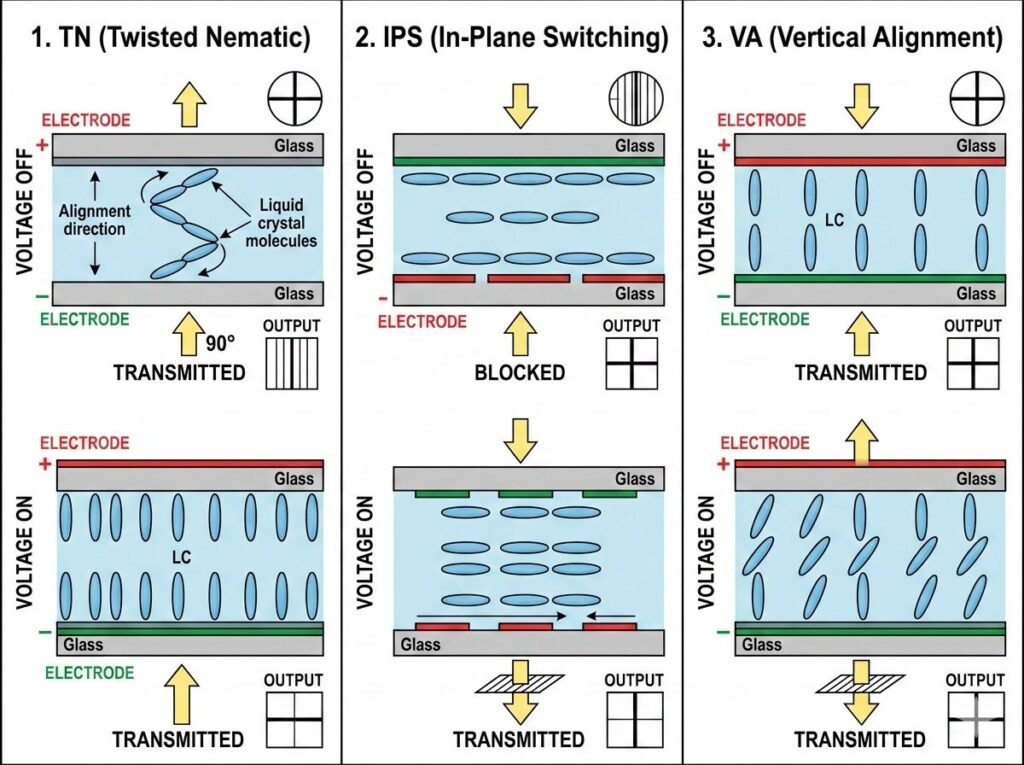
TN, IPS, and VA panels differ in how liquid crystals are arranged and how they rotate when voltage is applied. This seemingly small difference creates dramatically different performance characteristics.
Twisted Nematic (TN): Crystals arranged in a 90-degree twisted structure. Fast rotation but poor viewing angles.
In-Plane Switching (IPS): Crystals rotate parallel to the panel plane. Slower rotation but excellent viewing angles.
Vertical Alignment (VA): Crystals align perpendicular to the panel. Better contrast than IPS but narrower viewing angles.
Each technology represents a trade-off between response time, viewing angles, contrast ratio, and color accuracy. No panel type excels at everything.
TN Panels: Twisted Nematic (Legacy Technology)
TN panels are the oldest LCD technology — cheap to manufacture, very fast response times, but poor viewing angles and color accuracy. Now primarily found in budget monitors and competitive gaming displays.
TN Panel Characteristics
Response time: 1-3ms gray-to-gray (GTG) — fastest of any LCD technology. Liquid crystals rotate quickly because the twisted structure requires minimal voltage change.
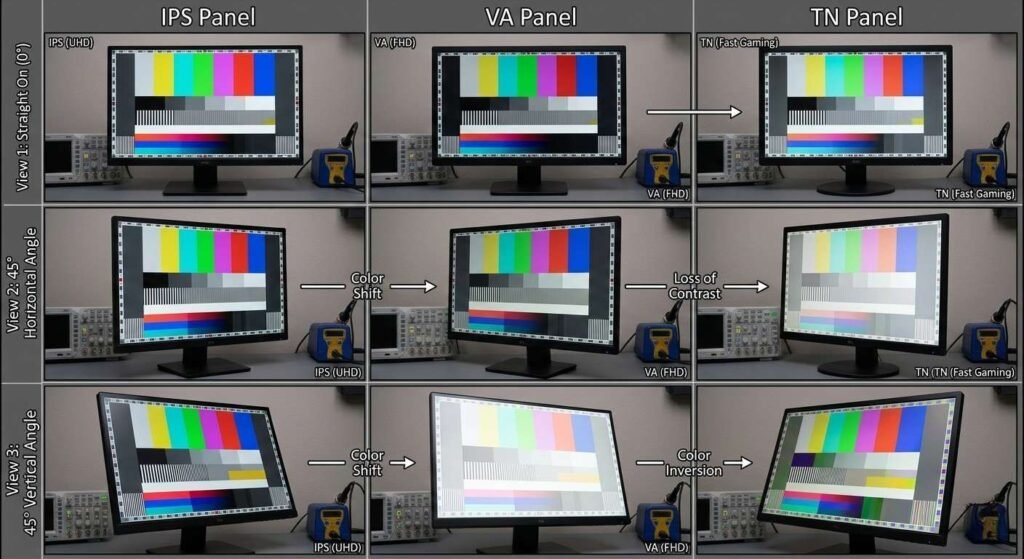
Viewing angles: Poor, especially vertical. Colors shift and invert when viewed from above or below. Horizontal viewing angles are acceptable but still worse than IPS.
Contrast ratio: 600:1 to 1000:1 typical — mediocre. Better than IPS but worse than VA.
Color accuracy: Poor out of box. Can be calibrated but limited by narrow color gamut (typically 90-95% sRGB coverage). Not suitable for professional color work.
Refresh rate capability: TN panels easily reach 240Hz, 360Hz, even 500Hz. The fast crystal response enables extreme refresh rates without ghosting.
Why TN Panels Persist
Despite objectively worse image quality than IPS or VA, TN panels remain relevant for one specific use case: competitive gaming where response time and refresh rate matter more than image quality.
Competitive advantage: The 1-2ms response time difference between TN and IPS translates to approximately 1-2 frames of motion clarity advantage at 240Hz. For professional esports players, this matters. For everyone else, it’s imperceptible.
Cost: TN panels are cheapest to manufacture. Budget gaming monitors use TN to achieve high refresh rates at accessible prices.
Modern alternatives: Fast IPS and Fast VA technologies have closed the response time gap to 3-5ms, making TN less compelling. New gaming monitors increasingly use IPS even at 240Hz+.
IPS Panels: In-Plane Switching
IPS is the dominant technology for professional monitors, high-end laptops, and color-critical work. Superior color accuracy and viewing angles come at the cost of lower contrast and historically slower response times.
IPS Panel Characteristics
Response time: 4-8ms GTG typically, Fast IPS achieves 3-5ms. Slower than TN because the in-plane crystal rotation requires more voltage and time.
Viewing angles: Excellent, 178°/178° (horizontal/vertical). Colors remain consistent when viewed from any angle — critical for multi-person viewing or vertical monitor orientations.
Contrast ratio: 1000:1 to 1200:1 typical. This is IPS’s primary weakness. Black levels appear gray in dark rooms because backlight leakage is higher than VA.
Color accuracy: Excellent. Professional IPS monitors achieve Delta E < 2 (imperceptible color difference from reference). Wide color gamuts — 99-100% sRGB, 90-95% DCI-P3 on wide gamut models.
IPS glow: A characteristic viewing angle phenomenon where corners appear brighter when viewing the screen off-center in dark conditions. Not a defect but an inherent IPS property that some users find distracting.
IPS Variants
Standard IPS: Original implementation. Good color and viewing angles, 6-8ms response.
Nano IPS (LG) / Quantum Dot IPS: IPS panel with quantum dot film to extend color gamut. Achieves 95-98% DCI-P3. Used in wide gamut professional monitors.
Fast IPS / IPS-level: Marketing terms for IPS panels with improved crystal response. Achieves 3-5ms GTG, narrowing the gap with TN for gaming use.
Best Uses for IPS
Professional color work: Photography, video editing, graphic design. Color accuracy and wide gamut coverage are essential.
Office work: Excellent viewing angles mean the screen remains readable when you shift position or share content with colleagues.
General-purpose computing: Best all-around panel for users who don’t prioritize maximum contrast for movies or minimum response time for gaming.
For specific recommendations, see our guide to monitors for work from home.
VA Panels: Vertical Alignment
VA panels occupy a middle position between IPS and TN — better contrast than IPS, better viewing angles than TN, but with their own trade-offs. Increasingly popular for gaming and media consumption.
VA Panel Characteristics
Response time: 4-8ms GTG typically. Modern Fast VA achieves 3-5ms. Comparable to IPS but with one critical difference: black-to-white transitions are slower than gray-to-gray transitions.
Viewing angles: Good but not excellent. 178° specification matches IPS numerically, but VA suffers from color shift and gamma changes at angles. Blacks appear lighter and colors shift toward blue/purple when viewed off-center.
Contrast ratio: 2500:1 to 6000:1 — dramatically better than IPS or TN. VA’s perpendicular crystal alignment blocks more backlight when creating black, producing deeper blacks and more convincing dark scenes.
Color accuracy: Good but slightly behind IPS. Modern VA panels achieve 95-99% sRGB and 85-90% DCI-P3. Sufficient for most users but professionals still prefer IPS.
Black crush: VA panels sometimes lose shadow detail in very dark scenes because of aggressive contrast. Dark gray pixels near black may appear as pure black, eliminating subtle detail.
VA Variants
Standard VA: Balanced performance. Good contrast, acceptable response time.
Curved VA: VA panels are easier to curve than IPS, allowing ultrawide monitors with 1000R-1800R curvature. The curve helps maintain viewing angle consistency across a wide screen.
Fast VA / Rapid VA: Improved crystal response targeting 3-5ms GTG. Reduces but doesn’t eliminate black smearing in dark scenes.
Best Uses for VA
Media consumption: Movies, TV shows, YouTube. The high contrast ratio creates more convincing dark scenes — essential for HDR content and cinematic material.
Gaming (non-competitive): Single-player, story-driven games benefit from VA’s contrast. Dark fantasy games, horror titles, space simulators look dramatically better on VA than IPS.
Budget HDR: VA’s native high contrast makes it better suited for HDR than IPS. Even budget VA panels with HDR400 certification produce more convincing HDR than IPS at the same price.
VA’s Dark Transition Problem
VA panels struggle with dark gray transitions — moving from dark gray to darker gray or black. This creates “black smearing” or “ghosting” in dark scenes where motion appears to leave a trailing blur.
Why it happens: The crystals must rotate from nearly perpendicular to fully perpendicular — a small angle change requiring precise voltage control and more time than larger rotations.
When it’s visible: Dark scenes with motion. A character moving across a night scene. Panning camera in a dark game. Scrolling dark-themed website.
When it’s not visible: Bright content, static images, productivity work. Most users never notice it outside of specific dark gaming or video scenarios.
OLED: Organic Light-Emitting Diode
OLED fundamentally differs from LCD — no backlight, no liquid crystals, no color filters. Each pixel is a microscopic organic LED that emits its own light and color. This enables perfect blacks, infinite contrast, and instant response times.
OLED Panel Characteristics
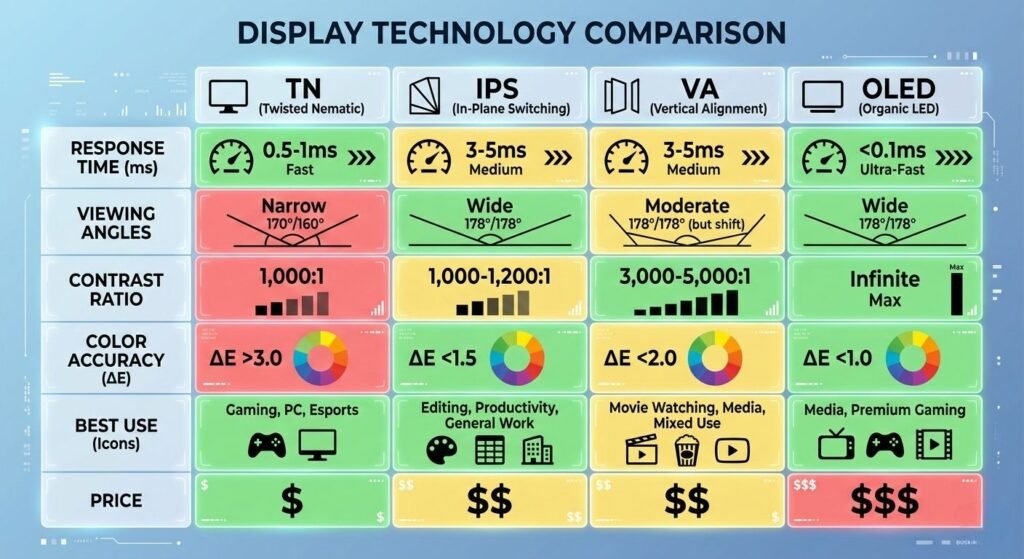
Response time: 0.1ms GTG — effectively instantaneous. OLED pixels turn on and off electronically with no mechanical crystal rotation required.
Viewing angles: Perfect, identical to the reference across all angles. OLEDs emit light directly rather than filtering backlight, eliminating viewing angle color shift.
Contrast ratio: Infinite (∞:1). When a pixel is off, it emits zero light — true black, not dark gray. This creates contrast ratios that LCD cannot approach.
Color accuracy: Excellent on premium models. OLED displays in professional monitors and reference displays achieve Delta E < 1. Consumer OLED (TVs, laptops) is calibrated less precisely but still very good.
Brightness: 300-400 nits sustained full-screen on most OLED monitors, 800-1000 nits peak for small HDR highlights. Lower than high-end LCD monitors (500-600 nits sustained) but the perfect blacks create perceived contrast that compensates.
OLED Trade-offs
Burn-in risk: Static UI elements (taskbar, icons, logos) displayed for hundreds of hours can permanently damage pixels, leaving ghost images. Modern OLED includes pixel shifting and automatic brightness limiting to reduce risk, but burn-in remains possible with static content.
Cost: OLED monitors cost 2-3× more than equivalent LCD monitors. A 27″ 4K IPS monitor costs $400-600. An equivalent OLED costs $1,000-1,500.
Lifespan: OLED organic compounds degrade over time. Typical lifespan is 30,000-50,000 hours before brightness drops to 50% of original. For 8 hours daily use, that’s 10-15 years — adequate but less than LCD’s 50,000-100,000 hour lifespan.
Text clarity (RGB vs WBGR): Some OLED panels use WBGR (white + red/green/blue) sub-pixel layouts rather than standard RGB. This can create text fringing issues on Windows — particularly visible in white text on black backgrounds. QD-OLED (quantum dot OLED) uses RGB and avoids this issue.
OLED Variants
WOLED (LG Display): White OLED with color filters. Used in LG OLED TVs and monitors. Good but not perfect color accuracy due to white sub-pixel.
QD-OLED (Samsung Display): OLED with quantum dot color conversion. Better color volume and brightness than WOLED. Used in Samsung TVs and Alienware/ASUS OLED monitors.
Tandem OLED (Apple): Two OLED layers stacked for higher brightness and longer lifespan. Currently exclusive to iPad Pro.
Best Uses for OLED
HDR content consumption: Perfect blacks and infinite contrast create the most convincing HDR experience. OLED is the gold standard for HDR movies and games.
Gaming (non-static): Games with dynamic UI and varied content. Not suitable for games with permanent HUD elements displayed for hundreds of hours (MMOs, MOBAs).
Content creation (HDR): Editing HDR video where perfect blacks and accurate shadow detail are critical.
Portable devices: OLED’s power efficiency when displaying mostly dark content makes it ideal for laptops, tablets, and phones where battery life matters.
Mini-LED and Micro-LED Backlight Technology
Mini-LED and Micro-LED represent LCD backlight improvements rather than new panel types. They can be combined with IPS or VA panels to improve contrast while maintaining LCD’s advantages.
Mini-LED
Technology: Thousands of tiny LEDs (0.2-0.4mm) as backlight instead of edge lighting or traditional LED array. Divided into hundreds or thousands of dimming zones.
Benefit: Local dimming creates much deeper blacks than standard LCD. A 1,000-zone mini-LED monitor approaches (but doesn’t match) OLED contrast while avoiding burn-in risk.
Limitation: “Blooming” or “haloing” — bright objects on black backgrounds create visible glow zones around them. The dimming zones are large enough (typically 2-5cm) that a small bright object lights up a larger surrounding area.
Cost: Premium. Mini-LED monitors cost 50-100% more than standard LED but less than OLED.
Micro-LED
Technology: Each pixel is a microscopic LED — similar to OLED but using inorganic LEDs that don’t degrade. Combines OLED’s per-pixel control with LED’s longevity and brightness.
Status: Not yet available in consumer monitors or laptops. Only exists in massive, ultra-premium displays ($50,000+). Expected to become viable for consumer products in 5-10 years.
Panel Type Comparison by Use Case
For Office Work & Productivity
Best choice: IPS
Why: Viewing angles matter when you shift position or share screens. Color consistency prevents eye strain during all-day use. Text clarity is excellent.
Runner-up: VA — acceptable if you primarily view the screen straight-on.
Avoid: TN (poor viewing angles), OLED (burn-in risk from static UI)
For Competitive Gaming
Best choice: Fast IPS or TN at 240Hz+
Why: Response time and refresh rate matter most. Modern Fast IPS achieves 3-5ms, nearly matching TN’s 1-3ms — the difference is imperceptible except at professional esports level.
Runner-up: Fast VA at 165-240Hz — excellent for single-player but black smearing visible in dark competitive games.
Avoid: OLED (burn-in risk from static HUD), standard IPS (6-8ms too slow for 240Hz+)
For Story-Driven Gaming
Best choice: OLED or VA
Why: Contrast creates atmosphere. Dark fantasy, horror, and space games look dramatically better with deep blacks. OLED is perfect; VA is very good at lower cost.
Runner-up: IPS with mini-LED backlight — approaches OLED contrast without burn-in risk.
Avoid: Standard IPS (washed out blacks reduce immersion), TN (poor colors)
For Photo/Video Editing
Best choice: IPS (wide gamut)
Why: Color accuracy is non-negotiable. Wide gamut (95%+ DCI-P3) necessary for professional work. Viewing angles allow accurate color from any position.
Runner-up: OLED — perfect contrast and color but burn-in risk with static editing UI.
Avoid: VA (color shift at angles), TN (poor color accuracy)
For HDR Movies & Streaming
Best choice: OLED
Why: Perfect blacks and infinite contrast create the most convincing HDR. Equivalent to OLED TV experience.
Runner-up: VA with local dimming — good HDR at much lower cost.
Avoid: IPS (poor contrast undermines HDR), TN (poor color and contrast)
Response Time and Motion Clarity Explained
Response time specifications are often misleading. Understanding what they actually measure and what creates motion blur helps evaluate real-world performance.
Gray-to-Gray (GTG) Response Time
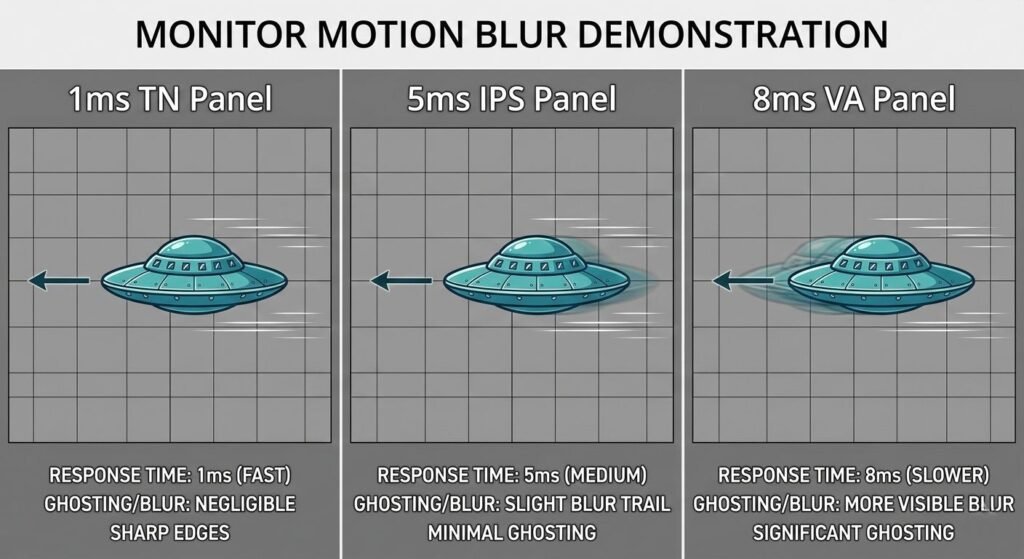
What it measures: How long a pixel takes to change from one gray level to another gray level. Typically measured as average across multiple transitions.
Marketing deception: Manufacturers report the fastest single transition (often 1ms), not the average (often 4-6ms). “1ms GTG” may mean only the 50% gray to 50% gray transition hits 1ms while other transitions are slower.
Real-world relevance: Average GTG correlates moderately with perceived motion blur. But pixel response is only one factor.
Black-to-White Response Time
Rarely advertised but often more relevant than GTG. The time for a pixel to go from completely off (black) to completely on (white) or vice versa.
VA panels: Black transitions are significantly slower than gray transitions — sometimes 2-3× slower. This creates the “black smearing” phenomenon.
Overdrive and Pixel Overshoot
Monitors use “overdrive” — applying excess voltage to speed crystal rotation, then reducing to target level. This reduces response time but creates pixel overshoot if too aggressive — pixels briefly exceed target brightness before settling, creating inverse ghosting.
Settings matter: Most monitors offer multiple overdrive settings (Off, Normal, Fast, Extreme). “Extreme” often causes visible overshoot. “Normal” or “Fast” usually optimal.
Motion Clarity vs Response Time
Panel response time is necessary but not sufficient for motion clarity. Other factors:
Refresh rate: 144Hz provides 6.9ms per frame. If pixel response is 8ms, motion blur occurs. Response time must be lower than frame time.
Sample and hold: LCD panels hold each frame for the full 6.9ms (at 144Hz), creating persistence blur. This is why CRT monitors and OLED (which flash pixels briefly) appear sharper despite technically slower refresh.
Strobing/ULMB: Some monitors add black frame insertion or backlight strobing to reduce persistence blur, significantly improving motion clarity at the cost of brightness.
Viewing Angles: Why They Matter
“178°/178° viewing angles” appears on every IPS and VA monitor specification — yet VA and IPS have clearly different viewing angle performance despite identical numbers.
How Viewing Angles Are Measured
Industry standard: Viewing angle is defined as the angle at which contrast ratio drops to 10:1. At 10:1, the image is barely visible — washed out and color shifted.
Why numbers are meaningless: Both IPS and VA meet 178° at this low threshold. But IPS maintains accurate color and contrast to much wider angles than VA before degrading to 10:1.
Real-World Viewing Angle Differences
IPS: Color accuracy maintained within ±2 Delta E to approximately 45° off-axis. Beyond 45°, slight color shift occurs but image remains usable to 70°+.
VA: Color shift begins at 20-30° off-axis. Blacks lighten, colors shift toward blue/purple. Gamma shifts, crushing or expanding dynamic range. Still “viewable” (meeting 10:1) but color accuracy degraded.
TN: Significant color shift at 15-20° off-axis. Vertical viewing angles particularly poor — looking up or down at TN monitor causes dramatic color inversion.
When Viewing Angles Matter
Multi-person viewing: Sharing a screen with colleagues. IPS maintains color for all viewers; VA and TN favor the centered viewer.
Vertical orientation: Portrait mode for coding or reading. IPS remains consistent top-to-bottom; VA and TN show visible color shifts.
Large screens: Ultrawide or 32″+ monitors. Edges are viewed at angles. IPS maintains consistency; VA edges appear different than center.
Single-user, centered viewing: VA’s viewing angle limitation matters less. If you’re always centered, VA’s contrast advantage outweighs viewing angle disadvantage.
Color Accuracy vs Color Gamut
Marketing conflates these distinct concepts. Understanding the difference prevents confusion about which matters for your use.
Color Gamut (Coverage)
What it measures: The range of colors a display can reproduce, compared to a standard reference (sRGB, DCI-P3, Adobe RGB).
Examples:
- 99% sRGB: Can display 99% of colors in the sRGB standard
- 90% DCI-P3: Can display 90% of DCI-P3 color space (wider than sRGB)
- 95% Adobe RGB: Can display 95% of Adobe RGB (wider than sRGB, used in print)
Why it matters: Wide gamut displays show more saturated colors. Essential for professional photo/video work targeting DCI-P3 or Adobe RGB. Not necessary for web content (sRGB).
Color Accuracy (Delta E)
What it measures: How precisely displayed colors match the reference. Delta E < 2 is imperceptible to human eyes. Delta E 2-4 is visible to trained eyes. Delta E > 4 is obviously wrong.
Calibration: Factory calibrated monitors achieve Delta E < 2 out of box. Uncalibrated monitors may have Delta E 4-8, requiring user calibration.
Why it matters: You can have wide gamut (95% DCI-P3) but poor accuracy (Delta E 5) — colors are saturated but wrong. Professional work requires both wide gamut AND accuracy (Delta E < 2).
For Most Users
Standard gamut (99% sRGB) with good accuracy (Delta E < 3) is sufficient. Wide gamut matters only if you create content for DCI-P3 delivery (HDR video, modern cinema) or print (Adobe RGB).
Overly wide gamut without OS/application support creates oversaturated, inaccurate colors on sRGB content.
Burn-In and Image Retention: Real Risks
OLED burn-in is permanent damage. Image retention is temporary. Understanding both helps assess OLED suitability for your use.
OLED Burn-In Mechanism
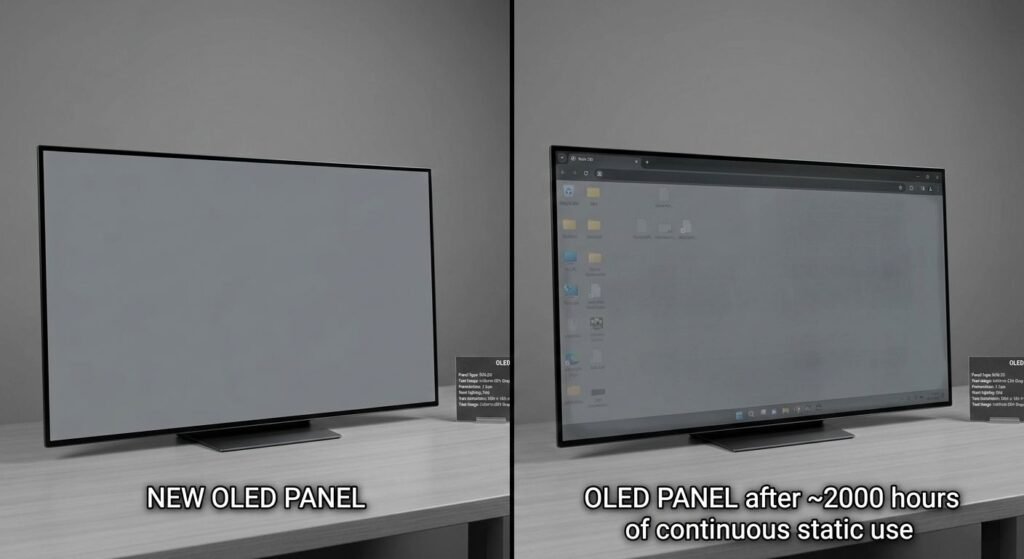
Cause: Organic LED compounds degrade with use. Pixels displaying bright static content (taskbar, desktop icons, UI elements) degrade faster than pixels displaying varied content. After hundreds or thousands of hours, uneven wear creates permanent ghost images.
Modern mitigation:
- Pixel shifting: UI elements shift 1-2 pixels periodically
- Logo dimming: Detects static elements and reduces brightness
- Pixel refresh cycles: Recalibrates pixels to even out wear
Effectiveness: These features significantly reduce but don’t eliminate burn-in risk. Static content for 8+ hours daily will eventually create wear.
Image Retention (Temporary)
Cause: Liquid crystals in LCD panels or charge build-up in OLED can temporarily “remember” recently displayed content. Appears as faint ghost images of previous content.
Recovery: LCD image retention usually clears within minutes to hours by displaying varied content. OLED image retention clears within seconds to minutes.
Not harmful: Unlike burn-in, retention causes no permanent damage. Annoying but temporary.
Managing Burn-In Risk
High risk: Static desktop UI all day, every day. Taskbar never hidden. Same icons in same positions for months.
Medium risk: Mixed content — some productivity work (static UI), some video/gaming (varied content). Hide taskbar, use screensavers, vary content.
Low risk: Mostly varied content — video, gaming with dynamic UI, applications in different positions. Minimal static elements.
For productivity monitors used 8+ hours daily with static UI, LCD remains the safer choice despite OLED’s image quality advantages.
Frequently Asked Questions
Is IPS or VA better for general use?
IPS is more versatile. Better viewing angles mean the screen works well regardless of how you sit or share content. VA’s contrast advantage is most noticeable in dark rooms; IPS’s consistency is beneficial in all conditions. For mixed use (work, media, light gaming), IPS is typically the better choice. VA excels specifically for media consumption and single-player gaming where contrast matters most.
Why do manufacturers list higher contrast ratios than measured?
Manufacturer specifications often use dynamic contrast — maximum white brightness divided by minimum black brightness measured in different test patterns. Real-world static contrast (both measured in the same frame) is typically 10-50× lower than advertised dynamic contrast. Focus on static contrast ratios and independent reviews rather than manufacturer claims.
Can I calibrate any monitor to professional accuracy?
Hardware calibration (using a colorimeter like X-Rite i1Display) significantly improves accuracy on any monitor. However, you cannot expand a monitor’s native color gamut — a 90% sRGB monitor will never achieve 95% DCI-P3 through calibration. Calibration corrects color errors within the native gamut but cannot add colors the panel cannot produce.
Does response time matter for 60Hz gaming?
At 60Hz (16.7ms per frame), pixel response time matters less than at higher refresh rates. Even an 8ms panel updates before the next frame. Response time becomes critical at 120Hz+ (8.3ms per frame) where slow pixels cannot complete transitions before the next frame arrives, creating motion blur.
Is OLED worth the burn-in risk for desktop use?
For static productivity work (programming, writing, office applications), burn-in risk is significant and LCD remains advisable. For mixed use with varied content and precautions (hidden taskbar, screensavers, varied content), OLED’s image quality advantages may outweigh manageable burn-in risk. For pure media consumption or gaming, OLED’s burn-in risk is minimal.
Why do some OLED monitors look sharper than others?
Sub-pixel layout affects text clarity. RGB stripe (standard) provides sharpest text. WRGB (white sub-pixel) and QD-OLED (triangular arrangement) can create color fringing on text, particularly white-on-black. This affects desktop use more than gaming or video where sub-pixel layout is imperceptible.
Key Takeaways
Display panel technology determines fundamental image characteristics that cannot be fully corrected through settings or calibration. IPS prioritizes viewing angles and color accuracy at the cost of lower contrast. VA prioritizes contrast ratio and deep blacks at the cost of narrower viewing angles and potential dark smearing. OLED delivers perfect blacks and infinite contrast but introduces burn-in risk with static content. TN offers fast response times but poor viewing angles and color accuracy, relegating it to competitive gaming niches.
The best panel type depends entirely on primary use case. Office productivity and color-critical work require IPS’s viewing angles and accuracy. Media consumption and atmospheric gaming benefit from VA’s contrast or OLED’s perfect blacks. Competitive gaming prioritizes Fast IPS or TN for response time. No single panel excels at everything — understanding trade-offs allows informed matching of technology to use rather than chasing marketing superlatives.
Response time specifications are frequently misleading — manufacturers report best-case single transitions rather than averages, and pixel response is only one factor in motion clarity alongside refresh rate, persistence blur, and overdrive implementation. Similarly, viewing angle specifications (178°/178°) are technically accurate but meaningless in comparing real-world color shift and contrast maintenance across IPS, VA, and TN technologies.
Related guides: