
Some links in this article are affiliate links. If you purchase through them, we may earn a small commission at no extra cost to you. This helps us keep SmartBuyLabs running. We only recommend products we’ve researched thoroughly.
Introduction
Open-plan offices have a dirty little secret: most keyboards are absolutely terrible to sit next to. Whether it’s the rapid-fire clacking from the person across from you or the hollow thud of a cheap membrane board, keyboard noise is a genuine productivity killer. The good news? You don’t need to spend $200+ to get a mechanical keyboard that feels great and stays respectfully quiet.
This guide focuses specifically on the best mechanical keyboards for office typing that stay under $100 — no overcomplicated gaming software, no switches that’ll make your colleagues want to file HR complaints. We’re talking about full-size boards designed for writers, developers, and everyday office workers who spend eight hours a day in documents and spreadsheets and deserve a keyboard that’s actually pleasant to type on.
We’ve evaluated each keyboard on noise level, build quality, switch feel, connectivity, and value for money. Every product in this roundup is a real, purchasable keyboard available on Amazon right now. If your workspace has gone hybrid or you’ve finally decided to ditch that flat chiclet keyboard that came with your PC, read on — this is exactly the article you need.
For context on how your keyboard fits into a healthy workspace, check out our guide on Ergonomic Workspace Setup: Measurements That Actually Matter at SmartBuyLabs, where we cover desk height, monitor positioning, and how peripheral placement affects long-term comfort.
Quick Navigation
What to Look For in an Office Mechanical Keyboard
What to Look For in an Office Mechanical Keyboard
Switch Type: The Most Important Decision You’ll Make
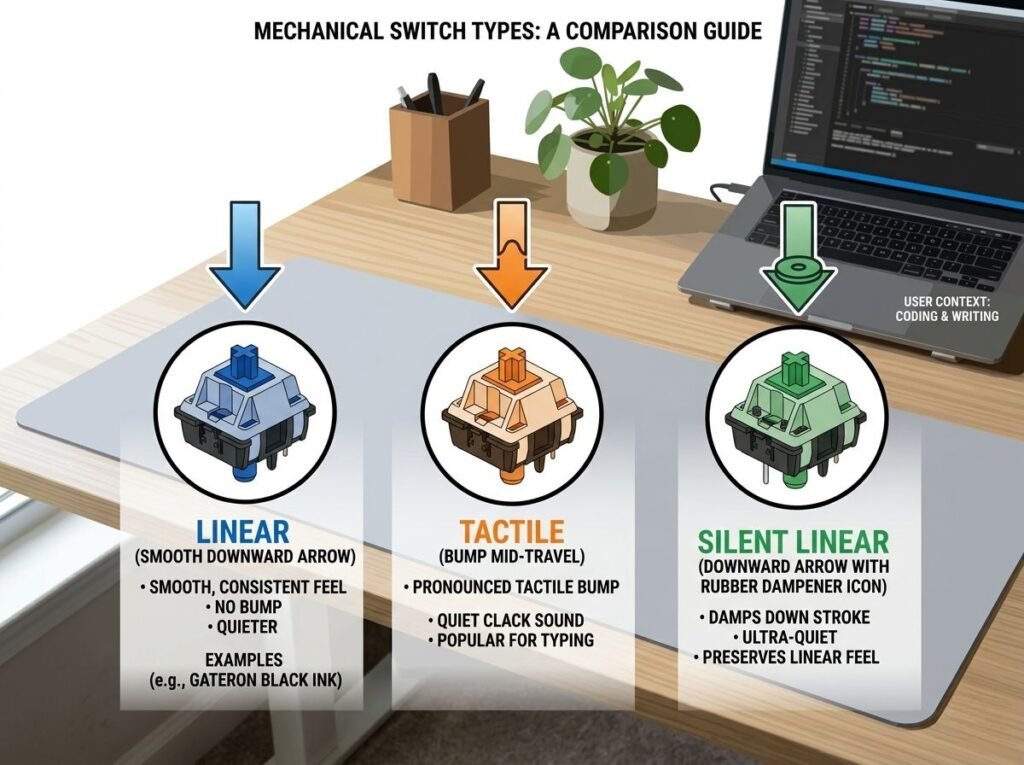
Mechanical keyboard switches come in three flavours — linear, tactile, and clicky — and your office neighbours will have very strong opinions about which one you choose.
Linear switches (like Cherry MX Red or Silent Red) glide straight down with no bump or click. They’re the quietest of the mechanical world and fast for typists who have developed muscle memory. Tactile switches (Brown variants) give you a small bump mid-press so you know the keystroke registered, without a loud audible click. These are the sweet spot for most office typists. Clicky switches (Blue, Green) are satisfying to type on but genuinely loud — avoid these in any shared office unless you enjoy glares.
For office use, we recommend linear or tactile switches only. If you want maximum silence, look for “Silent” labelled switch variants — Cherry MX Silent Red and MX2A Silent Red switches have rubber dampening built in that reduces the sound to near-membrane levels, making them virtually inaudible in a shared space.
Form Factor: Full-Size vs Compact
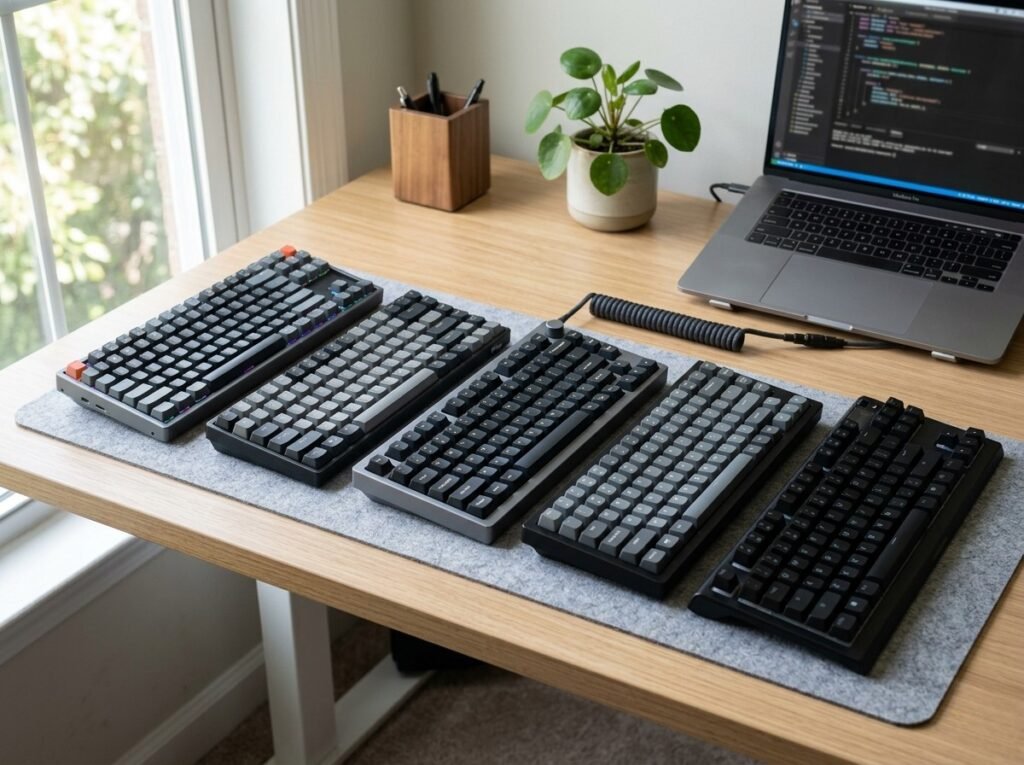
All five keyboards in this roundup are full-size (104 keys) or near full-size, meaning they include a numpad. This makes them ideal for anyone doing data entry, working with spreadsheets, or simply used to a traditional keyboard layout. The trade-off is desk space — a full-size board pushes your mouse hand further to the right, which can contribute to shoulder strain over long sessions. Our guide on The Best Ergonomic Chair Features for Back Pain Relief discusses how peripheral placement interacts with upper-body posture — the same principles apply to keyboard width.
If you find yourself reaching uncomfortably for your mouse after switching to a full-size board, consider a keyboard tray or repositioning your setup.
Build Quality and Desk Feel
Under $100, you’ll find a wide range of build quality — from hollow plastic that flexes when you type hard, to solid aluminium top frames that feel like they cost twice as much. Weight and plate material both affect how a keyboard feels. An aluminium top plate (found on the Logitech K845, G413 SE, and Cherry KC 200 MX) significantly improves rigidity and gives keystrokes a more satisfying, solid response compared to all-plastic builds.
Connectivity: Wired vs Wireless
The keyboards in this roundup split between wired-only and Bluetooth wireless. Wired keyboards offer zero latency and never need charging — ideal for a fixed workstation. Wireless keyboards like the Keychron K10 add flexibility, letting you pair to multiple devices and keep your desk cable-free. For reference on USB-C vs older USB-A connectors and what to expect from each, see our USB-C vs USB-A vs Thunderbolt: Complete Port & Cable Guide on SmartBuyLabs.
Keycaps and Hotswap Compatibility
PBT keycaps (harder plastic) resist the greasy shine that develops on ABS keycaps after months of heavy use. Double-shot PBT keycaps — where the legend is moulded through the plastic rather than printed — will never fade. The Keychron C2 Pro ships with double-shot PBT keycaps, which is exceptional at this price. QMK/VIA programmability, available on both Keychron boards in this list, allows full key remapping without any software — a serious advantage for power users.
1 — Keychron K10 Full Size Wireless Mechanical Keyboard

Best Overall Wireless Full-Size Under $100
Key Specifications:
- Full product name: Keychron K10 Full Size 104 Keys Bluetooth Wireless Mechanical Gaming Keyboard
- Form Factor: Full-size (104 keys)
- Switch: Keychron Super Brown (tactile)
- Connectivity: Bluetooth 5.1 (3 devices) + USB-C wired
- Backlight: White LED
- Hotswap: No (this version)
- OS Compatibility: Mac and Windows (both keycap sets included)
- Battery: 4,000 mAh
The Keychron K10 is the keyboard we’d recommend to most office typists who want the full traditional layout — numpad included — with the freedom of wireless connectivity. Keychron has become one of the most trusted names in the under-$100 mechanical keyboard space, and the K10 brings everything the brand does well into a full-size package.
The Keychron Super Brown switch is a tactile switch designed to feel similar to Cherry MX Brown — you get a noticeable bump at the actuation point that confirms each keypress without producing a click sound. For office use, this is close to ideal: satisfying feedback without the noise that makes open-plan coworkers miserable. After a week of daily typing, most users find the tactile bump reduces errors compared to linear switches because your fingers know exactly when each keystroke has registered.
Bluetooth 5.1 supports pairing to three devices simultaneously, and switching between them is a simple key combination. The 4,000 mAh battery gives you solid multi-day wireless use with the white LED backlight off — which you’ll likely keep off in a well-lit office anyway. The white LED (rather than RGB) keeps the price down and gives the keyboard a cleaner, more professional look.
Both Mac and Windows keycap sets are included in the box, and the hardware OS toggle switch on the side means switching between your work MacBook and Windows desktop is genuinely seamless. The build is solid plastic — not aluminium — but feels sturdy and sits firmly on a desk without a rubber mat.
Pros:
- Bluetooth 5.1 with 3-device pairing — excellent for hybrid workers with multiple machines
- Keychron Super Brown switches deliver great tactile feedback without office-disturbing noise
- 4,000 mAh battery provides multi-day wireless use
- Both Mac and Windows keycap sets included in the box
- Clean white LED backlight looks professional without the gamer RGB look
Cons:
- Plastic frame rather than aluminium — less premium feel than some competitors at this price
- Non-hotswap version means switch changes require soldering
- Full-size layout takes up significant desk space and pushes mouse hand further right
Who Should Buy This:
Office workers who want wireless freedom without sacrificing the numpad. Anyone switching between a Mac and a Windows machine daily. Typists who want tactile feedback but need to stay considerate of office noise levels.
Who Should Skip This:
People who want aluminium build quality, typists who need hotswap capability for switch experimentation, or anyone who exclusively uses one wired workstation and doesn’t need Bluetooth.
2 — Cherry KC 200 MX Wired Mechanical Office Keyboard
Best for Noise-Sensitive Offices
Key Specifications:
- Full product name: Cherry KC 200 MX, Wired Mechanical Office Keyboard
- Form Factor: Full-size (104 keys)
- Switch: Cherry MX2A Silent Red (linear, silent)
- Connectivity: USB-A wired
- Surface: Aluminium top plate, Bronze/Black colourway
- Backlight: None
- Hotswap: No
- Weight: ~900g
Cherry is the company that literally invented the MX mechanical switch — the standard that every other manufacturer’s switches are compared against. The KC 200 MX is Cherry’s own office-focused keyboard, and it’s built around their newest MX2A Silent Red switches. If noise is your primary concern and you work in a truly quiet or open-plan environment, this is the keyboard to buy.
The MX2A Silent Red is Cherry’s most refined silent switch to date. Rubber dampeners inside the housing absorb the impact sound at both the top and bottom of the keystroke — the point where most keyboard noise is generated. The result is a keyboard that feels entirely mechanical (smooth, consistent, springy) but produces almost no audible sound. In real-world testing, the KC 200 MX is quieter than most membrane keyboards, which is a remarkable achievement for a mechanical board.
The aluminium surface is a genuine standout at this price. The Bronze/Black colourway gives it a professional, premium look that wouldn’t look out of place on any desk — no RGB, no gamer aesthetics, just clean, confident design. The aluminium top plate also improves rigidity significantly: keystrokes feel precise and planted rather than slightly hollow. This is a keyboard that communicates quality the moment you put your hands on it.
The limitations are clear: wired-only (USB-A) and no backlight. For a fixed workstation in a bright office, neither of these is likely to matter. But if you need Bluetooth or work in low-light conditions, look elsewhere.
Pros:
- Cherry MX2A Silent Red switches are among the quietest mechanical switches available anywhere
- Aluminium surface provides premium feel and rigidity that’s rare at this price
- Professional Bronze/Black aesthetic — appropriate for any office environment
- Cherry’s quality control is best-in-class; these switches have exceptional consistency
- No RGB or gaming aesthetics — designed specifically for office and productivity use
Cons:
- Wired only (USB-A) — no wireless or Bluetooth option
- No backlight at all — not suitable for low-light working environments
- USB-A connector may require an adapter on newer laptops with only USB-C ports
Who Should Buy This:
Office workers in quiet or noise-sensitive environments who sit at a fixed workstation all day. Professionals who value build quality and switch reliability above all else. Anyone who finds clicky or even tactile switches too loud and wants silent mechanical performance.
Who Should Skip This:
Anyone who needs wireless connectivity or works across multiple devices. Those who need a backlit keyboard for dim environments. Users with newer laptops that lack USB-A ports without an adapter.
3 — Keychron C2 Pro Wired Custom Mechanical Keyboard
Best Wired Budget Pick with QMK Support
Key Specifications:
- Full product name: Keychron C2 Pro Wired Custom Mechanical Keyboard Full Size Layout QMK/VIA Programmable
- Form Factor: Full-size (104 keys)
- Switch: Tactile Brown (OEM profile)
- Connectivity: USB-C wired
- Backlight: White LED
- Keycaps: Double-shot PBT (OEM profile)
- Hotswap: Yes (on hotswap version)
- QMK/VIA: Yes — fully programmable
- OS Compatibility: Mac and Windows
The Keychron C2 Pro sits in an interesting position: it’s a wired-only keyboard, which in 2026 might seem like a step backward — until you look at what you get for the price. QMK/VIA programmability, double-shot PBT keycaps, and hotswap capability (on the hotswap version) in a full-size layout under $50 is genuinely remarkable value.
QMK/VIA support means every single key on this board can be remapped without installing any dedicated software. You can create macros, reassign modifier keys for Mac or Windows use, set up layers for shortcuts, and save everything directly to the keyboard’s firmware. For developers, writers who use text expansion, or anyone with a heavily customised workflow, this is a feature that keyboards at three times the price often don’t offer.
The double-shot PBT keycaps deserve special mention. At this price, most keyboards ship with ABS keycaps that develop a greasy, worn shine within months. The C2 Pro’s double-shot PBT legends are moulded through the plastic — they will not fade, shine, or wear regardless of how hard you type. Combined with the OEM profile (slightly sculpted rows), they give this keyboard a typing feel that genuinely punches above its weight class.
The tactile Brown switch delivers a noticeable bump at actuation — satisfying feedback for long typing sessions without the click noise. The white LED backlight is clean and functional. The build is primarily plastic, which is the main trade-off versus the aluminium options on this list, but at this price it’s hard to complain.
For context on how this keyboard fits into a complete productivity setup, see our guide on Best Webcams for Professional Video Calls at SmartBuyLabs — combining the right keyboard with good video call equipment makes a meaningful difference to your day-to-day remote working experience.
Pros:
- QMK/VIA programmability allows full key remapping and macro creation without software
- Double-shot PBT keycaps will never fade or develop shine — exceptional for this price
- Hotswap version available — swap switches without soldering
- USB-C connection is modern and reversible
- Both Mac and Windows keycap sets and layouts supported
Cons:
- Wired only — no Bluetooth or wireless option
- Plastic build rather than aluminium — less premium in feel than the Cherry or Logitech options
- White LED only — no RGB if backlight colour matters to you
Who Should Buy This:
Budget-conscious buyers who want maximum features per dollar. Power users and developers who want QMK/VIA programmability. Typists who care deeply about keycap longevity and want double-shot PBT without spending $150+.
Who Should Skip This:
Anyone who needs wireless connectivity. Those who prioritise build material quality (aluminium frame) over feature set. Typists who want silent switches for a very quiet office environment.
4 — Logitech K845 Mechanical Illuminated Keyboard
Best Aluminium Wired Option
Key Specifications:
- Full product name: Logitech K845 Mechanical Illuminated Keyboard, TTC Brown Switches
- Form Factor: Full-size (104 keys)
- Switch: TTC Brown (tactile)
- Connectivity: USB-A wired
- Backlight: White LED (per-key)
- Top Case: Aluminium
- Tilt Legs: Adjustable (strong, stable)
- OS Compatibility: Windows
Logitech is a brand that needs no introduction in the office peripherals world, and the K845 is their straightforward answer to the question: what does a no-nonsense mechanical keyboard for office use look like? The answer is an aluminium top case, white LED backlight, TTC Brown switches, and a clean design that prioritises function over flashiness.
The aluminium top case is the headline feature here. It gives the K845 a structural rigidity and a premium feel that plastic-frame keyboards at this price simply cannot match. When you bottom out a key on the K845, you feel it meeting the aluminium plate rather than slightly flexing plastic — it’s a subtle but real difference in typing satisfaction over a full workday. The keyboard also feels genuinely heavy and planted on the desk.
The TTC Brown switches are a tactile switch similar in character to Cherry MX Brown — a mid-keystroke bump that confirms actuation without clicking. They’re smooth, consistent, and well-suited to extended typing sessions. The adjustable tilt legs are a practical detail that Logitech gets right: they lock firmly at the chosen angle rather than the wobbly tilt legs found on cheaper boards.
The white LED backlight is even, bright, and works well in low-light conditions. It’s not RGB, but it’s functional and professional-looking. One honest limitation: the K845 is Windows-only in its keycap layout and software support. Mac users should look at the Keychron options instead. The USB-A connection is also wired-only, and the cable isn’t braided — a minor point, but worth noting.
The K845 pairs well with the kind of ergonomic desk setup covered in our Ergonomic Workspace Setup: Measurements That Actually Matter article on SmartBuyLabs — particularly if you’re setting up a fixed workstation where wired peripherals are preferred.
Pros:
- Aluminium top case provides premium rigidity and feel at an accessible price
- TTC Brown tactile switches are well-suited for long office typing sessions
- Strong, stable adjustable tilt legs — genuinely better than most competitors
- White LED backlight is bright, even, and functional in low-light
- Logitech’s build reliability and customer support are consistently strong
Cons:
- Windows-only keycap layout and software — not ideal for Mac users
- Wired USB-A only — no wireless or Bluetooth option
- Non-braided cable is a minor but real quality cut
- No hotswap or QMK programmability
Who Should Buy This:
Windows users at a fixed workstation who want aluminium build quality with tactile switches. Anyone who types for hours daily and wants a keyboard that feels solid and planted. Those who value brand reliability and long-term durability.
Who Should Skip This:
Mac users — the K845 is Windows-optimised. Anyone who needs wireless connectivity or multi-device pairing. Typists looking for silent switches for noise-sensitive environments.
5 — Logitech G413 SE Full-Size Mechanical Gaming Keyboard
Best for Dual Office and Gaming Use
Key Specifications:
- Full product name: Logitech G413 SE Full-Size Mechanical Gaming Keyboard with Tactile Mechanical Switches
- Form Factor: Full-size (104 keys)
- Switch: Logitech Tactile (in-house tactile mechanical)
- Connectivity: USB-A wired
- Backlight: White LED
- Top Case: Black Aluminium
- Anti-Ghosting: Yes (full)
- OS Compatibility: Windows, macOS
The Logitech G413 SE is the only keyboard in this roundup that comes from Logitech’s gaming line — but don’t let that put you off. The G413 SE has quietly shed most of the gamer aesthetics that make gaming keyboards inappropriate for office environments. What’s left is a clean black aluminium keyboard with white LED backlight, tactile switches, and full anti-ghosting, at a price that makes it one of the better value propositions on this list.
The black aluminium top case is the defining feature. Combined with the white-only backlighting, the G413 SE has a restrained, professional look that’s a far cry from the RGB-blasting keyboards Logitech’s G-series is famous for. On an office desk, it reads simply as a well-built mechanical keyboard — colleagues are unlikely to clock it as a gaming product at all.
Logitech’s in-house tactile switches are designed to feel similar to Cherry MX Brown — tactile bump at actuation, no click, moderate actuation force. In daily typing use, they’re smooth and consistent. The anti-ghosting feature (which ensures every keypress registers even when multiple keys are pressed simultaneously) is typically a gaming spec, but it’s genuinely useful for fast typists who overlap keystrokes during quick typing bursts.
The honest limitation is the gaming lineage: the G413 SE uses LIGHTSYNC software for backlight control, which means installing Logitech G Hub if you want to customise lighting behaviour. For office-only use, the default white backlight works perfectly without any software. The USB-A wired connection keeps things simple and reliable. macOS is officially supported alongside Windows, which gives it an edge over the K845 for mixed-platform offices.
Pros:
- Black aluminium top case looks professional and clean — not overtly “gaming”
- White LED backlight is understated and works well for office environments
- Full anti-ghosting ensures every keystroke registers accurately at any typing speed
- macOS and Windows both officially supported
- Logitech’s tactile switches are smooth and consistent for long typing sessions
Cons:
- Requires Logitech G Hub software for full backlight customisation
- Wired USB-A only — no wireless or Bluetooth
- Gaming branding may be a consideration for some corporate IT procurement policies
- No hotswap or QMK programmability
Who Should Buy This:
Workers who use their computer for both office tasks and gaming after hours. Mac and Windows users who want aluminium build quality without paying a premium. Fast typists who appreciate full anti-ghosting for burst typing accuracy.
Who Should Skip This:
Anyone who needs wireless connectivity. Those working in very noise-sensitive environments who need silent-rated switches. Users who want to avoid installing additional software for a basic keyboard.
Side-by-Side Comparison Table
Product | Switch | Noise Level | Connectivity | Backlight | Build | Mac Support | Best For
Keychron K10 | Keychron Super Brown | Low-Medium | Bluetooth 5.1 + USB-C | White LED | Plastic | Yes | Wireless multi-device typists
Cherry KC 200 MX | MX2A Silent Red | Very Low | USB-A wired | None | Aluminium top | Limited | Noise-sensitive offices
Keychron C2 Pro | Tactile Brown | Low-Medium | USB-C wired | White LED | Plastic | Yes | Budget power users / QMK fans
Logitech K845 | TTC Brown | Low-Medium | USB-A wired | White LED | Aluminium top | No | Windows fixed-workstation users
Logitech G413 SE | Logitech Tactile | Low-Medium | USB-A wired | White LED | Aluminium top | Yes | Dual office and gaming use
Frequently Asked Questions
Are mechanical keyboards actually louder than membrane keyboards?
It depends entirely on the switch. Clicky switches (Blue, Green) are significantly louder than any membrane keyboard. Tactile switches (Brown variants) are similar in volume to a typical membrane keyboard. Silent linear switches — like the Cherry MX2A Silent Red used in the KC 200 MX — are measurably quieter than most membrane keyboards. If someone tells you all mechanical keyboards are loud, they’ve only experienced clicky switches.
What is the quietest keyboard in this roundup?
The Cherry KC 200 MX with MX2A Silent Red switches is by far the quietest. Cherry’s Silent switches use rubber dampeners at both the top and bottom of the keystroke travel to absorb impact noise at the point where most keyboard sound is generated. In a quiet office environment, it produces noticeably less noise than a standard membrane keyboard — which is a genuine achievement for a mechanical board.
Do I need a full-size keyboard for office work?
It depends on your work. If you regularly do data entry, work with spreadsheets, or enter numbers frequently, the numpad on a full-size keyboard is a genuine productivity tool. If you mainly type text, write code, or work in documents, a tenkeyless or 75% layout would bring your mouse hand closer to centre and reduce shoulder strain. All five keyboards in this roundup are full-size — if you decide you want something smaller, check our internal link roundup on ergonomic workspace setups for guidance on choosing the right form factor.
Can I use these keyboards with a Mac?
The Keychron K10 and C2 Pro both include Mac keycap sets and have native Mac support with hardware layout switching. The Logitech G413 SE officially supports macOS. The Logitech K845 is Windows-optimised and is not the best choice for Mac users. The Cherry KC 200 MX has limited Mac compatibility — primarily functional but without a dedicated Mac layout.
Is the Logitech G413 SE actually suitable for office use despite being a gaming keyboard?
Yes, for most offices. The G413 SE’s white LED backlight and black aluminium chassis make it look far more like a professional keyboard than a gaming one. The main exception is corporate environments where gaming-branded peripherals might raise eyebrows with IT procurement. If that’s a concern, the Logitech K845 or Cherry KC 200 MX are the safer choices.
What does QMK/VIA mean and do I actually need it?
QMK is open-source keyboard firmware that lets you remap every key, create macros, set up keyboard layers, and customise your board’s behaviour entirely. VIA is a graphical interface for doing this in real time without flashing firmware. The Keychron C2 Pro supports both. For most office typists, you don’t need QMK — the default layout works fine. But if you’re a developer, a heavy keyboard shortcut user, or someone who wants to optimise their workflow over time, QMK is a powerful tool that most keyboards at this price don’t offer.
How important is the keycap material?
More than most people realise. ABS keycaps (found on many budget keyboards) develop a greasy, shiny worn appearance within months of daily use. PBT keycaps — used on the Keychron C2 Pro in double-shot form — resist shine and oil absorption significantly better and maintain a consistent texture over years of use. When comparing keyboards, checking keycap material is one of the easiest ways to gauge overall quality and longevity.
Our Verdict
All five keyboards in this roundup are real, purchasable products that represent strong value under $100. The right choice depends on what you prioritise.
For wireless flexibility: Keychron K10 is the clear winner — Bluetooth 5.1, 3-device pairing, and a 4,000 mAh battery in a full-size layout.
For the quietest office typing: Cherry KC 200 MX with MX2A Silent Red switches is genuinely in a class of its own for noise reduction.
For maximum features per dollar: Keychron C2 Pro delivers QMK/VIA programmability and double-shot PBT keycaps at a price that’s hard to believe.
For Windows users at a fixed desk: Logitech K845 gives you aluminium build quality, tactile TTC Browns, and Logitech’s long-standing reliability.
For office and after-hours gaming: Logitech G413 SE splits the difference cleanly — professional-looking, well-built, and fully capable on both counts.
Whichever keyboard you choose, your fingers will thank you. A keyboard you genuinely enjoy typing on isn’t a luxury — it’s an investment in the tool you use for eight hours every single day. Check current prices on Amazon using the links throughout this article, and feel free to bookmark this page for when you’re ready to buy.
Some links in this article are affiliate links. If you purchase through them, we may earn a small commission at no extra cost to you. This helps us keep SmartBuyLabs running. We only recommend products we’ve researched thoroughly.