
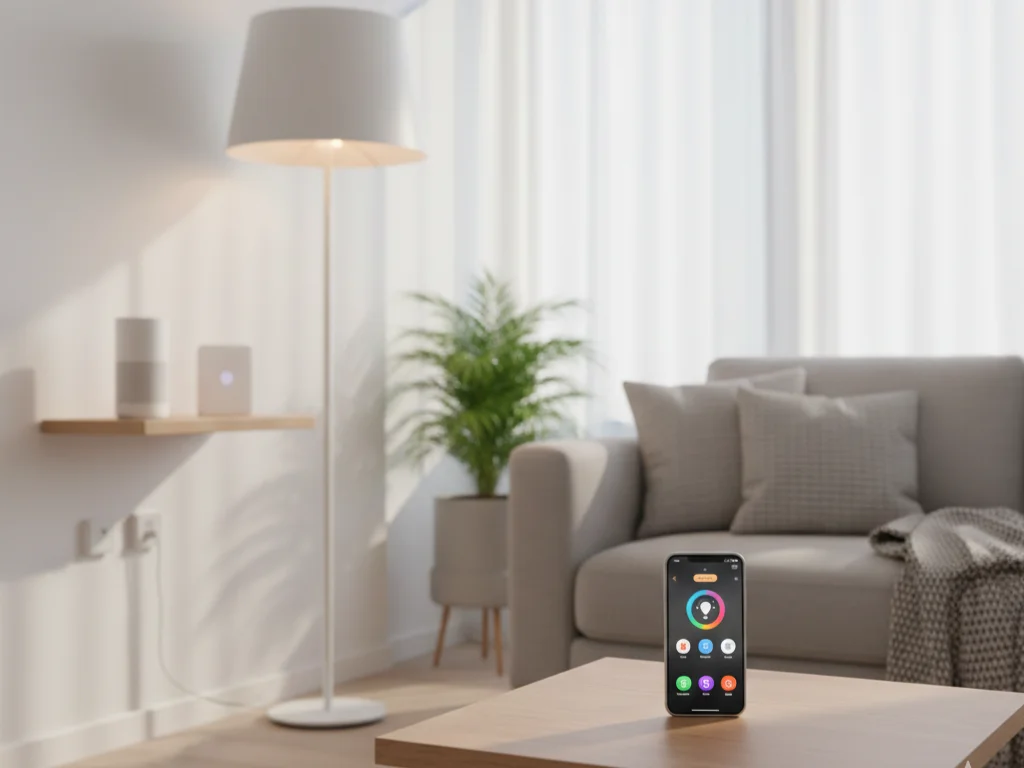
Best Budget Smart Home Starter Kits (Build a Smart Home for Under $250)
Affiliate disclosure: This post may contain affiliate links. As an Amazon Associate, we may earn from qualifying purchases at no extra cost to you.
Why a Smart Home on a Budget Is Totally Realistic
You don’t need a huge budget or a professional installer to start a smart home in 2026. Thanks to affordable starter kits and DIY-friendly devices, you can get:
- App control for lights and plugs
- Voice control with Alexa / Google Assistant
- Basic home security and leak alerts
- Automation routines (schedules, “goodnight” scenes, away mode)
All while keeping your first setup comfortably below the cost of a premium smartphone accessory.
The trick is choosing the right starter kit: something that’s easy to set up, expandable, and built on a reliable ecosystem instead of random no-name devices that break after a few months.
Below you’ll find carefully researched smart home starter kits that are usually priced very reasonably, plus examples of how to build a complete starter setup around them.
How Smart Home Starter Kits Work (Quick Overview)
Before we jump into product picks, it helps to understand the basics.
Hub-based kits
These include a dedicated hub or bridge (like a Hue Bridge, Ezlo hub, or YoLink SpeakerHub) that talks to your bulbs, sensors, or plugs using protocols like Zigbee, Z-Wave, or LoRa.
Pros:
- More reliable automation
- Less Wi-Fi congestion
- Easier to expand with lots of devices
Hubless / Wi-Fi kits
These devices connect directly to your Wi-Fi and are controlled via an app.
Pros:
- Super simple setup
- Great for renters and apartments
- No “hub” box needed
Ecosystem choice
Most kits support at least one major ecosystem:
- Alexa
- Google Assistant
- Sometimes Apple Home or Matter
It’s usually smartest to pick devices that fit the platform you already use on your phone or smart speaker.
At a Glance: Popular Budget-Friendly Smart Home Starter Kits
| Kit | Type | What It Includes | Best For |
|---|---|---|---|
| Amazon Smart Lighting Starter Kit (Echo Dot + smart bulb + plug + remote) | Alexa lighting starter | Smart speaker, smart bulb, smart plug, smart dimmer/remote | First-time Alexa users, small apartments |
| BroadLink Smart Home Starter Kit | Lighting + hub | 3 smart bulbs, 1 scene switch, 1 hub | Simple app-controlled lighting + scenes |
| Philips Hue Essential Starter Kit (4 bulbs + Hue Bridge) | Premium lighting | 4 full-color bulbs + Hue Bridge | “Serious” smart lighting, highly expandable |
| Wyze Home Monitoring Core Starter Kit | DIY security | Hub, motion & entry sensors (cams optional) | Affordable home security + smart alerts |
| YoLink Leak Detection Starter Kit | Leak & freeze protection | SpeakerHub or hub + leak sensors | Basements, rentals, vacation homes |
| DIY Kasa Combo (plugs + bulbs) | Wi-Fi lighting/power | Smart plugs + smart bulbs | Hub-free, very simple smart home |
(Exact contents and models can vary slightly by region or current bundle.)
1. Amazon Smart Lighting Starter Kit (Echo Dot + Smart Bulb + Smart Plug + Remote)
Best for: Absolute beginners who want Alexa + smart lighting + a smart plug in a single box.
Typically, this bundle includes:
- An Echo Dot smart speaker (Alexa voice assistant)
- An Amazon Basics smart bulb (white or color, depending on offer)
- An Amazon Smart Plug
- An Amazon Basics remote/dimmer for lights
Why it’s great for a tight budget
With just one kit you get:
- Voice control
- Smart lighting
- A controllable plug
All managed in the Alexa app, which also supports thousands of other devices (cameras, thermostats, robot vacuums and more).
What you can do with it
- Say “Alexa, turn off the lamp” or “dim the lights to 30%”
- Put lights on schedules or “away” mode
- Use the plug for a fan, lamp, coffee maker, or TV
- Trigger routines like “Goodnight” that turn lights off and play sleep sounds
Pros
- Very beginner-friendly
- Perfect for renters (no wiring)
- Great foundation for future expansion
Cons
- Strongly centered on Alexa (Google / Apple users may prefer other kits)
- The exact bulb/plug models can vary depending on the current bundle

- Getting started with smart home has never been easier – An all-in-one kit with a quick guided setup makes starting your …
- A setup so easy, it feels like magic – Just unbox, plug it in, and tap to get started.
2. BroadLink Smart Home Starter Kit – 3 Bulbs, Scene Switch & Hub
Best for: Budget-friendly multi-room smart lighting with both app and physical button control.
This kit usually includes:
- 3 BroadLink smart bulbs
- 1 scene switch (wall-mount or handheld)
- 1 BroadLink hub that connects them and integrates with Alexa / Google
Why it’s a strong value
You can control three rooms or three lamps with:
- App control (on/off, dimming, color temperature or color, depending on bulb)
- A dedicated scene switch to trigger presets (e.g., “movie”, “study”, “night”)
Because it’s based around a hub, you can add additional BroadLink devices later (more bulbs, smart IR blasters for TV/AC, switches, etc.).
Ideal for:
- Small homes or apartments that want basic but coordinated lighting
- People who appreciate a physical button as well as app/voice control

- 【Enjoy Easiest Smart Home in Fingertips】- With Bro…
3. Philips Hue Essential Starter Kit (4 E26 Bulbs + Hue Bridge)
Best for: Users who want premium, rock-solid smart lighting that’s built to scale.
In this kit you generally get:
- 4 Philips Hue White & Color Ambiance E26 bulbs
- 1 Hue Bridge (the hub that manages them)
Why people still love Hue
Philips Hue is more expensive than many Wi-Fi bulbs, but the quality is noticeable:
- Smooth dimming
- Great color accuracy
- Very reliable and low latency
- Big ecosystem of compatible lightstrips, lamps, switches and sensors
The Hue Bridge talks Zigbee (and now works with Matter via updates), leaving your Wi-Fi free and allowing you to control dozens of bulbs without performance issues.
What it’s perfect for
- Living rooms, bedrooms and offices where lighting quality matters
- “Scenes” like sunrise wake, movie night, and relaxing warm light in the evenings
- Homes that plan to expand to more complex setups later
Trade-offs
- Higher cost per bulb than many competitors
- The kit focuses on lighting only—you’ll still add separate brands for cameras, plugs, etc.
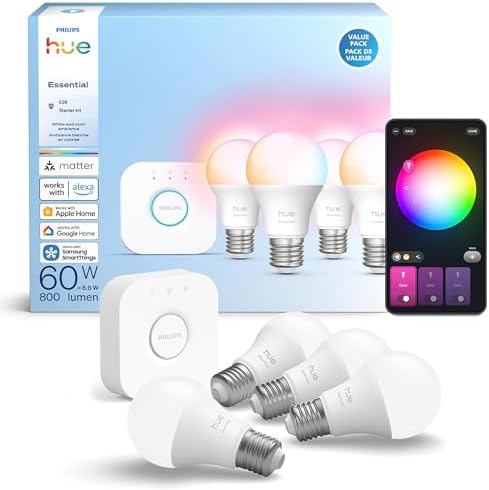
- WHAT’S IN THE BOX – This starter kit includes one Hue Bridge and four E26 smart bulbs; to get started, simply install yo…
- CREATE AMBIANCE WITH COLOR – Set the mood with millions of colors and a library of preset light scenes designed by Hue’s…
- DIM EASILY – Adjust from full brightness all the way down to 2% using the Hue app to achieve the right level of lighting…
4. Wyze Home Monitoring Core Starter Kit – Affordable DIY Security
Best for: People starting a smart home around security and basic monitoring.
The Wyze Home Monitoring starter bundle typically includes:
- A Wyze Sense Hub
- A combination of entry (door/window) sensors and motion sensors
- Optionally, in some bundles, a keypad or other sensors
Wyze is well known for its extremely affordable cameras and sensors, which often deliver features that rival much more expensive brands.
What you can do
- Monitor doors and windows for unexpected openings
- Get motion alerts inside your home
- Add Wyze cams for indoor/outdoor video, doorbells, and more
- Use the Wyze app to arm/disarm and review alerts
Strengths
- Very budget-friendly way to add smart security
- Easy to pair with Wyze cameras and other devices
- Good app for managing multiple Wyze products
Things to know
- Professional monitoring and cloud recording are optional paid services
- Works great for many users, but is more cloud-service dependent than purely local systems

- 24/7 Professional Security Monitoring – Get a text or call from a professional security agent in 5 seconds (yes, seconds…
- Easy DIY Installation – Do-it-yourself home security has never been easier. Every security and monitoring sensor connect…
- Easy to Use App – With our beloved industry-leading app experience, you can control and monitor your home’s status anywh…
5. YoLink Leak Detection Starter Kit (SpeakerHub + Water Leak Sensors)
Best for: Homeowners and renters who care about water damage prevention and peace of mind.
A typical YoLink leak detection kit contains:
- A YoLink hub or SpeakerHub (provides alerts and cloud connectivity)
- Several water leak sensors for placing under sinks, near washing machines, water heaters, or in basements
YoLink uses LoRa (long-range radio), which offers extremely good coverage even in larger homes, garages, or buildings with thick walls.
Why it’s powerful for protection
- Early detection of leaks can prevent very expensive water damage
- SpeakerHub can sound loud in-home alarms
- You can receive SMS, email, and push notifications
- Integrations with Alexa and other services allow automations (like turning on a smart plug connected to a pump)
Ideal scenarios
- Houses with basements, sumps, or older plumbing
- Vacation homes or rentals you don’t visit every day
- Anyone who’s had a water leak before and never wants that stress again

- Comprehensive Leak Detection Kit: Get started with the YoLink SpeakerHub Leak Detection Starter Kit, featuring one hub a…
- Effortless Installation: Experience hassle-free setup with the YoLink wireless Water Sensor. Simply place it near or und…
DIY Option: Build a Simple Smart Home with Kasa Plugs & Bulbs
If you prefer to assemble your own “kit”, TP-Link’s Kasa line is one of the best ways to create a hub-free starter system.
Combine:
- A 2-pack of Kasa Smart Wi-Fi Plugs
- 2–4 Kasa smart bulbs
Everything is controlled via the Kasa app, and integrates directly with Alexa and Google Assistant for voice control. No hub, no extra box, just Wi-Fi devices.
What you can accomplish with a small combo
- Turn lamps, fans, and small heaters on/off remotely
- Put devices on schedules (e.g., lights on at sunset, off at bedtime)
- Create “Away” routines for security
- Set bulbs to bright white for productivity or warm dim light for relaxing
This DIY route is ideal if you want absolute simplicity and flexibility without committing to a special hub from day one.
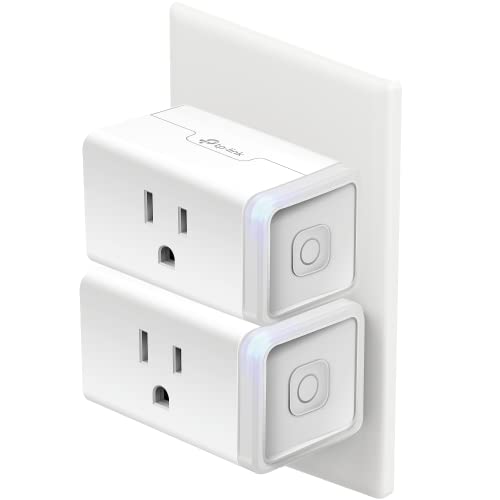
- Voice Control: Add voice control to any outlet. Enjoy the hands-free convenience of controlling any home electronic appl…
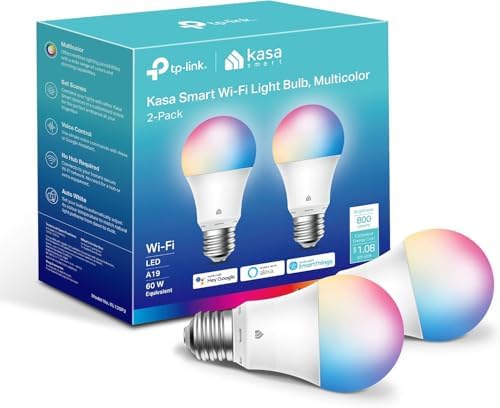
- Multicolor & Auto White: Dimmable 16 million colors and warm to cool whites(2500K-6500K). Set your bulb to automatically…
How to Choose the Right Starter Setup for Your Home
With so many options, here’s how to pick the best starting point for your situation.
1. Decide your main goal
Ask yourself: What problem do I actually want to solve first?
- “I want to control my lights and use my voice.”
→ Amazon Lighting Kit, BroadLink, Philips Hue, or a Kasa combo. - “I want to know if someone opens a door or window.”
→ Wyze Home Monitoring Kit. - “I’m worried about leaks or flooding.”
→ YoLink leak detection kit. - “I want more advanced logic with sensors.”
→ Ezlo smart home starter kit.
2. Match the ecosystem you already use
If you already use:
- Alexa → Amazon kit, Kasa, Hue, Wyze, YoLink, BroadLink all work nicely.
- Google Assistant → Hue, Kasa, Wyze, BroadLink, and many others integrate smoothly.
- Apple Home → Philips Hue with the Bridge and some Matter-compatible devices are usually the easiest path.
Choosing devices that talk to your preferred voice assistant keeps things simple and avoids juggling multiple apps.
3. Consider hub vs. hub-free
- Hub-free (Wi-Fi only)
- Easier to understand
- Best for small setups and apartments
- Great first step (Kasa, basic Amazon bundle, some cameras)
- Hub-based
- More stable for larger households
- Less Wi-Fi clutter
- Better for heavy automation and many devices (Hue, Ezlo, YoLink, Wyze)
4. Don’t forget security & privacy
Whatever you choose:
- Change default passwords
- Use strong Wi-Fi encryption
- Enable two-factor authentication on your main smart home account
- Review which cloud services your devices rely on and what gets stored
Example Starter Builds You Can Copy
Here are three sample setups you can realistically assemble while still staying on a modest budget.
A. Cozy Smart Lighting + Voice Assistant
- Amazon Smart Lighting Starter Kit (Echo Dot + bulb + plug + remote)
- 1–2 extra smart bulbs (Kasa, BroadLink, or Amazon Basics)
What you get:
- Voice-controlled lights
- A smart plug for a lamp or fan
- Routines like “Goodnight”, “Movie time”, and “I’m home”
B. Affordable Security & Monitoring Setup
- Wyze Home Monitoring Core Starter Kit
- 1 Wyze Cam for the living room or entry
- Optional: Add Wyze doorbell camera later
What you get:
- Entry and motion alarms
- Mobile alerts if someone opens a door or triggers motion
- Live view inside your home when you’re away
C. Protection-Focused (Leaks + Smart Power)
- YoLink leak detection kit (hub + several leak sensors)
- 2 Kasa smart plugs
What you get:
- Alerts the moment water is detected in risky areas
- Smart plug control for dehumidifiers, pumps, or space heaters
- Peace of mind for basements, laundry rooms, or older plumbing
Frequently Asked Questions (FAQ)
Do I have to stick to one brand?
No. Most smart homes are a mix of brands that all tie together through Alexa, Google Assistant, Apple Home, Matter, or services like IFTTT. Just make sure new devices support your main voice assistant or platform.
Will I have to throw everything away if I expand later?
In most cases, no. Kits like Philips Hue, Wyze, Kasa, YoLink, and Ezlo are designed to scale. You can keep adding lights, sensors, and plugs over time.
Is it safe to control my home from the cloud?
In general, yes—if you use strong passwords, enable two-factor authentication, and keep your router and apps updated. Always buy from reputable brands and read their privacy policies.
What’s the easiest “first device” if I’m nervous about complexity?
A smart plug or a single smart bulb is usually the best first step. You get a feel for the apps and routines without changing your whole setup.
Final Thoughts: Start Small, Grow Naturally
The smartest way to begin is not to automate everything at once, but to:
- Pick one room or one problem: lighting, security, or leaks.
- Choose a starter kit that fits that goal.
- Live with it for a few weeks.
- Add more devices only where they truly improve daily life.
Whether you begin with an Amazon lighting bundle, a Philips Hue kit, Wyze security, or a YoLink leak setup, you’ll quickly see which kind of automation actually helps you—and that’s the best foundation for a smart, comfortable home that doesn’t drain your wallet.