
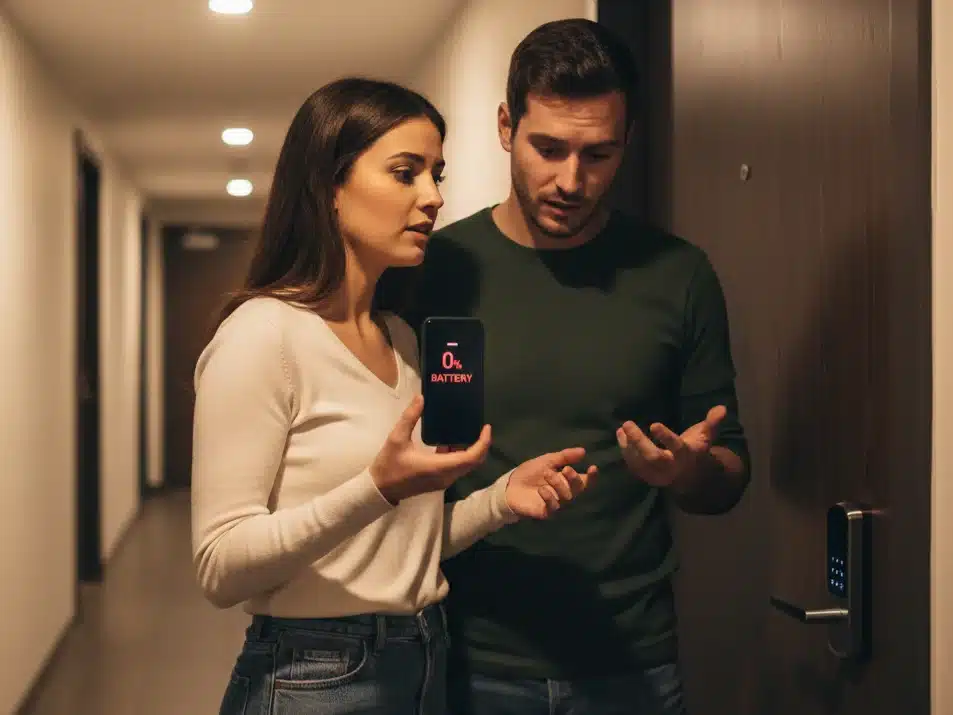
Looking for a smart lock with keypad backup after getting locked out with a dead phone? I’ve been there—twice.
After $150 in locksmith bills, I learned the hard way: you need a smart lock with keypad backup AND a physical key. Not just an app-only lock that fails when your phone dies.
After being locked out twice, I learned important lessons about smart home device setup the hard way.
My Bluetooth-only lock wouldn’t open that night. No backup keypad. No physical key. Just a dead phone and an emergency locksmith bill.
Here’s the Yale Assure Lock 2 that finally solved my lockout nightmare, and why the keypad backup saved me.
Why I Got Locked Out Twice
My first smart lock only worked with my phone. No keypad. No physical key. Just a Bluetooth app.
First Lockout: Dead Phone Battery
I went for a run. My phone battery was at 15 percent. I ran longer than I planned.
When I got home, my phone was dead. The lock needed my phone to open. I couldn’t get in.
I called my landlord from a neighbor’s phone. I waited 90 minutes for an emergency locksmith. The bill was $150.
Second Lockout: App Crashed
A few weeks later, my phone updated overnight. The lock app crashed when I opened it.
The error message said “App needs to be configured.” Nothing I tried worked.
My physical key was inside the apartment. I had moved it somewhere and forgot where.
I sat outside for two hours. I waited for my girlfriend to come home with her spare key.
What I Learned
Technology fails. Batteries die. Apps crash. Updates break things.
A smart lock that only works with your phone will lock you out eventually.
The Problem with Phone-Only Smart Locks
Phone-only locks have one big problem. They rely on a single point of failure.
Seven Ways Your Phone Can Fail
- Battery dies unexpectedly
- Screen breaks and stops working
- Phone falls in water
- App crashes or needs an update
- Phone gets stolen
- Bluetooth stops working
- Software update breaks the app
That’s seven different ways to get locked out.
A traditional key has one failure point. You lose the key.
The Solution: Three Backup Systems
After my lockouts, I researched smart locks. The solution was clear.
You need at least three different ways to unlock your door.
A proper smart lock with keypad backup gives you three independent access methods.
Layer 1: Convenient Access
Use your phone app for daily access. Enable auto-unlock when you approach. Connect to voice assistants.
This layer is convenient when everything works.
Layer 2: Keypad Backup
Have a physical keypad that works without your phone. Type a code to enter.
This layer saves you when your phone fails.
Layer 3: Physical Key
Keep a traditional physical key as your final backup. It works when all electronics fail.
This layer is your emergency access.
Yale Assure Lock 2 Review


This is the smart lock with keypad backup that finally solved my lockout problem.
The Yale Assure Lock 2 has all three backup layers. It solved my lockout problem.
What Makes This Lock Different
This lock has three ways to unlock:
- Phone app with Wi-Fi
- Touchscreen keypad
- Physical key
You can’t get locked out unless all three systems fail at once.
Key Features That Matter
Touchscreen Keypad
The keypad works without your phone. No Bluetooth needed. No app required.
You type your code and the door unlocks. It works in rain, snow, heat, and cold.
The keypad is backlit for nighttime. It responds quickly to touch.
Built-In Wi-Fi
The lock has Wi-Fi built in. You don’t need a separate hub.
You can lock or unlock from anywhere. You can check if your door is locked. You get notifications when someone enters.
You can create temporary codes for guests. You can set codes to expire automatically. You can delete codes instantly.
Physical Key Backup
The lock includes a traditional keyhole. It comes with two brass keys.
If the keypad breaks or the batteries die suddenly, your key still works. It’s completely mechanical.
Multiple User Codes
You can create up to 25 different access codes. Each family member gets their own code.
Your dog walker gets a simple code. Your parents get their own code. You can track who enters and when.
Auto-Lock Feature
The door locks automatically after closing. You can set the delay time.
Most people forget to lock their doors sometimes. Auto-lock solves this problem.
DoorSense Technology
A sensor detects if your door is actually closed. It prevents auto-lock if the door is still open.
You get an alert if the door wasn’t closed properly.
Real-World Performance
I’ve used this lock for six months. Here’s what works well and what doesn’t.
What Works Great
The keypad is reliable in all weather. I’ve used it in rain, snow, and heat. It works every time.
The battery life is good. Four AA batteries last about 10 months. You get low battery warnings weeks early.
The activity log is accurate. I can see who unlocked the door and when. This helps with security.
Installation was easy. It took me 45 minutes with a basic screwdriver. No locksmith needed.
The build quality feels solid. The touchscreen is responsive. Everything feels well-made.
Smart home features work reliably. Alexa and Google Assistant respond quickly to voice commands.
Minor Issues
Heavy winter gloves don’t work well on the touchscreen. You need to remove one glove. This is a small inconvenience.
The Wi-Fi setup took 15 minutes. You need to follow the instructions carefully. But you only do this once.
The touchscreen shows fingerprints after use. You need to clean it occasionally.
You need interior access to replace batteries. Plan ahead when you see the low battery warning.
The lock needs a 2.4 GHz Wi-Fi network. It won’t work with 5 GHz-only networks.

- KEY-FREE ACCESS, YOUR WAY: Everyone that needs access can choose their own way to unlock, whether it’s the keypad, voice…
Who Should Buy This Lock
✅ Anyone seeking a smart lock with keypad backup for reliability
✅ This lock is perfect if you’ve been locked out before. It’s great for your first smart lock.
✅ It works well for homeowners who can change their locks. Families love having separate codes for each person.
✅ People who host guests frequently find it convenient. The temporary codes feature is very useful.
This lock is not ideal for renters who can’t change locks. It won’t work on non-standard doors. You need a 2.4 GHz Wi-Fi network.
Installation Guide
Most people can install this lock themselves. You need basic tools and 45 minutes.
What You Need
- Phillips screwdriver
- Existing deadbolt hole
- 2.4 GHz Wi-Fi network
- Four AA batteries
Installation Steps
Remove your old deadbolt. This usually takes four screws.
Install the Yale deadbolt assembly. Test that it operates smoothly.
Mount the exterior keypad. Connect the color-coded wires.
Mount the interior lock mechanism. Secure all screws tightly.
Insert batteries and test the keypad. Program your first code.
Download the Yale Access app. Follow the setup wizard to connect Wi-Fi.
The process is straightforward. YouTube has helpful installation videos.
Smart Lock Buying Guide
When buying any smart lock, look for these features.
Must-Have Features
Physical Keypad
The keypad must work without your phone. This is non-negotiable for preventing lockouts.
Physical Key Backup
Always have a traditional key option. Electronics can fail in unexpected ways.
Long Battery Life
Look for locks that last 6-12 months on standard batteries. Avoid proprietary batteries.
Multiple User Codes
Different family members need different codes. Look for at least 10 code slots.
Auto-Lock
Automatic locking prevents the problem of forgotten locks. Make sure you can customize the timing.
Nice-to-Have Features
Wi-Fi connectivity gives you remote access. This is more convenient than Bluetooth-only.
Smart home integration works with Alexa and Google. Voice control adds convenience.
Activity logs help with security monitoring. You can track who enters and when.
Features to Avoid
Don’t buy app-only locks with no keypad. Don’t buy locks without physical key backup.
Avoid locks with proprietary batteries. Check app store reviews before buying.
Skip unknown brands with no track record. Look for established lock manufacturers.
Common Questions
How long do the batteries last?
Four AA batteries last 8-12 months with normal use. You get low battery warnings weeks before they die.
Keep spare batteries handy. Replacement takes two minutes.
What if my phone gets stolen?
You have multiple layers of protection. The app requires biometric authentication.
Use a different keypad code than your phone PIN. You can disable app access remotely.
Your physical key still works. You can change codes immediately if needed.
Can smart locks be hacked?
Any electronic device has theoretical vulnerabilities. But physical break-ins are more common than hacking.
Yale uses bank-level encryption. They have 180 years of lock-making experience.
Traditional locks can be picked too. No lock is completely secure.
What happens during power outages?
Smart locks run on batteries, not home power. Power outages don’t affect the lock.
Your physical key works. Your keypad works. Manual operation works.
Only Wi-Fi features stop temporarily. They reconnect when power returns.
Does this work with Alexa?
Yes, it works with Amazon Alexa, Google Assistant, and Apple HomeKit.
You can say “Alexa, lock the front door.” Setup takes a few minutes.
Voice assistants can lock but not unlock remotely. Unlocking needs a code or key for security.
Is installation difficult?
Most homeowners can install this lock. You need a Phillips screwdriver and 45 minutes.
The lock replaces a standard deadbolt. Instructions are clear and detailed.
If your door has no deadbolt hole, you need professional installation.
What if I forget my code?
You have multiple recovery options. Use your physical key immediately.
Use the app to unlock if your phone works. Use the app to view or create new codes.
A family member with their own code can let you in.
Does this work in extreme temperatures?
The lock works in normal residential temperature ranges. It handles cold winters and hot summers.
Rain and snow don’t affect it. The powder coating protects against weather.
In extreme cold, you might need bare fingers on the touchscreen.
Final Recommendation
Always buy a smart lock with keypad backup, not an app-only model.
After two lockouts and months of research, I learned one thing. Never rely on just one way to unlock your door.
The Yale Assure Lock 2 solved my problem because it has three backup systems:
- Phone app for convenience
- Keypad for when your phone fails
- Physical key for when everything fails
This isn’t about buying the most expensive lock. It’s about understanding that technology fails sometimes.
If you’re considering a smart lock, look for three features:
- Physical keypad that works without your phone
- Physical key backup that works without electronics
- Reliable smart features that add convenience
Standing outside with a dead phone taught me this lesson. It cost me $150 to learn it.
You can learn from my mistake instead. Choose a lock with proper backup systems from the start.
Your future self will thank you when your phone dies at a bad time.
Disclosure: This article contains affiliate links. As an Amazon Associate, I earn from qualifying purchases at no extra cost to you. My recommendations are based on real lockout experiences, not commission rates.