
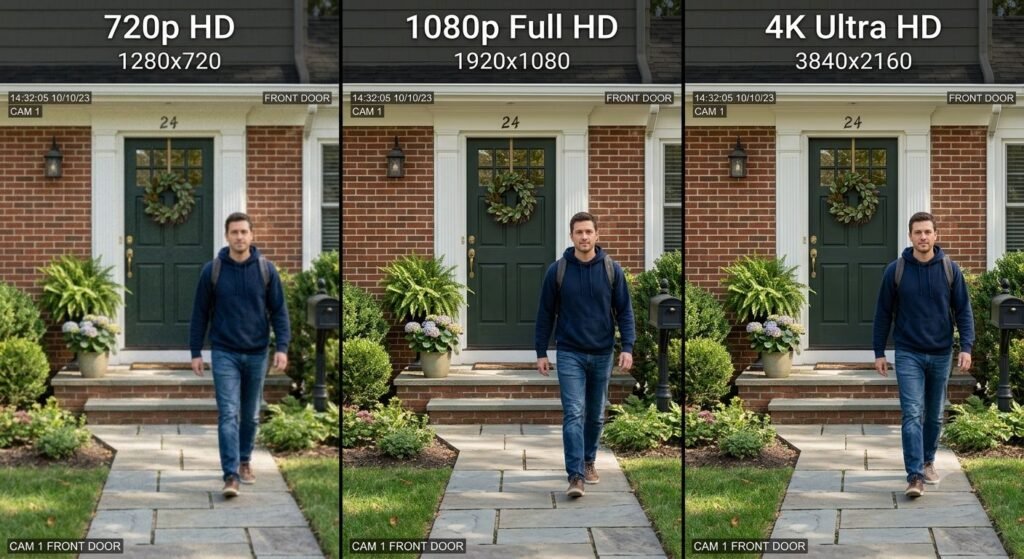
Security camera marketing emphasizes “4K Ultra HD” and “8MP resolution” as if higher numbers automatically mean better security — yet resolution is only one factor in identification capability, and excessive resolution creates storage and bandwidth problems that often outweigh marginal benefits.
This guide explains what camera resolution actually means for security purposes, how much detail different resolutions provide at various distances, the storage and network bandwidth implications of higher resolutions, and how to match resolution to specific security needs rather than chasing maximum specifications.
Quick Navigation
- What Camera Resolution Means
- Resolution Standards Explained
- Identification vs Detection
- Resolution Requirements by Distance
- 720p Capabilities and Limitations
- Storage and Bandwidth Impact
- Night Vision and Resolution
What Camera Resolution Means for Security
Camera resolution describes the number of pixels that compose the image. More pixels can capture finer detail, but only if other system components (lens quality, sensor size, lighting, compression) support that resolution.
Pixel Count and Image Dimensions
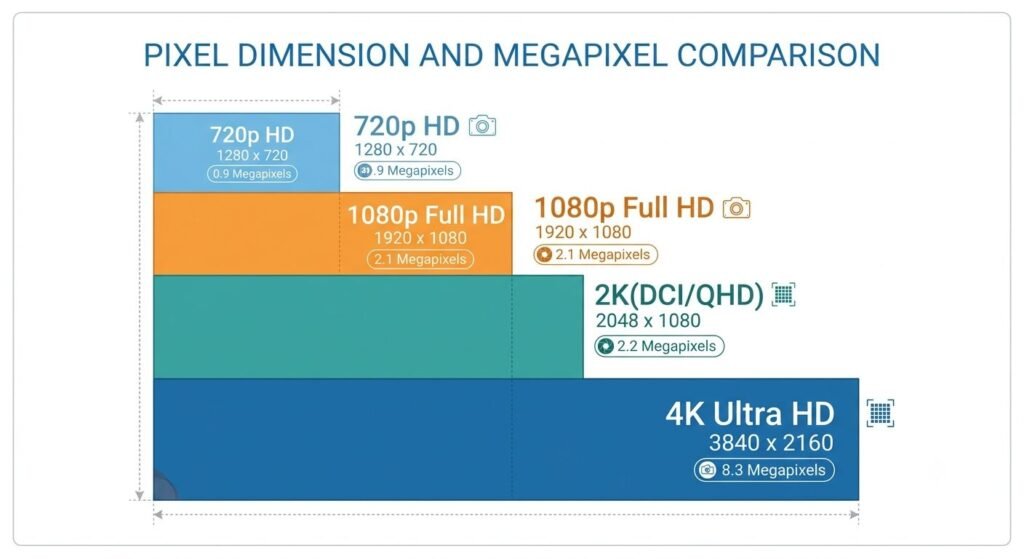
720p (HD): 1280 × 720 pixels = 921,600 total pixels (~1 megapixel)
1080p (Full HD): 1920 × 1080 pixels = 2,073,600 total pixels (~2 megapixels)
1440p (2K): 2560 × 1440 pixels = 3,686,400 total pixels (~4 megapixels)
4K (Ultra HD): 3840 × 2160 pixels = 8,294,400 total pixels (~8 megapixels)
8K: 7680 × 4320 pixels = 33,177,600 total pixels (~33 megapixels)
Higher resolution provides more pixels to capture detail within the same field-of-view. A 4K camera captures 4× the pixels of 1080p in the same scene — theoretically enabling identification at twice the distance.
Pixels Per Foot (PPF)
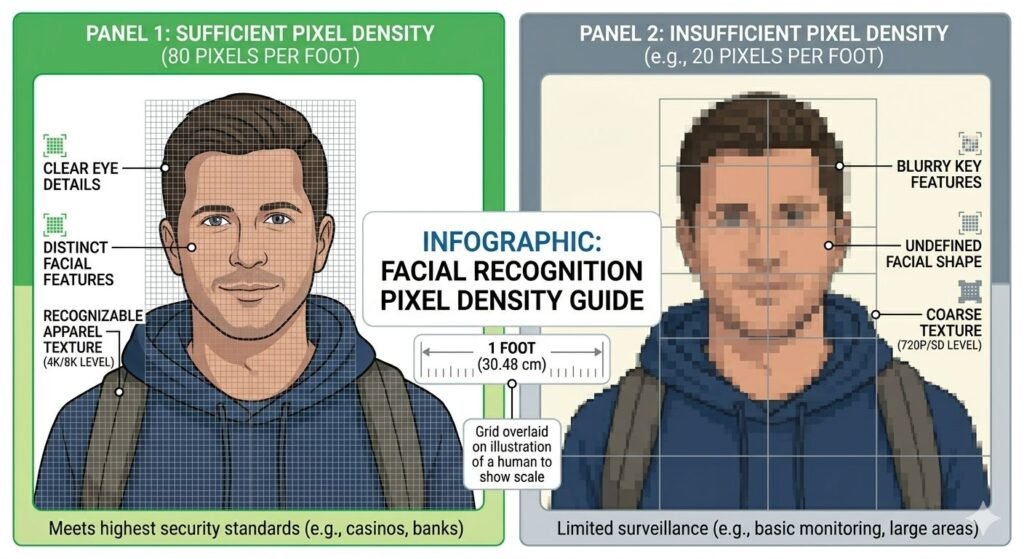
Security industry standard: pixels per foot at target distance determines identification capability.
Identification standard: 80-100 pixels per foot
Recognition standard: 40-60 pixels per foot
Detection standard: 20-30 pixels per foot
Example: To identify a person’s face at 20 feet with 80 PPF requirement, you need 1600 horizontal pixels capturing that 20-foot width. A 1080p camera with 1920 horizontal pixels can theoretically achieve this if the person fills most of the frame horizontally.
Resolution vs Effective Resolution
Advertised resolution is sensor pixel count. Effective resolution is detail actually captured after accounting for:
- Lens quality (cheap lenses blur detail, wasting pixels)
- Sensor size (small sensors create noise that obscures detail)
- Compression (heavy compression discards detail to reduce file size)
- Lighting (low light reduces effective resolution dramatically)
A high-quality 1080p camera with excellent lens and large sensor often captures more usable detail than a cheap 4K camera with poor optics and aggressive compression.
Security Camera Resolution Standards Explained
720p (1 Megapixel)
Pixel dimensions: 1280 × 720
Aspect ratio: 16:9
Total pixels: ~1MP
History: Standard definition for early HD security cameras (2010-2015). Now considered baseline minimum for security applications.
Current use: Budget cameras, secondary viewing angles, areas where identification is not required.
1080p (2 Megapixels)
Pixel dimensions: 1920 × 1080
Aspect ratio: 16:9
Total pixels: ~2MP
History: Became mainstream for security cameras 2015-2020. Current standard for consumer and commercial security.
Current use: Most common resolution. Balances detail, storage requirements, and cost.
1440p / 2K (4 Megapixels)
Pixel dimensions: 2560 × 1440
Aspect ratio: 16:9
Total pixels: ~4MP
History: Intermediate step between 1080p and 4K. Less common in consumer cameras.
Current use: Some premium consumer cameras. More common in commercial installations where 4K storage costs are prohibitive.
4K / Ultra HD (8 Megapixels)
Pixel dimensions: 3840 × 2160
Aspect ratio: 16:9
Total pixels: ~8MP
History: Adopted for consumer security 2018+. Premium option with significant storage implications.
Current use: Premium residential cameras, commercial high-security areas, license plate reading, large area coverage.
5MP, 6MP, 8MP Non-Standard Resolutions
Some manufacturers offer non-standard resolutions (2592 × 1944 for 5MP, 3072 × 2048 for 6MP). These typically use 4:3 aspect ratio sensors rather than 16:9, providing more vertical pixels — useful for monitoring doorways or hallways.
For comprehensive smart home security integration, see our guide to WiFi security cameras for renters.
Identification vs Detection vs Recognition
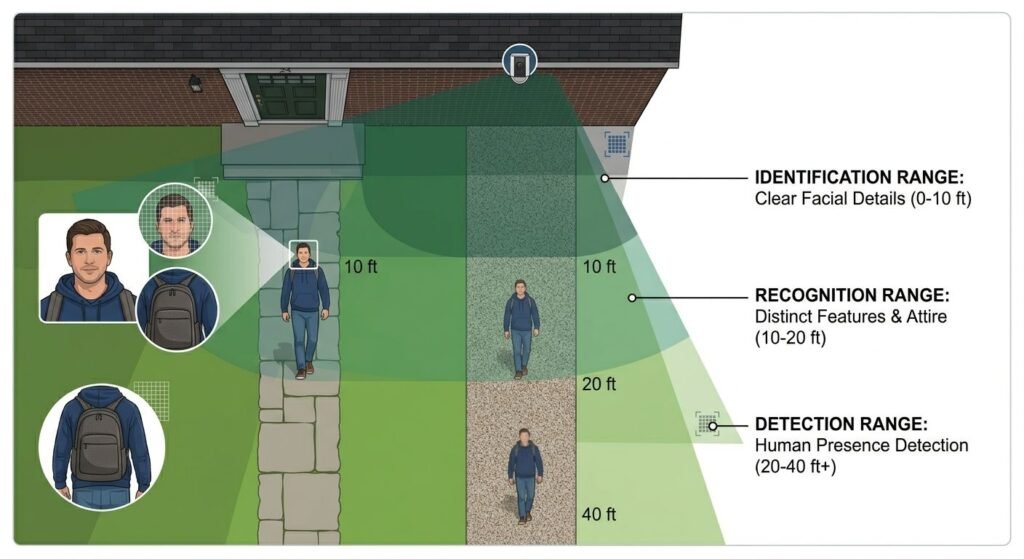
Security camera effectiveness depends on the task: detecting that something happened, recognizing a known person, or identifying an unknown person.
Detection (Lowest Resolution Requirement)
Goal: Notice that a person, vehicle, or object is present
Requirement: 20-30 pixels per foot
Resolution needed: 720p is often sufficient for detection within 30-40 feet
Use cases: Perimeter monitoring, general activity awareness, triggering alerts
Example: Detecting that someone approached your porch requires far less resolution than identifying their face.
Recognition (Medium Resolution Requirement)
Goal: Identify a person you already know (family member, employee, regular visitor)
Requirement: 40-60 pixels per foot
Resolution needed: 1080p for recognition within 20-30 feet
Use cases: Confirming expected visitors, employee access monitoring, verifying package delivery person
Example: Recognizing your mail carrier requires less detail than identifying a stranger’s face for police investigation.
Identification (Highest Resolution Requirement)
Goal: Identify unknown person with enough detail for investigation or prosecution
Requirement: 80-100 pixels per foot (minimum for facial features, clothing details, unique identifiers)
Resolution needed: 1080p for identification within 10-15 feet, 4K for 20-30 feet
Use cases: Facial identification for criminal investigation, license plate reading, detailed evidence collection
Example: Capturing enough facial detail to identify a burglar requires significantly higher resolution than simply detecting their presence.
Resolution Requirements by Distance
720p Coverage Areas
Detection range: 50-60 feet
Recognition range: 15-20 feet
Identification range: 8-12 feet
Best for: Small areas, close-range monitoring, secondary cameras covering angles where identification is not critical
Limitations: Cannot reliably identify faces beyond 10-12 feet. License plates unreadable beyond 15 feet.
1080p Coverage Areas
Detection range: 80-100 feet
Recognition range: 30-40 feet
Identification range: 15-20 feet
Best for: Front doors, driveways, small yards, typical residential security needs
Limitations: Cannot identify faces in large yards or across streets. Detail degrades significantly beyond 20 feet.
4K Coverage Areas
Detection range: 120-150 feet
Recognition range: 50-60 feet
Identification range: 25-35 feet
Best for: Large properties, parking lots, monitoring across streets, license plate reading from distance
Limitations: Massive storage requirements. Requires excellent network bandwidth for live viewing. More expensive cameras and recording equipment.
Practical Example
Scenario: Monitoring 30-foot driveway
720p: Can detect person walking up driveway but cannot identify facial features from camera mounted at house. Useful for general awareness, not evidence.
1080p: Can recognize familiar people (family, regular visitors) and identify strangers if they approach within 15 feet of camera. Good balance for most residential use.
4K: Can identify unknown person anywhere in 30-foot driveway with facial detail. Overkill for residential unless driveway connects to public street where identification at distance is valuable.
720p Capabilities and Limitations
What 720p Can Do
General monitoring: Adequate for confirming activity, detecting motion, general awareness of property status
Close-range identification: Faces identifiable within 8-10 feet with good lighting
Indoor monitoring: Sufficient for monitoring rooms, hallways, interior doorways where distances are short
Cost-effective coverage: Enables multi-camera systems on budget. Five 720p cameras cost less than two 4K cameras while covering more angles.
What 720p Cannot Do
Distant identification: Faces beyond 12 feet lack detail for identification. License plates unreadable beyond 10-15 feet.
Digital zoom: Enlarging 720p footage quickly reveals pixelation. No usable detail remains when zooming.
Large area coverage: 720p spreads insufficient pixels across large scenes. A 40-foot wide view provides only 32 pixels per foot (1280 pixels / 40 feet) — below detection standard.
Low-light performance: Fewer pixels to capture light means grainier low-light images compared to higher resolutions with same sensor size.
When 720p Is Acceptable
Secondary angles: Cameras monitoring less critical areas (side yards, garage interiors, storage areas)
Motion detection triggers: Cameras that alert you to activity but where recorded detail isn’t critical
Budget constraints: Coverage with marginal resolution beats no coverage. Multiple 720p cameras viewing different angles often outperform single 4K camera with limited field-of-view.
Bandwidth limited: Locations with poor internet upload speed where 1080p or 4K would saturate connection
1080p: The Current Sweet Spot
Why 1080p Dominates Security Cameras
Sufficient detail for residential use: Identifies faces within 15-20 feet — adequate for monitoring front doors, driveways, small yards
Manageable storage: 1080p requires roughly 1/4 the storage of 4K while providing double the pixels of 720p
Moderate bandwidth: Streams reliably over typical residential internet upload speeds (5-10 Mbps)
Affordable: 1080p cameras cost 30-50% less than equivalent 4K models while providing 90% of practical benefit for most users
Wide hardware support: All modern recording devices (NVR, cloud storage, local storage) handle 1080p efficiently
1080p Performance Characteristics
Facial identification range: 15-20 feet in good lighting, 10-12 feet in moderate lighting
License plate reading: Readable within 15-25 feet depending on camera quality and angle
Digital zoom tolerance: Can enlarge portions of frame 2× before detail degrades significantly
Storage requirement: ~60-100 GB per camera per month with motion detection (varies by activity level and compression)
Network bandwidth: 2-4 Mbps per camera for streaming, less with local recording
When 1080p Is Ideal
Front door monitoring: 1080p captures faces clearly as visitors approach within 10-15 feet
Driveway coverage: Identifies vehicles and people in typical residential driveways (20-40 feet)
Backyard monitoring: Covers typical suburban backyards (30-50 feet) with identification capability near the house
General residential security: Meets 90% of security needs for single-family homes and small businesses
System scalability: Can deploy 6-8 cameras on typical residential internet and storage without overwhelming system
4K: When It Actually Matters
4K Advantages
Extended identification range: Identifies faces at 25-35 feet vs 15-20 feet for 1080p
Digital zoom capability: Can enlarge 4× and retain 1080p-equivalent detail. Enables post-incident investigation of specific areas within wide scenes.
Large area coverage: Single 4K camera can cover what requires 2-4 1080p cameras with less total blind spots
Future-proofing: As storage costs decrease, 4K footage becomes more practical to archive long-term
License plate reading: Captures plates from 40-50 feet vs 20-25 feet for 1080p
4K Disadvantages
Storage cost: Requires 3-4× the storage of 1080p. A camera recording continuously at 4K generates 200-400 GB per month vs 60-100 GB for 1080p.
Bandwidth requirements: Live streaming 4K requires 8-15 Mbps upload per camera. Most residential internet upload speeds (10-20 Mbps total) support only 1-2 simultaneous 4K streams.
Processing power: Reviewing, scrubbing through, and exporting 4K footage requires powerful computers. Older systems struggle.
Camera cost: 4K cameras cost 50-100% more than equivalent 1080p models with same features
Network infrastructure: May require upgraded network switches, cabling (Cat6 instead of Cat5e), and router to handle multiple 4K streams
Diminishing returns: Identification at 30+ feet requires both high resolution and excellent lens quality. Cheap 4K cameras with poor lenses provide no benefit over quality 1080p cameras.
When 4K Makes Sense
Large properties: Monitoring expansive yards, long driveways, parking lots, or commercial properties where identification at 30+ feet is needed
License plate capture: Reading plates from street, parking lot entrances, or across multiple lanes
Single camera coverage: Using one 4K camera to replace multiple 1080p cameras in situations where mounting multiple cameras is impractical
High-value protection: Securing expensive assets (luxury vehicles, commercial inventory, high-value homes) where storage cost is negligible compared to asset value
Legal evidence priority: Applications where maximum possible detail is required for prosecution (commercial security, high-risk locations)
Storage and Bandwidth Impact
Storage Requirements by Resolution
Estimated storage per camera per month (continuous recording, H.264 compression, motion detection):
720p: 40-70 GB/month
1080p: 60-100 GB/month
1440p: 100-150 GB/month
4K: 200-400 GB/month
System example: 4-camera system, 30-day retention
- 720p: 160-280 GB total = 500GB drive sufficient
- 1080p: 240-400 GB total = 1TB drive recommended
- 4K: 800-1600 GB total = 2TB drive minimum, 4TB recommended
Cloud storage costs: Most cloud services charge by GB. 4K cameras can cost 3-4× more for monthly cloud storage than 1080p cameras.
Network Bandwidth Requirements
Upload bandwidth per camera (live streaming):
720p: 1-2 Mbps
1080p: 2-4 Mbps
1440p: 4-6 Mbps
4K: 8-15 Mbps
Residential internet example: 100 Mbps download, 10 Mbps upload (typical cable/fiber)
720p system: Can support 5-8 cameras simultaneously streaming
1080p system: Can support 2-4 cameras simultaneously streaming
4K system: Can support 1 camera streaming, maybe 2 with bandwidth prioritization
Note: Local recording eliminates bandwidth concerns for recorded footage. Bandwidth only matters for live viewing and cloud backup.
Compression Impact
Modern H.265 (HEVC) compression reduces file sizes by 30-50% compared to H.264 with same quality. However:
Pros: Lower storage and bandwidth requirements
Cons: Requires more powerful recording device for encoding/decoding. Not all systems support H.265.
H.265 adoption: Most cameras manufactured 2020+ support H.265. Verify recording device (NVR, computer) also supports H.265 before relying on storage savings.
Night Vision and Resolution
Resolution and Low-Light Performance
Higher resolution does not automatically mean better night vision. Low-light image quality depends primarily on:
- Sensor size: Larger sensors collect more light per pixel
- Infrared illumination: Dedicated IR LEDs determine night vision range
- Lens aperture: Wider aperture (lower f-number) allows more light
Common issue: 4K cameras often have worse night vision than 1080p cameras because pixel size is smaller (8MP spread across same sensor size as 2MP = 1/4 the light per pixel).
Exception: 4K cameras with physically larger sensors (1/1.8″ or 1/2″ vs 1/3″) can match or exceed 1080p night vision while providing 4K day resolution.
Effective Night Resolution
Even cameras advertised as 4K often drop to 1080p or 720p in night vision mode to improve sensitivity. Check specifications for “night vision resolution” separately from day resolution.
Reality: Night vision footage from 1080p and 4K cameras is often indistinguishable because both operate at reduced resolution in low light. Don’t pay 4K premium expecting 4K night vision.
For complete smart home security integration including smart locks, see our guide to smart locks with keypad backup.
Factors That Matter More Than Resolution
1. Lens Quality
Impact: Cheap lenses blur detail regardless of sensor resolution. A sharp 1080p image beats a blurry 4K image.
What to look for: Glass lenses over plastic, multi-element lens designs, reputable manufacturers
2. Field-of-View (FOV)
Impact: Wider FOV spreads same pixels across larger area, reducing pixels-per-foot. Narrower FOV concentrates pixels on smaller area, increasing identification range.
Trade-off: Wide FOV (110-130°) for general monitoring, narrow FOV (70-90°) for identification at distance
3. Compression Quality
Impact: Aggressive compression to reduce file size discards detail, wasting resolution. Low compression preserves detail but increases storage requirements.
Bitrate matters: 4K at 4 Mbps bitrate looks worse than 1080p at 8 Mbps bitrate. Check bitrate specifications, not just resolution.
4. Lighting
Impact: Adequate lighting provides more detail than resolution increases. 1080p camera in good lighting outperforms 4K camera in poor lighting.
Solution: Add motion-activated lighting for critical areas rather than upgrading from 1080p to 4K.
5. Camera Placement
Impact: Camera at optimal height and angle captures useful detail. Camera mounted too high or at poor angle wastes resolution.
Recommendation: Mount cameras 7-9 feet high angled 15-30° downward for facial capture. Avoid mounting above 12 feet (captures top of head, not faces).
6. Frame Rate
Impact: Higher frame rate (30 FPS vs 15 FPS) captures motion more smoothly, improving identification of moving subjects.
Trade-off: Higher frame rate increases storage/bandwidth requirements. 20-30 FPS is sweet spot for security.
Resolution Recommendations by Use Case
Front Door / Porch
Recommended: 1080p minimum, 4K if budget allows
Why: Close-range identification critical. Faces approach within 5-15 feet.
Alternative: Doorbell cameras with 1080p+ resolution
Driveway
Recommended: 1080p for single-car driveways, 4K for multi-car or long driveways
Why: Need license plate reading and facial identification at 20-40 feet
Consideration: Two 1080p cameras (one at street, one at house) often better than single 4K camera
Backyard / Side Yard
Recommended: 1080p
Why: Most activity occurs within 20-30 feet of house. 1080p sufficient for identification within this range.
Consideration: 720p acceptable for side yards with minimal activity
Garage Interior
Recommended: 1080p or 720p
Why: Short distances (10-20 feet max). 720p often sufficient but 1080p provides better identification.
Consideration: If garage contains valuable equipment, 1080p recommended
Large Property / Commercial
Recommended: 4K for wide area coverage, 1080p for targeted views
Why: 4K enables identification at distance. Mix resolutions based on specific coverage needs.
Consideration: PTZ (pan-tilt-zoom) cameras with 4K provide flexibility for large areas
License Plate Reading (LPR)
Recommended: 4K with narrow FOV (60-80°)
Why: Reading plates requires 80-100 pixels per foot. 4K concentrates maximum pixels on plate area.
Alternative: Dedicated LPR cameras (often lower resolution but optimized optics and IR)
Frequently Asked Questions
Is 4K worth it for home security cameras?
For most residential use, no. 1080p provides sufficient detail for facial identification within typical monitoring distances (10-20 feet). 4K makes sense only when monitoring large areas (long driveways, expansive yards, commercial properties) where identification at 30+ feet is required, or when storage/bandwidth costs are irrelevant compared to security priority. The 2-3× cost premium for cameras, storage, and bandwidth rarely provides proportional benefit for standard home security.
Can I mix resolutions in the same system?
Yes, and this is often optimal. Use higher resolution (1080p or 4K) for critical views (front door, driveway) and lower resolution (720p) for secondary angles (side yards, garage interiors). Most modern recording systems handle mixed resolutions. This balances coverage with storage costs.
Does higher resolution mean better night vision?
No. Night vision depends on sensor size, infrared illumination, and lens aperture, not resolution. Many 4K cameras have worse night vision than 1080p cameras because smaller pixels (same sensor size spread across 4× pixels) collect less light. Check night vision specifications separately from day resolution. Add external IR illuminators if night vision quality is insufficient.
How much internet upload speed do I need for remote viewing?
For live viewing: 2-4 Mbps per 1080p camera, 8-15 Mbps per 4K camera. For typical 4-camera system with 1080p, 10-15 Mbps upload speed allows viewing 2-3 cameras simultaneously. 4K systems require 20-30 Mbps minimum for 2-camera simultaneous viewing. Local recording eliminates bandwidth requirement — you only need upload speed for live remote viewing and cloud backup.
Will 720p footage be usable in court?
Admissibility depends on whether footage shows relevant detail, not resolution specification. 720p footage clearly showing a person’s face or license plate is admissible. 4K footage too dark, blurry, or poorly angled to show useful detail is not. Focus on camera placement, lighting, and coverage rather than resolution alone. That said, 1080p provides more margin for capturing detail that becomes legally useful.
Do I need to upgrade my router for 4K cameras?
Possibly. Check router specifications for total throughput and simultaneous device capacity. 4K cameras generate significant network traffic (8-15 Mbps per camera). Budget routers may struggle with 3+ simultaneous 4K streams plus other home internet use. Gigabit routers with QoS (Quality of Service) to prioritize camera traffic are recommended for 4K systems. 1080p cameras work fine on standard routers.
Key Takeaways
Resolution determines detail captured but is only one factor in security camera effectiveness. Lens quality, sensor size, lighting, compression, and placement often matter more than resolution specification. A well-positioned 1080p camera with quality lens captures more usable evidence than a poorly-placed 4K camera with cheap optics.
1080p represents the current sweet spot for residential security — providing sufficient facial identification within 15-20 feet while maintaining manageable storage (60-100 GB/month per camera) and bandwidth (2-4 Mbps per camera) requirements. It meets 90% of residential security needs at reasonable cost. Upgrading from 720p to 1080p provides significant benefit; upgrading from 1080p to 4K provides marginal benefit unless monitoring distances exceed 25-30 feet.
4K makes sense for specific applications — large properties requiring identification at 30+ feet, license plate reading from distance, commercial security with high-value assets, or situations where single camera must cover area requiring multiple 1080p cameras. For these cases, 4K’s 3-4× storage requirement and 2× camera cost are justified. For typical residential front door, driveway, and backyard monitoring, 1080p provides better value.
Storage and bandwidth implications of resolution choice are often overlooked. A 4-camera 4K system requires 800-1600 GB storage monthly versus 240-400 GB for 1080p — requiring larger hard drives and higher cloud storage costs. Network upload bandwidth limits how many cameras can stream simultaneously — typical 10 Mbps residential upload supports 2-4 1080p cameras or 1 4K camera. Consider total system cost (cameras, storage, bandwidth) rather than just camera price when choosing resolution.
Related guides: