
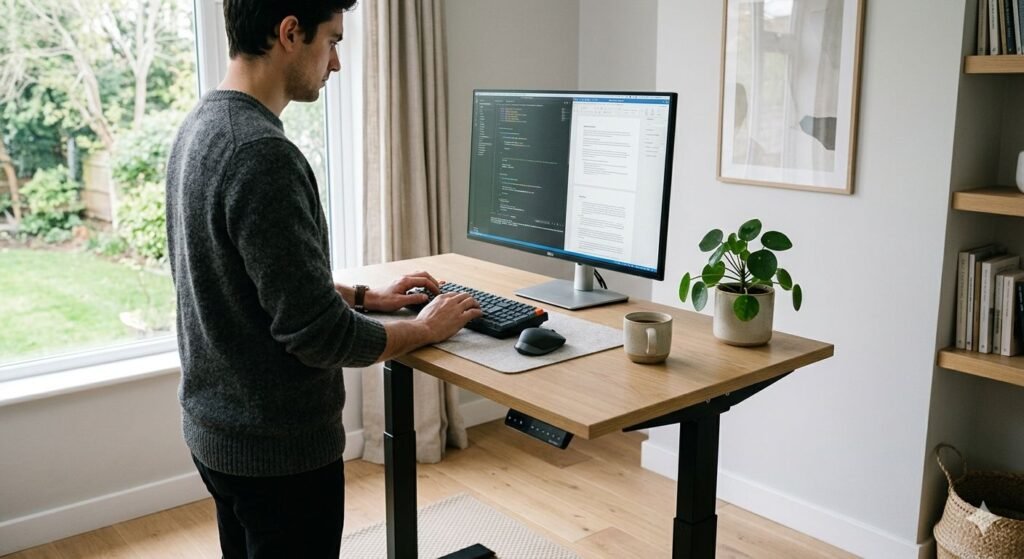
Somewhere between the open-plan office revolution and the work-from-home boom, the standing desk went from executive curiosity to mainstream furniture. Sales surged. Tech companies ordered them by the floor. Ergonomics consultants added them to every workplace assessment. And a steady stream of headlines declared that sitting was the new smoking — a phrase that, like most health metaphors compressed into a slogan, contains a kernel of truth wrapped in considerable overstatement.
The standing desk market in 2026 is enormous, the marketing is confident, and the health claims range from well-supported to wildly speculative. What does the research actually say? Does alternating between sitting and standing during the workday genuinely improve health outcomes, reduce back pain, boost productivity, or lower cardiovascular risk? And if the answer is yes — even partially — which desks are worth buying?
This article works through the evidence honestly, covers who is most likely to benefit, addresses the limitations and risks that rarely appear in marketing materials, and recommends the best sit-stand desks available right now for different budgets and needs.
For context on how sedentary behaviour affects cardiovascular health more broadly, our guide on Heart Rate Zones Explained: What Different BPM Ranges Mean for Fitness at SmartBuyLabs explains why movement frequency matters — not just exercise intensity.
The Science of Sitting: What Extended Sedentary Time Actually Does
Before evaluating standing desks, it’s worth understanding what the concern about prolonged sitting is actually based on — because it is more nuanced than the “sitting is the new smoking” framing suggests.
The epidemiological evidence linking prolonged sedentary behaviour to adverse health outcomes is substantial. Large-scale studies consistently associate extended sitting time — typically defined as more than eight hours of sitting per day — with increased risk of type 2 diabetes, cardiovascular disease, and all-cause mortality. A landmark 2012 meta-analysis published in Diabetologia, covering nearly 800,000 participants, found that the highest levels of sedentary time were associated with significantly elevated risk of diabetes, cardiovascular disease, and cardiovascular mortality compared to the lowest levels.
Crucially, these associations appeared to persist even after controlling for leisure-time physical activity — meaning that someone who sits for ten hours at a desk and then exercises for an hour in the evening is not fully offsetting the sitting. This finding, replicated across multiple studies, is what gave rise to the phrase “sitting disease” and drove significant interest in breaking up sedentary time during the workday.
The biological mechanisms are reasonably well understood. Prolonged inactivity suppresses lipoprotein lipase activity — an enzyme critical for fat metabolism — and reduces skeletal muscle glucose uptake, contributing to insulin resistance. Circulation slows in the lower limbs. Postural muscles become inactive. Blood pools in the legs. These effects begin within hours of continuous sitting and accumulate over time.
What this research does not support is the idea that standing is simply the antidote to sitting. Standing is not exercise. The metabolic difference between sitting and standing quietly is modest — roughly 8 to 10 additional calories burned per hour standing compared to sitting. The real question is whether breaking up prolonged sitting with intermittent standing and movement produces meaningful health benefits. That is a more specific and more interesting question, and the evidence here is more mixed than the marketing would have you believe.
For context on how daily movement patterns affect sleep and recovery, our guide on Understanding Sleep Cycles: What REM, Deep Sleep & Light Sleep Mean at SmartBuyLabs is a useful companion — sedentary behaviour and sleep quality are more closely linked than most people realise.
What Does the Research Say About Standing Desks Specifically?
The research on sit-stand desks as an intervention is a younger and more contested body of evidence than the broader sedentary behaviour literature. Most studies are short-term, conducted in small workplace cohorts, and face a fundamental methodological challenge: it is very difficult to blind participants to whether they are using a standing desk.
The most rigorous work in this area includes the STAND project (a multi-site UK workplace trial), the Take a Stand Project in the United States, and multiple systematic reviews published in occupational health journals. The overall picture from this literature is encouraging but requires careful qualification.
The strongest and most consistent findings relate to reduction in sitting time — which sounds obvious but matters, because it confirms that people given sit-stand desks actually use them to stand more, rather than defaulting to sitting regardless. A 2018 Cochrane review found that sit-stand desks reduced sitting time by an average of thirty to sixty minutes per eight-hour workday in the short term, though the effect tended to diminish over months as novelty wore off without active encouragement or prompting systems.
Beyond sitting time reduction, the evidence becomes more variable depending on the outcome measured. Back and neck pain, energy levels, and mood show the most consistent positive signals. Cardiometabolic markers, cognitive performance, and long-term health outcomes are less clearly supported by the current evidence base.
The Benefits That Are Well-Supported by Evidence
Reduced musculoskeletal discomfort, particularly lower back pain
This is the benefit with the strongest evidence base for sit-stand desks specifically. Multiple randomised controlled trials and systematic reviews have found that sit-stand desk interventions reduce self-reported lower back and neck pain in office workers. A 2017 study published in BMJ Open found that a twelve-week sit-stand desk intervention led to significant reductions in upper back, neck, and shoulder pain compared to a control group. The mechanism is consistent with what we understand about prolonged static postures loading the lumbar spine, hip flexors, and posterior chain.
It’s worth noting that the benefit is specifically from alternating between sitting and standing — not from standing exclusively. Prolonged standing produces its own musculoskeletal strain, particularly in the lower back, feet, and legs. The sit-stand pattern is the intervention, not standing as a replacement for sitting.
Reduced sitting time across the workday
As noted above, this is the most reliably demonstrated direct effect. People with access to sit-stand desks do sit less during working hours. Whether this reduction in sitting time translates meaningfully into improved health outcomes depends on magnitude and consistency — reductions of thirty minutes per day are likely insufficient to produce measurable cardiometabolic change on their own, while larger reductions sustained over months are more promising.
Improved energy levels and reduced afternoon fatigue
Several workplace studies have found self-reported improvements in energy, vitality, and reductions in fatigue among sit-stand desk users. A study from the University of Minnesota found participants reported feeling more energetic and engaged during standing periods. These effects are likely mediated partly by improved circulation and partly by the psychological effect of postural change — a change of state that briefly interrupts the monotony of extended desk work.
Modest improvements in mood and engagement
Related to the above, some studies have found modest improvements in self-reported mood, wellbeing, and workplace engagement among sit-stand desk users. These effects are real but difficult to disentangle from placebo, novelty, and general satisfaction with receiving a workplace benefit. They should be taken as a genuine positive signal while being cautious about the magnitude.
Blood glucose regulation after meals
There is emerging evidence that light activity, including standing, after meals can blunt post-meal blood glucose rises. A 2013 study found that breaking up sitting with light-intensity walking reduced post-meal glucose and insulin responses significantly. The evidence specifically for standing rather than walking is less robust — walking appears more effective — but standing does produce a modest improvement over continuous sitting, particularly relevant in the two hours after lunch when many office workers sit most continuously.
For anyone using a CGM alongside a standing desk — an increasingly common combination among health-conscious workers — our article on Continuous Glucose Monitors for Non-Diabetics: Useful or Overkill? at SmartBuyLabs covers how to interpret post-meal glucose data in a healthy person.
The Claims That Are Overstated or Unproven
“Standing desks help you lose weight”
This claim is technically defensible in arithmetic terms — standing burns slightly more calories than sitting — but is meaningless in practice. The caloric difference between sitting and standing is approximately 8 to 10 calories per hour. Standing for three extra hours per workday equates to roughly 24 to 30 additional calories burned — the caloric equivalent of a small grape. Over a year of five-day working weeks, this amounts to roughly 6,000 to 7,500 additional calories, which is marginally above two pounds of fat. No serious researcher presents this as a weight management intervention, and marketing materials that imply meaningful weight loss from standing desk use are exaggerating considerably.
“Standing desks improve cognitive performance and productivity”
The evidence here is genuinely mixed and partially contradictory. Some studies have found modest improvements in self-reported cognitive engagement among standing desk users. Others have found the opposite — that standing reduces working memory and attention on tasks requiring sustained cognitive focus, particularly fine motor tasks. A 2017 study found that prolonged standing impaired mental-state task performance and increased discomfort. The honest summary is that there is no strong, consistent evidence that standing desks improve productivity or cognitive output, and some evidence that prolonged standing may mildly impair it. The sit-stand pattern again appears more beneficial than either posture alone.
“Standing desks significantly reduce cardiovascular risk”
The epidemiological evidence linking prolonged sitting to cardiovascular risk is robust. The evidence that standing desk use meaningfully reduces that risk is much weaker, primarily because most studies are too short-term to detect changes in hard cardiovascular endpoints. The plausible mechanism exists — reducing sitting time, improving glucose metabolism, increasing circulation — but the causal chain from “bought a standing desk” to “lower cardiovascular disease risk” involves many links that have not been independently verified in long-term studies.
“Sitting is as dangerous as smoking”
This framing, which became ubiquitous in health journalism, is not supported by the research it claims to represent. The studies that found associations between prolonged sitting and mortality did not find effect sizes comparable to smoking. Smoking doubles or triples the risk of lung cancer and significantly elevates risk across multiple disease categories. Prolonged sitting is associated with elevated risk of diabetes and cardiovascular disease — meaningfully, but not at the magnitude of smoking. The comparison is rhetorically effective and scientifically irresponsible.
How to Use a Sit-Stand Desk Correctly
Buying a standing desk is the straightforward part. Using it in a way that produces actual benefit requires understanding what the evidence supports — and it is not simply “stand more.”
The sit-stand ratio that research supports
Most occupational health guidance, based on the current evidence, suggests a rough ratio of one to two hours of standing per eight-hour workday, broken into intervals of twenty to thirty minutes rather than extended standing sessions. The Public Health Agency of Canada and several European occupational health bodies recommend breaking up sitting every thirty minutes as a minimum — which is more about movement frequency than standing duration.
Practically: stand for twenty to thirty minutes, sit for an equivalent or longer period, and aim to alternate throughout the day. Set a reminder or use the desk’s built-in reminder system if it has one. The data on habit formation with sit-stand desks consistently shows that without prompting, most people default back to sitting within weeks.
Ergonomics matter more than position
Whether sitting or standing, poor ergonomics will cause problems. When standing, the monitor should be at eye level, the keyboard at elbow height, and your weight distributed evenly across both feet. An anti-fatigue mat is strongly recommended — standing on a hard floor for extended periods concentrates pressure in the heel and ball of the foot and accelerates fatigue. Good footwear matters too; standing barefoot on a hard floor is one of the fastest ways to undermine the benefits of a standing desk.
When transitioning back to sitting, check that your chair height, lumbar support, and monitor position are correctly adjusted. Many sit-stand desk users neglect their seated ergonomics because the desk feels like the intervention — the chair still matters.
Movement is more important than standing
The strongest occupational health evidence supports frequent movement breaks — walking to a colleague’s desk, a brief walk to get water, a few minutes away from the workstation — over static standing. If the goal is to interrupt the physiological effects of prolonged immobility, moving is more effective than standing still. A sit-stand desk facilitates this by making postural change easy, but it should be seen as part of a broader strategy of movement frequency rather than as a complete solution in itself.
The Best Standing Desks in 2026
The sit-stand desk market ranges from budget-friendly fixed-height risers to premium motorised desks with programmable height memory, collision detection, and integrated wellness apps. Here are the best options across different needs and price points.
Flexispot E7 Pro
Best Overall: Premium Performance at a Mid-Range Price
| Specification | Detail |
|---|---|
| Height range | 58–123 cm (22.8–48.4 inches) |
| Motor | Dual motor |
| Lift speed | 38 mm/s |
| Weight capacity | 125 kg (275 lbs) |
| Noise level | Under 45 dB |
| Height memory presets | 4 |
| Anti-collision | Yes |
| Frame warranty | 5 years |
| Desktop included | Optional (various sizes) |
The Flexispot E7 Pro has established itself as the benchmark for mid-range sit-stand desks and earns that reputation through a combination of stability, lift capacity, and build quality that competes with desks costing significantly more. The dual-motor system lifts smoothly and quietly — under 45 dB — and the 125 kg weight capacity accommodates the heaviest dual-monitor setups without wobble at full height extension.
The height range of 58 to 123 cm covers virtually every user height comfortably, from seated positions for shorter users to standing positions for users over 6’4″. Four programmable memory presets mean switching between sitting and standing height takes a single button press — critical for habit formation, since friction is the enemy of consistent desk alternation.
The anti-collision system detects resistance during motorised movement and reverses direction — preventing damage to objects placed beneath the desk mid-transition. This is a feature that separates well-engineered desks from budget alternatives and matters more than it might seem in a busy workspace.
The frame is sold separately from the desktop, which allows you to choose your preferred surface size and material. Flexispot’s own desktops are solid options, or the frame accommodates standard worktops from other suppliers.
Pros:
- Dual-motor stability with under-45 dB operation — genuinely quiet
- 125 kg weight capacity handles the heaviest monitor and equipment setups
- Broad height range suits shorter and taller users equally well
- Four memory presets make sit-stand transitions effortless
- Anti-collision detection protects equipment and pets
- Five-year frame warranty reflects genuine build confidence
Cons:
- Desktop sold separately adds to total cost
- At maximum height, some lateral wobble noticeable on heavier setups
- No integrated reminder system for sit-stand prompting
Uplift V2 Commercial
Best for: Heavy-Duty Use, Maximum Stability, Office Environments
| Specification | Detail |
|---|---|
| Height range | 60.5–129.5 cm (23.8–51 inches) |
| Motor | Dual motor |
| Lift speed | 40 mm/s |
| Weight capacity | 159 kg (350 lbs) |
| Noise level | Under 50 dB |
| Height memory presets | 4 (advanced controller: unlimited) |
| Anti-collision | Yes |
| Frame warranty | Lifetime (commercial) |
| Desktop included | Yes (multiple size options) |
The Uplift V2 Commercial is the desk for users who want the best available stability, the highest weight capacity in its category, and a lifetime warranty that genuinely covers the frame for as long as you own it. It is more expensive than the Flexispot E7 Pro, and it earns the premium through measurable build quality differences — particularly in frame rigidity at maximum height and the robustness of the leg crossbar system.
The 159 kg weight capacity is exceptional and largely academic for most home office users, but the rigidity that produces that capacity has a practical benefit: the Uplift V2 Commercial is noticeably more stable at full extension than most competitors, including desks at similar or higher price points. For users with large triple-monitor setups, reference displays, or significant equipment loads, this matters.
The lifetime warranty is the headline benefit and is genuinely industry-leading. Uplift’s warranty covers the frame, motors, and electronics for the life of the desk — a meaningful statement of confidence in longevity that other manufacturers in this category don’t match.
The advanced controller option — available as an upgrade — allows unlimited memory presets and includes a display showing exact desk height, which is useful for users who share the desk with others of different heights or who track their sit-stand ratio carefully.
Pros:
- Lifetime commercial warranty on frame, motors, and electronics
- 159 kg weight capacity and best-in-class stability at full extension
- Widest height range in this roundup — suits the broadest range of user heights
- Desktop included in base price — genuine value consideration at this tier
- Anti-collision and advanced controller options available
Cons:
- Significantly more expensive than mid-range alternatives
- Overkill weight capacity for most home office users
- Bulkier crossbar frame takes more floor space than slimmer competitors
IKEA Bekant Sit-Stand
Best for: Budget-Conscious Buyers, First Sit-Stand Desk
| Specification | Detail |
|---|---|
| Height range | 65–125 cm (25.6–49.2 inches) |
| Motor | Single motor |
| Lift speed | Not specified |
| Weight capacity | 70 kg (154 lbs) |
| Noise level | Not specified |
| Height memory presets | None |
| Anti-collision | No |
| Frame warranty | 10 years |
| Desktop included | Yes |
Check current price on Amazon
The IKEA Bekant Sit-Stand is not the most sophisticated desk in this roundup, and it doesn’t try to be. What it offers is a complete sit-stand solution — frame and desktop included — at a price point that removes the financial barrier to trying electric height adjustment for the first time. For someone unconvinced they will actually use a sit-stand desk consistently, starting with a Bekant rather than a premium motorised desk is a rational choice.
The height range is practical for most adult heights, and the motor, while slower than dual-motor alternatives, raises and lowers the desk reliably. The absence of memory presets is the main usability limitation — adjusting height requires holding the control button until you reach your preferred position, which adds enough friction to sit-stand transitions that it mildly discourages frequent use. A piece of tape marking your preferred sitting and standing heights on the leg helps.
The 70 kg weight capacity is the specification to watch. A large monitor, a laptop, a monitor arm, and accompanying equipment can approach this limit on heavier setups. Single-monitor home office users are unlikely to encounter issues; multi-monitor setups should consider a higher-capacity desk.
IKEA’s 10-year warranty is better than most manufacturers in its price tier and reflects the Bekant’s track record of reliable if unspectacular long-term performance.
Pros:
- Lowest cost of entry in this roundup — complete desk included
- 10-year warranty at this price is genuinely good value
- Practical height range covers most adult users
- IKEA’s widespread retail presence means easy access and physical inspection before purchase
Cons:
- No memory presets — height adjustment requires holding controls
- No anti-collision detection
- 70 kg weight capacity limits heavier multi-monitor setups
- Single motor is slower and less stable at full extension than dual-motor alternatives
Autonomous SmartDesk Pro
Best for: Tech-Forward Users, App Integration, Value Features
| Specification | Detail |
|---|---|
| Height range | 58.5–123 cm (23–48.4 inches) |
| Motor | Dual motor |
| Lift speed | 38 mm/s |
| Weight capacity | 113 kg (250 lbs) |
| Noise level | Under 45 dB |
| Height memory presets | 4 |
| Anti-collision | Yes |
| Frame warranty | 5 years |
| Desktop included | Yes (multiple size and colour options) |
The Autonomous SmartDesk Pro occupies a competitive position in the mid-range market, offering dual-motor performance, four memory presets, anti-collision, and a desktop included — at a price that undercuts several competitors with similar specifications. The app integration is the feature that distinguishes it: Autonomous’s companion app includes a sit-stand reminder system and basic tracking of how long you’ve been sitting or standing, addressing one of the key behavioural challenges of sit-stand desk adoption.
The reminder functionality is genuinely useful. As noted in the research section of this article, habit formation with sit-stand desks consistently breaks down without external prompting. Having a reminder built into the desk’s ecosystem — rather than requiring a separate app or timer — reduces friction meaningfully.
Build quality is solid at this price tier, though the frame is slightly less rigid at maximum extension than the Flexispot E7 Pro or Uplift V2. For users who rarely work at maximum standing height, this is academic. For very tall users who will routinely use the desk near its upper limit, the stability difference is worth considering.
Pros:
- App-integrated sit-stand reminders address the habit-formation gap
- Dual motor, anti-collision, and four memory presets at a competitive price
- Desktop included — strong overall value
- Under-45 dB operation is quiet enough for open office environments
- Good colour and size options for the desktop
Cons:
- Slightly less frame rigidity than competitors at full extension
- App requires account creation and ongoing connection — privacy consideration worth noting
- 113 kg weight capacity lower than Flexispot E7 Pro or Uplift at similar or lower prices
Side-by-Side Comparison Table
| Product | Height Range | Motor | Weight Capacity | Memory Presets | Anti-Collision | Warranty | Desktop Included | Best For |
|---|---|---|---|---|---|---|---|---|
| Flexispot E7 Pro | 58–123 cm | Dual | 125 kg | 4 | Yes | 5 years | No | Best overall performance |
| Uplift V2 Commercial | 60.5–129.5 cm | Dual | 159 kg | 4 / unlimited | Yes | Lifetime | Yes | Heavy use, max stability |
| IKEA Bekant Sit-Stand | 65–125 cm | Single | 70 kg | None | No | 10 years | Yes | Budget, first desk |
| Autonomous SmartDesk Pro | 58.5–123 cm | Dual | 113 kg | 4 | Yes | 5 years | Yes | App integration, value |
What to Look For When Buying a Standing Desk
Height range
This is the most important specification to check against your own measurements. Your ideal standing desk height puts your elbows at roughly 90 degrees when your hands rest on the keyboard — typically 2 to 4 cm below elbow height. For shorter users (under 5’4″), some desks don’t go low enough in seated mode. For taller users (over 6’2″), some desks don’t go high enough in standing mode. Measure before buying. Most manufacturers provide a height recommendation calculator on their websites.
Single motor vs dual motor
Dual-motor desks are meaningfully more stable, faster, and capable of higher weight capacity than single-motor alternatives. For desks carrying more than one monitor and standard office equipment, dual motor is strongly recommended. Single-motor desks are adequate for lighter setups and significantly reduce cost.
Weight capacity
Add up the weight of everything that will sit on the desk: monitor or monitors, monitor arms, laptop, desktop computer if applicable, speakers, and any other equipment. Leave a reasonable margin above that total. Consistently operating near the maximum weight capacity accelerates motor wear.
Memory presets
This matters more for habit formation than it might seem. A desk that requires manual height adjustment every time you switch positions creates just enough friction to discourage the behaviour. Four presets — at minimum one sitting and one standing position — make the transition a single button press. If multiple people share the desk, more presets are worth the small cost premium.
Anti-collision detection
Relevant if you have pets, children, or a workspace where objects regularly end up under the desk. The motor’s force during powered movement can cause damage to items placed in the path of descent. Anti-collision detection stops the desk when it meets resistance and reverses direction. This is a quality-of-life feature worth having and is standard on most mid-range and premium desks.
Stability and wobble
Most desks are stable when fully lowered. Stability at maximum height — or near it — separates well-engineered frames from budget alternatives. If possible, test in a showroom or find independent reviews specifically mentioning high-height stability. A dual crossbar frame design generally outperforms single-beam frames for stability.
Warranty
Motor and electronics warranties matter more than frame warranties for long-term ownership. Motors are the most likely failure point in a motorised desk over years of use. A five-year warranty on motors and electronics is the minimum to look for in a desk you expect to own for a decade.
Frequently Asked Questions
How long should I stand at a standing desk each day? Current occupational health guidance suggests one to two hours of standing distributed across an eight-hour workday — broken into intervals of twenty to thirty minutes rather than extended standing sessions. This is not a maximum: it’s a reasonable starting point. If you’re new to a standing desk, start with shorter standing periods and build up gradually. Standing for four or more hours continuously is associated with its own musculoskeletal strain and is not supported by evidence as beneficial.
Can a standing desk fix my back pain? It depends on the cause. If your back pain is primarily driven by prolonged static sitting — muscular tension, hip flexor tightening, lumbar loading — then a sit-stand pattern may provide meaningful relief, and several studies support this. If your back pain has a structural cause — disc issues, nerve impingement, facet joint problems — a standing desk is unlikely to resolve it and may in some cases worsen it. Anyone with diagnosed or persistent back pain should consult a physiotherapist or physician before assuming a standing desk is the solution.
Is it bad to stand all day at a standing desk? Yes. Prolonged standing produces its own set of health problems: lower limb fatigue, varicose veins, plantar fasciitis, and musculoskeletal strain in the lower back and hips. The evidence supports alternating between sitting and standing — not replacing sitting with standing entirely. A standing desk used exclusively for standing largely defeats the purpose of the research behind sit-stand working.
Do I need an anti-fatigue mat? For any meaningful standing duration, yes. Anti-fatigue mats work by encouraging subtle continuous micro-movements in the leg muscles, improving circulation and reducing pressure concentration in the heel and ball of the foot. The difference between standing on a hard floor and standing on a quality anti-fatigue mat for thirty minutes is noticeable. This is a modest additional investment that significantly affects comfort.
What is the ideal monitor height when standing? The monitor should be positioned so the top of the screen is at or slightly below eye level when you’re standing in your normal posture. Many people set their monitor too low when transitioning to standing — compensating for a sitting-optimised monitor arm position — which leads to neck flexion and the neck and shoulder discomfort that proper standing ergonomics is supposed to prevent. A monitor arm with a wide range of height and depth adjustment is the most flexible solution.
Are manual sit-stand desks (hand-crank or pneumatic) worth considering? Manual desks — particularly pneumatic (gas-spring) models — can work well and are significantly cheaper than motorised alternatives. The honest limitation is that physical effort to adjust height creates enough friction to discourage frequent position changes. If the desk is set to standing height first thing in the morning and rarely adjusted again, the research benefits of regular alternation are not captured. Motorised desks with memory presets meaningfully outperform manual alternatives for actual sit-stand behaviour, based on the available evidence.
How quickly will I see benefits from using a standing desk? Reduction in afternoon fatigue and lower back discomfort are among the earliest-reported effects, often within the first one to two weeks of regular use. Cardiometabolic changes, if they occur, operate over months to years and are more difficult to attribute specifically to desk use in isolation from other lifestyle factors. The immediate, practical benefits — less discomfort, more energy, less afternoon slump — are the most reliably experienced and are worth focusing on when evaluating whether the desk is working for you.
Our Verdict
The research on standing desks is more nuanced than both the enthusiastic marketing and the sceptical backlash suggest. The evidence that prolonged sitting is associated with adverse metabolic and cardiovascular outcomes is robust and consistent. The evidence that sit-stand desks reduce sitting time and improve musculoskeletal comfort — particularly lower back and neck pain — in office workers is reasonably well-supported. The claims about weight loss, dramatic productivity improvements, and cardiovascular risk reduction are either modest or unproven.
The honest case for a standing desk is this: if you sit for eight or more hours a day in an office environment, and you experience lower back discomfort, afternoon energy crashes, or stiffness — a sit-stand desk used correctly (alternating every twenty to thirty minutes, with proper ergonomics and an anti-fatigue mat) is a meaningful intervention with a solid evidence base behind it. It is not a cure for metabolic disease, it will not replace exercise, and it will not produce significant weight loss. But it will likely make your working day more comfortable and reduce the health risk associated with prolonged uninterrupted sitting.
For most home and office users, the Flexispot E7 Pro offers the best combination of stability, capacity, and price and is the straightforward recommendation. The Uplift V2 Commercial is worth the premium for commercial environments, heavy equipment users, or anyone who wants to buy one desk and never think about it again. The Autonomous SmartDesk Pro is the pick for users who need built-in reminders to actually use the sit-stand function. And the IKEA Bekant is a sensible entry point for anyone not yet sure whether they’ll use a standing desk consistently enough to justify a premium investment.
Whatever desk you choose, remember that the desk is the enabler — the behaviour is the intervention. A premium sit-stand desk used exclusively for sitting is an expensive fixed-height desk. The benefit is in the alternation.